



Instagram isn’t just a photo-sharing app anymore – it’s become a powerful platform for building brands, connecting with communities, and even making a living. With over 3 billion monthly active users and constant algorithm updates, staying ahead of the curve has never been more important.

Whether you’re a content creator trying to grow your following, a business owner looking to boost sales, or just someone who wants to get more out of their Instagram experience, these 25+ Instagram hacks will help you master the platform in 2026.
The best part? These aren’t complicated tricks that require a marketing degree. They’re simple, actionable strategies that anyone can implement today.
Profile & Account Hacks
Your Instagram profile is your digital storefront – make it count. Here are some game-changing hacks to optimize your account setup.
1. Optimize Your Bio Like a Pro
Your bio has just 150 characters to make a first impression, so every word matters. Here’s what works:
- Use keywords your audience searches for. If you’re a fitness coach, include words like “fitness,” “workout,” or “health.”
- Add a clear call-to-action. Tell people exactly what you want them to do – “DM me for coaching” or “Check out my latest blog post.”
- Include emojis strategically. They break up text and add personality, but don’t overdo it.
2. Master the Art of Saved Collections
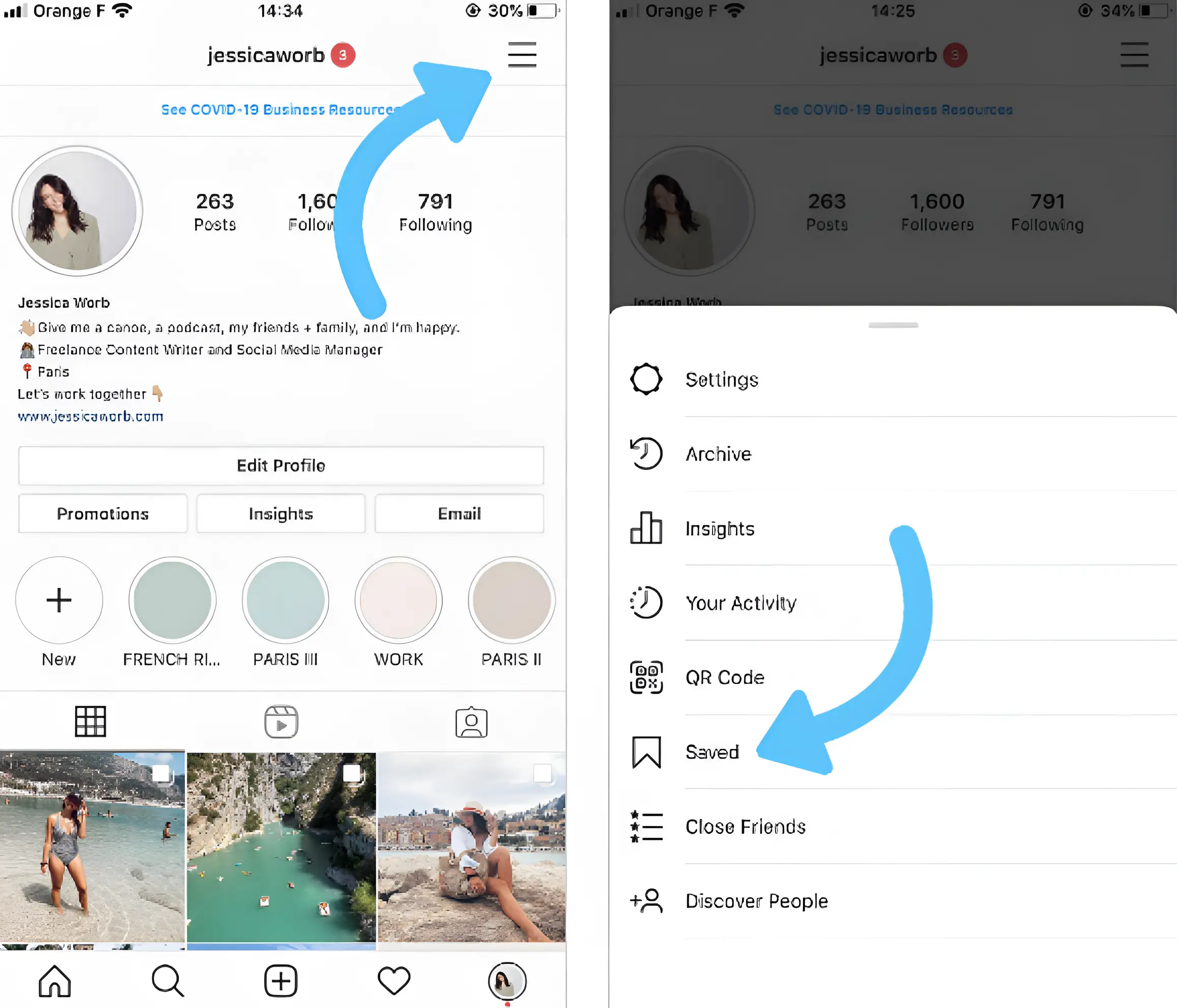
Instagram’s saved feature isn’t just for collecting pretty photos – it’s a powerful organization tool. Create specific collections like:
- “Content Ideas”
- “Competitor Analysis”
- “Brand Inspiration”
- “Trending Hashtags”
Creators who keep organized content libraries (saved inspiration, drafts, hashtag lists) tend to post more consistently simply because they’re not starting from scratch each time — and consistency is one of the clearest, most repeatedly confirmed drivers of Instagram growth.
3. Enable Smart Notifications
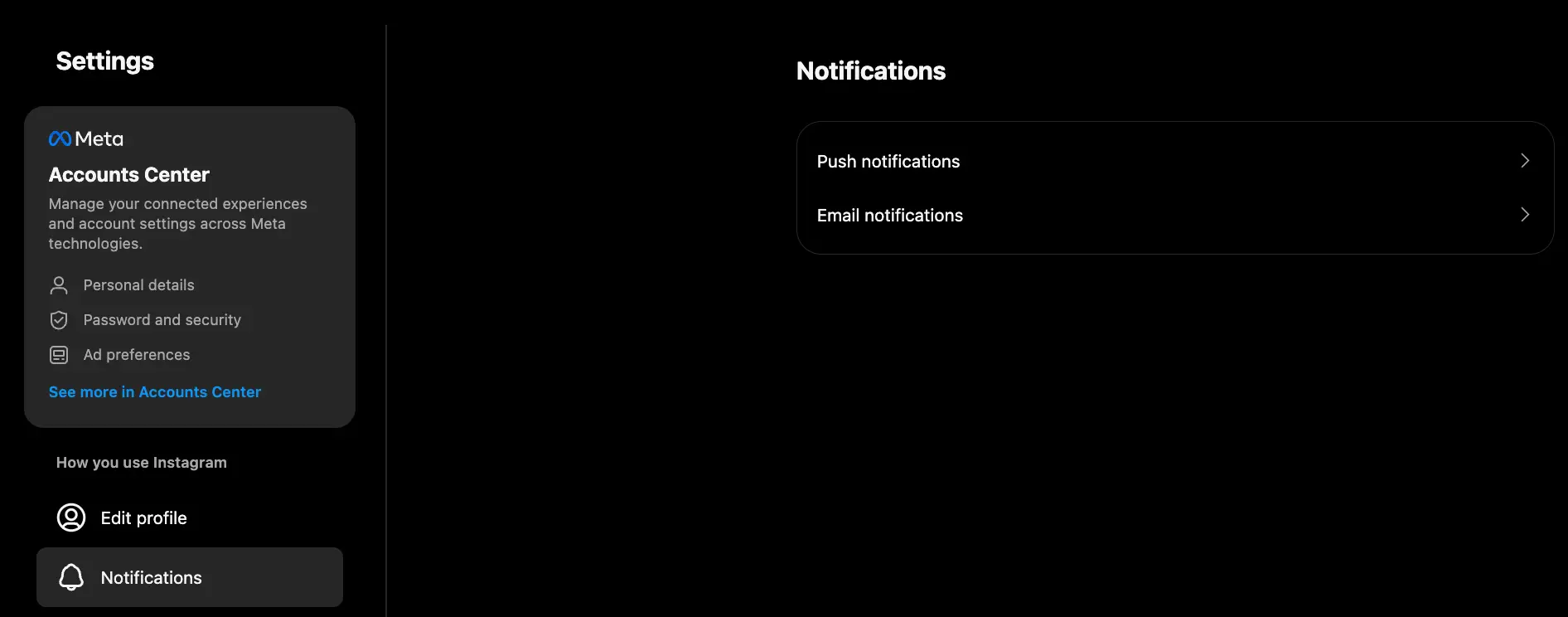
Don’t let the algorithm bury your favorite accounts. Turn on post notifications for:
- Your top 5-10 favorite creators
- Key industry leaders in your niche
- Accounts that inspire your content strategy
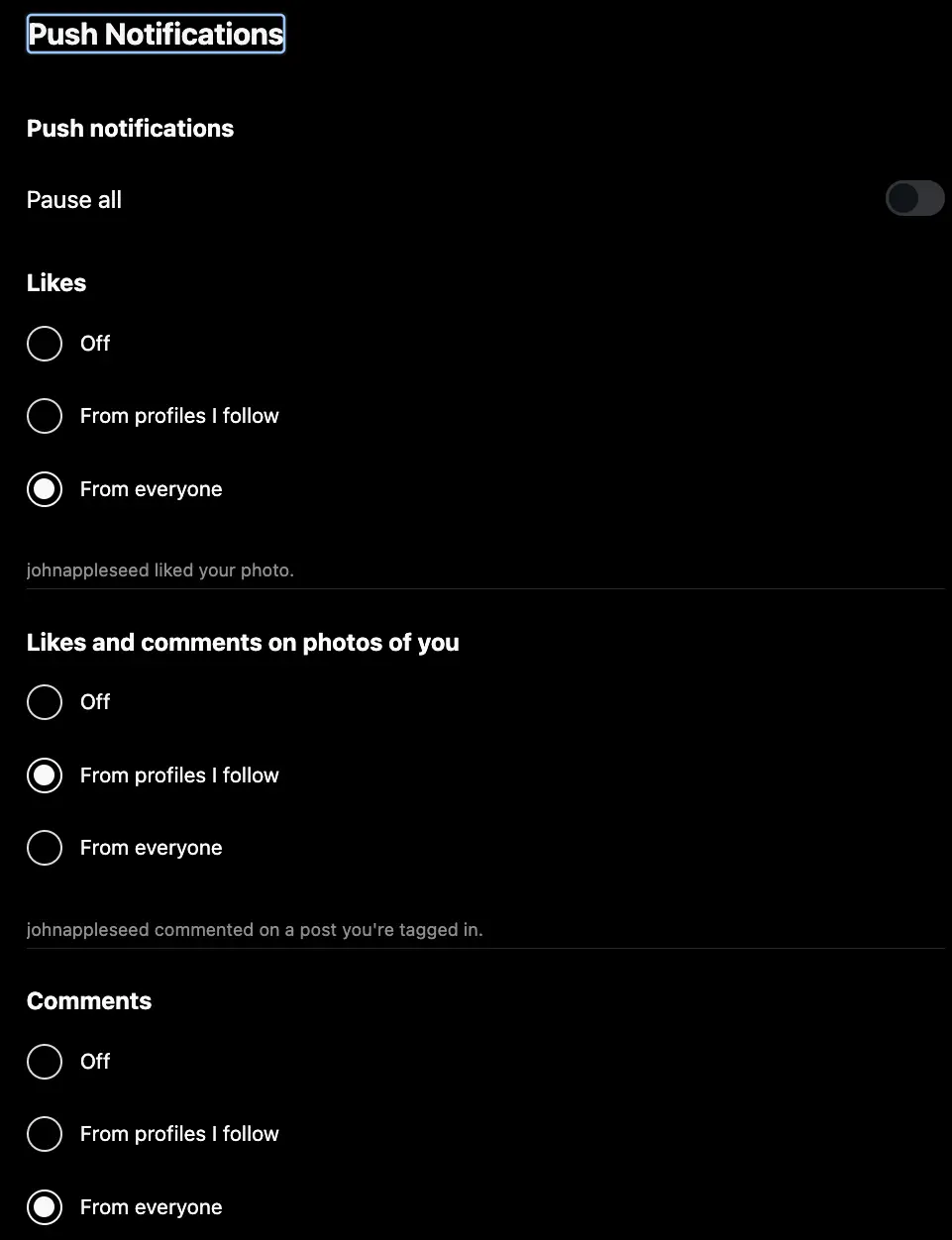
This hack helps you stay on top of trends and engage early when engagement rates are highest.
4. Clean Up Your Liked Posts
Here’s a hack most people don’t know: Instagram uses your liked posts to understand your interests and customize your feed. Regularly unlike posts that don’t align with your goals to train the algorithm to show you more relevant content.
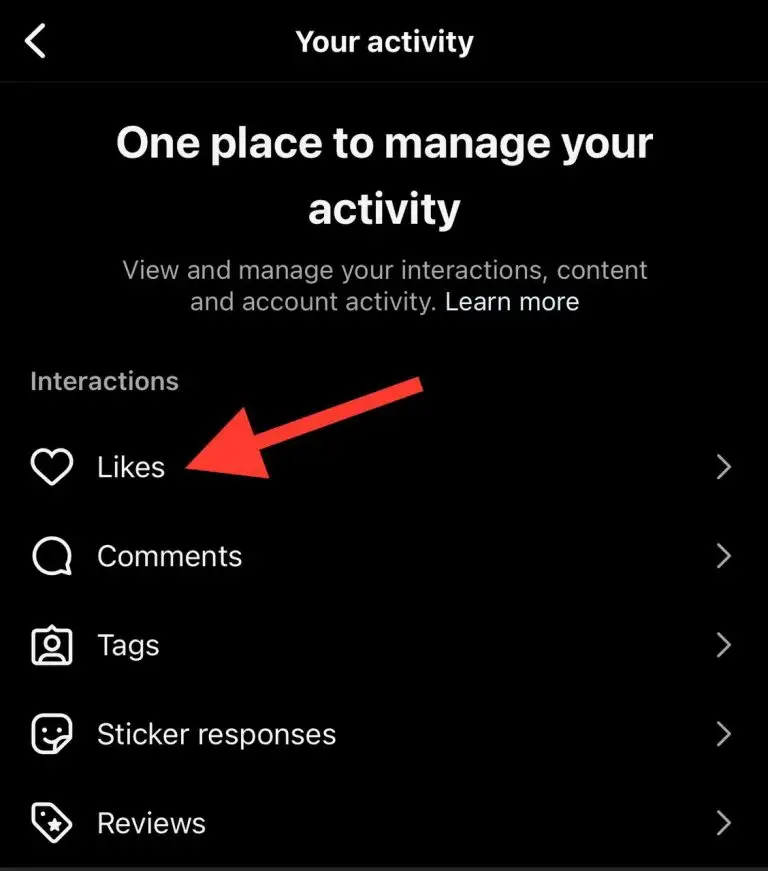
5. Set Healthy Boundaries
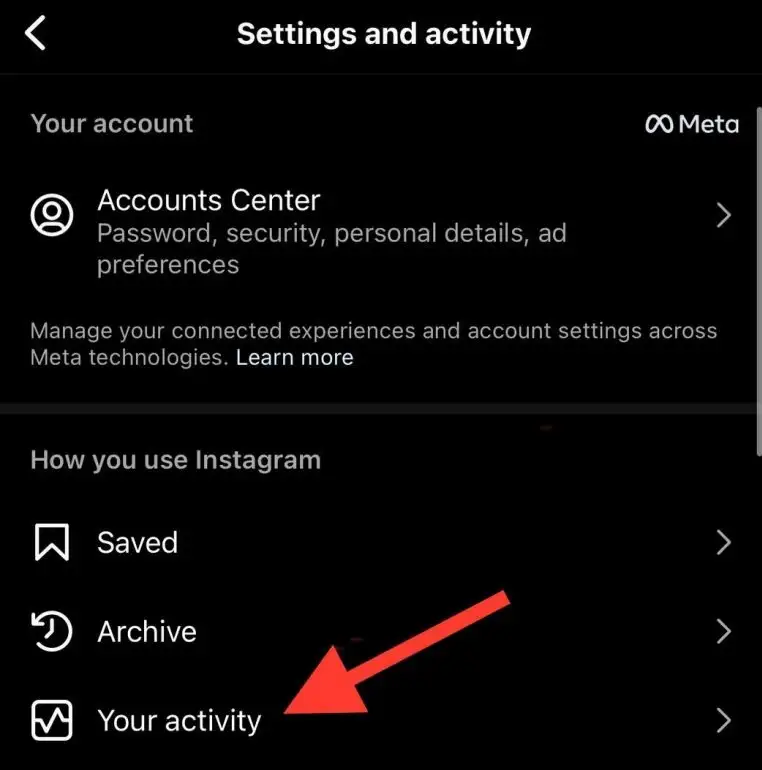
Instagram now offers time management tools. Set daily limits to avoid mindless scrolling and stay focused on creating rather than just consuming. Successful creators tend to spend far more of their Instagram time creating than scrolling. If you notice your time on the app skews heavily toward consuming rather than posting or engaging with your own community, that’s usually a sign to rebalance
Content Creation Hacks
Creating scroll-stopping content doesn’t have to be rocket science. These hacks will elevate your posts instantly.
6. Schedule Posts for Maximum Impact
Timing is everything on Instagram. Posts published when your audience is actually online consistently outperform posts published at random times — Instagram’s own Insights tool will show you your specific audience’s active hours, which is far more reliable than any general benchmark. Use Instagram’s native scheduling tool or third-party apps like Buffer or Hootsuite to:
- Post when your audience is online (check your insights)
- Maintain consistency even when you’re busy
- Plan content themes in advance
7. Plan Your Grid Like a Designer
Your Instagram grid is the first thing visitors see. Here are popular grid strategies that work:
- Puzzle Grid: Break a large image across 6-9 posts
- Checkerboard: Alternate between two content types
- Row by Row: Each row tells a different story
- Rainbow: Use consistent color schemes
A visually consistent grid gives new visitors a reason to hit “follow” the moment they land on your profile, since it signals a deliberate, professional presence rather than a random mix of content.
8. Master Instagram Reels
Reels continue to be one of Instagram’s most heavily promoted formats, and creators who prioritize them typically see meaningfully higher reach and engagement than static video posts — Instagram itself has said as much in creator communications, though exact percentages shift often enough that it’s worth checking current Insights data for your own account. Here’s how to make yours stand out:
- Hook viewers in the first 3 seconds. Start with a question, surprising statement, or preview of what’s coming.
- Use trending audio but make sure it fits your content naturally.
- Add captions – 85% of users watch videos without sound.
- Keep it vertical and use the full screen.
9. Leverage Carousel Posts
Carousel posts tend to outperform single-image posts on reach, largely because Instagram rewards the extra time users spend swiping through multiple slides as a strong engagement signal. Use them to:
- Share step-by-step tutorials
- Show before/after transformations
- Tell a story across multiple slides
- Break down complex topics
10. Hashtag Strategy That Actually Works
Forget using 30 random hashtags. Here’s what works in 2026:
- Use 8-15 strategic hashtags
- Mix popular (1M+ posts) with niche hashtags (10K-100K posts)
- Create a branded hashtag for your community
- Research hashtags your competitors use
- Add hashtags in your first comment to keep captions clean
Engagement & Algorithm Hacks
The Instagram algorithm rewards engagement, so here’s how to get more of it.
11. Stories Features That Boost Engagement
Instagram Stories have a 500 million daily active user base. Use these interactive features:
- Polls: Ask “This or That” questions
- Quizzes: Test your audience’s knowledge
- Questions: Get direct feedback and content ideas
- Sliders: Rate experiences or preferences
Interactive Stories elements — polls, quizzes, sliders — consistently drive stronger engagement than static Stories, since they require an action from the viewer rather than a passive tap-through.
12. Comment Management Hacks
Clean up your comment section to encourage healthy discussions:
- Hide or delete spam comments immediately
- Pin your best comments to the top
- Reply to comments quickly – within 1-2 hours if possible
- Ask questions in your captions to encourage responses
13. Use “Add Yours” Stickers Strategically
The “Add Yours” sticker in Stories creates viral chain reactions. Start trends relevant to your niche:
- “Show your workspace”
- “Favorite productivity tip”
- “Morning routine essentials”
Brands that use “Add Yours” strategically tend to see a real lift in mentions and reach, since each participant’s post links back to the original, creating a visible chain that other users can discover and join.
14. Location Tagging for Local Reach
Adding a location tag gives your post an additional discovery surface — anyone browsing that location’s tagged posts can find you — which meaningfully expands reach beyond your existing followers, even for accounts with no local business presence. Even if you’re not a local business:
- Tag popular locations in your city
- Use event locations when attending conferences or meetups
- Create location-based content around travel or local experiences
15. Trend Adoption Strategy
The early bird catches the algorithm worm. Here’s how to spot and use trends:
- Follow trend-tracking accounts in your industry
- Check the Explore page daily for emerging formats
- Adapt trends to your niche rather than copying exactly
- Act fast – trends have a 48-72 hour sweet spot
Story & Highlight Hacks
Stories disappear in 24 hours, but these hacks help you maximize their impact.
16. Custom Story Backgrounds
Stand out with custom backgrounds:
Most Stories blend into a scroll of near-identical white-text-on-photo content, which makes a custom background one of the easiest ways to stop the scroll without any extra production effort.
- Use your brand colors consistently. If someone sees your Story before they see your handle, the color palette alone should tell them whose content it is. This matters most for businesses posting multiple Stories a day, where visual repetition builds recognition over time.
- Build 3–5 reusable templates in Canva rather than designing from scratch each time. Save them to a folder you can duplicate in seconds — this is the difference between posting Stories consistently and skipping days because design felt like too much effort.
- Use gradients over flat colors when you want visual depth without adding a busy background image. A simple two-tone gradient reads as more polished than a flat single color, and costs nothing extra in production time.
- Always check contrast before posting. White text on a light gradient, or dark text on a dark background, is the single most common reason Stories get skipped — if you have to squint to read your own caption, so will everyone else.
17. Camera Roll Content Strategy
You don’t need to create everything in real-time:
One of the biggest reasons creators fall off a consistent posting schedule is treating every piece of content as something that has to be shot, edited, and posted the same day. Building a camera roll buffer removes that pressure entirely.
- Batch-create on your most productive days. Pick one or two days a week (or month, depending on your volume) to shoot multiple pieces of content in one sitting — the setup and mental switching cost of content creation is often higher than the actual shooting time, so batching saves real hours.
- Keep a running “bank” of unposted content in a dedicated camera roll album or cloud folder, so on low-energy days you’re pulling from a stockpile instead of scrambling to create something from nothing.
- Repurpose old content with new framing. A photo or clip from six months ago can work again with a different caption angle, a seasonal tie-in, or a “revisiting this” context — this is especially useful for evergreen tips or before/after content that doesn’t age out.
- Build 2–3 evergreen Story templates (a quote template, a tip template, a poll template) you can drop new content into whenever you need to post something quickly without starting the design from zero.
18. Story Highlight Optimization
Highlights are permanent and appear prominently on your profile:
- Use consistent cover designs
- Organize by topic or theme
- Update regularly with fresh content
- Include clear, descriptive titles
Popular highlight categories include: About, Services, FAQs, Behind-the-Scenes, and Testimonials.
19. Segmented Storytelling
Break longer stories into digestible segments:
- Use story threads for complex topics
- Number your stories (1/5, 2/5, etc.)
- Create cliffhangers to keep viewers watching
- Include “Swipe up” or “Next” prompts
Analytics & Growth Strategy Hacks
Data drives decisions. Here’s how to use Instagram insights effectively.
20. Centralized Analytics Tracking
Instead of jumping between multiple tools, use platforms like:
- Instagram’s native insights for basic metrics
- Hootsuite or Buffer for cross-platform analytics
- Sprout Social for detailed competitor analysis
- Google Analytics to track website traffic from Instagram
21. Reach Source Analysis
Understanding where your reach comes from helps optimize strategy, because each source tells you something different about how your content is actually performing:
- Home feed reach reflects how well you’re serving your existing followers. If this number is strong but your follower count is stagnant, your content is retaining people well but isn’t built to attract new ones — that’s a signal to lean into more shareable or discovery-friendly formats.
- Explore reach is your clearest indicator of discoverability to people who don’t follow you yet. If this number is low, it usually means your content isn’t matching well with what the algorithm is testing it against — try adjusting your hooks, formats, or posting times and watch how Explore reach responds over the following weeks.
- Hashtag reach shows whether your hashtag choices are actually connecting you to searchers. If this number is near zero, your hashtags are likely too broad (getting buried under millions of other posts) or too irrelevant to what people are actually searching for.
- Profile visit reach reflects how much your existing content is driving people to check out your full profile — a high number here paired with a low follow-through rate usually points to a weak bio or unclear value proposition once they land.
Check these four numbers together monthly rather than in isolation — a change in one usually explains a change in another.
For most active accounts, Explore page reach is where new audience growth actually comes from — home feed reach mostly reflects your existing followers, so if you want to grow past your current audience, Explore performance is the number to watch.
22. Content Calendar Planning
Consistency beats perfection. Plan your content:
- Batch create content weekly or monthly
- Plan themes for different days
- Schedule in advance using tools like Later or Creator Studio
- Leave room for spontaneous content
Accounts that post on a predictable, consistent schedule grow substantially faster than accounts that post sporadically, largely because consistency helps the algorithm learn how to categorize and distribute your content, and helps followers build a habit of checking in.
23. Turn Your Insights Into a Monthly Growth Routine
Checking analytics once and never again is nearly as unproductive as never checking them at all — the real value comes from tracking patterns over time and adjusting based on what you find. Set aside 30 minutes at the end of each month to work through this:
- Identify your top 3 posts of the month and look for what they have in common — topic, format, posting time, or caption style. Patterns across your best content are far more reliable than any single post’s performance.
- Check your follower demographics to confirm you’re actually reaching the audience you’re building content for. A mismatch here (say, targeting small business owners but attracting mostly students) usually means your content or hashtags are pulling in the wrong crowd.
- Review your Story completion rates to see where viewers are dropping off — a sharp drop on a specific slide usually points to a pacing or clarity problem worth fixing in future Stories.
- Compare hashtag performance month over month. Hashtags that stop pulling reach should be swapped out; ones that consistently perform should anchor your strategy going forward.
Selling & Brand Building Hacks
Turn your Instagram presence into a revenue-generating machine.
24. Grid as Storefront Strategy
Transform your feed into a visual catalog:
- Showcase products naturally in lifestyle contexts
- Use consistent product photography style
- Include pricing information in captions
- Create product education content
Brands with a cohesive, catalog-like visual strategy tend to convert browsers into buyers more effectively, since a consistent aesthetic builds the kind of trust and polish shoppers associate with legitimate, established sellers.
25. Instagram Shopping Optimization
Make purchasing seamless:
- Set up Instagram Shop with complete product catalogs
- Use product tags in posts and stories
- Enable shopping on Reels
- Create shopping-focused story highlights
Shoppable posts tend to outperform standard posts on engagement, since product tags give users an extra, low-friction reason to tap into the post rather than just scroll past it.
26. User-Generated Content (UGC) Strategy
Let customers become your marketing team:
- Create branded hashtags for customers to use
- Repost customer content (with permission)
- Run UGC contests with prizes
- Feature customer testimonials
User-generated content consistently outperforms brand-created content on engagement and trust, since audiences respond more to real customers than to polished marketing material — this is well-documented across multiple independent UGC platform studies (Stackla and Nosto both publish research on this if you want a citable source for the claim).
27. Brand Consistency Templates
Develop templates for:
- Story layouts with consistent fonts and colors
- Post designs that match your brand aesthetic
- Caption structures that reflect your voice
- Highlight covers that align with your visual identity
Hidden Gems for Advanced Users
28. Draft Collaboration
Save posts as drafts instead of publishing immediately, especially for anything with a caption you’re not 100% happy with. Come back to it a few hours later with fresh eyes — you’ll almost always catch a typo, a weak hook, or a better way to phrase your call-to-action that you missed the first time around.
29. Story Archive Strategy
Every Story you post (unless you’ve turned this off) automatically saves to your private Archive after 24 hours. Instead of letting that content disappear from your workflow entirely, revisit your Archive monthly and pull anything still relevant into a fresh Highlight, a repost with updated context, or inspiration for a new post on the same topic.
30. Cross-Promotion Timing
If you’re sharing the same content across Instagram, TikTok, and other platforms, avoid posting everywhere at the exact same moment. Stagger your posting by a few hours per platform so each one gets a clean, un-competing shot at its own algorithm, and so you’re not splitting your own audience’s attention across multiple notifications at once.
31. Engagement Pod Strategy
Some creators coordinate with a small group of peers to engage with each other’s posts within the first hour after publishing, since early engagement signals can influence how widely Instagram distributes a post. Use this cautiously — Instagram has cracked down on artificial engagement patterns in the past, so keep any group small, genuine, and focused on real interaction rather than mechanical like-and-comment exchanges.
32. Shadow Ban Recovery
If your reach drops suddenly and stays low for several posts in a row, first rule out an obvious cause — check whether you’ve used a flagged or banned hashtag, or violated a community guideline recently. If nothing obvious explains it, taking a short break from posting (24–48 hours) and avoiding aggressive follow/unfollow behavior can help reset engagement signals, though there’s no official Instagram confirmation this works — treat it as a commonly reported workaround rather than a guaranteed fix.
33. Competitor Intelligence
Turn on post notifications for 3–5 close competitors in your space. Watching what they post, when they post it, and how their audience responds gives you a real-time read on what’s resonating in your niche right now, without having to guess or wait for a monthly report.
New Instagram Features Worth Using in 2026
A few features have rolled out more recently that didn’t exist when Instagram growth advice was first written, and most creators still aren’t using them:
- Notes: A short status-style text that appears above DMs in your inbox, visible to followers you allow. Great for quick announcements or prompting replies without a full post or Story.
- Broadcast Channels: A one-way messaging channel where you can send updates, polls, and voice notes directly to followers who opt in — useful for building a more direct, algorithm-independent connection with your most engaged audience.
- Blend: A shared Reels feed you build with a friend or small group, based on both your interests — a lightweight way to increase reach through someone else’s engaged audience.
- Edits: Instagram’s own video editing app (positioned as a CapCut alternative), which gives Reels made in it a discovery boost in some cases since Instagram favors content created with its native tools.
None of these replace the fundamentals covered above, but ignoring them means missing distribution channels your competitors may already be using.
Conclusion
Instagram success in 2026 isn’t about having the biggest budget or the most followers – it’s about being strategic, consistent, and authentic. These 25+ hacks give you a roadmap to grow your presence, engage your audience, and achieve your Instagram goals.
Remember, not every hack will work for every account. Test different strategies, analyze what works for your specific audience, and adapt accordingly. The key is to start implementing these tactics consistently rather than trying everything at once.
Your Instagram journey is unique, and these tools are here to help you make the most of it. Pick 3-5 hacks from this list to focus on this week, and watch your Instagram game transform.
What’s your favorite Instagram hack from this list? Drop a comment below and let me know which strategy you’re excited to try first!
Frequently Asked Questions (FAQs)
Q1: How often should I post on Instagram in 2026?
A: The ideal posting frequency depends on your audience and content quality, but here’s what works best:
- For businesses: 4-7 posts per week (including Reels and carousels)
- For personal brands/creators: 3-5 posts per week
- For casual users: 1-3 posts per week
Quality always beats quantity. It’s better to post 3 high-quality posts per week than 7 mediocre ones. Consistency is more important than frequency – pick a schedule you can maintain long-term.
Q2: Do hashtags still work on Instagram in 2026?
A: Yes, but the strategy has evolved significantly. Instagram’s algorithm now focuses more on content relevance than hashtag volume. Here’s what works:
- Use 8-15 strategic hashtags instead of 30
- Mix popular hashtags with niche-specific ones
- Focus on hashtags your target audience actually searches for
- Create branded hashtags for community building
- Place hashtags in your first comment to keep captions clean
Hashtags can increase reach by up to 12.6% when used correctly, but they’re no longer the primary growth driver they once were.
Q3: What’s the best time to post on Instagram?
A: There’s no universal “best time to post on Instagram” – it depends entirely on your audience. However, general patterns show:
- Weekdays: 11 AM – 2 PM and 5 PM – 7 PM
- Best days: Tuesday through Thursday
- Worst times: Late nights and very early mornings
Pro tip: Check your Instagram Insights to see when your specific followers are most active. This data is more valuable than any general guideline.
Q4: How do I know if I’m shadow-banned on Instagram?
A: Shadow-banning isn’t officially confirmed by Instagram, but if you notice these signs, you might be experiencing reduced reach:
- Sudden drop in engagement (50%+ decrease)
- Your posts aren’t appearing in hashtag searches
- Reach is limited to existing followers only
- Stories views are significantly lower
What to do:
- Take a 24-48 hour break from posting
- Remove any potentially problematic hashtags
- Avoid aggressive following/unfollowing
- Focus on creating high-quality, original content
- Engage authentically with others’ content
Q5: Should I use Instagram Reels or regular posts for better reach?
A: Instagram heavily promotes Reels in 2026, and they typically get 22% more engagement than regular posts. However, the best strategy includes both:
Use Reels for:
- Quick tips and tutorials
- Behind-the-scenes content
- Trend participation
- Entertainment value
Use regular posts for:
- Detailed educational content
- Professional announcements
- Product showcases
- Longer-form storytelling
A good content mix is 40% Reels, 40% regular posts, and 20% carousel posts.
Q6: How can I increase my Instagram engagement without buying followers?
A: Focus on these organic growth strategies:
Content Quality:
- Post high-quality, original content consistently
- Use clear, compelling captions with call-to-actions
- Share valuable information your audience actually wants
Community Building:
- Respond to comments within 1-2 hours
- Engage genuinely with accounts in your niche
- Collaborate with other creators in your space
- Host Instagram Live sessions for direct connection
Strategic Timing:
- Post when your audience is most active
- Use trending hashtags relevant to your content
- Share user-generated content to build community
Remember: 1,000 engaged followers are worth more than 10,000 inactive ones.
Q7: What’s the ideal Instagram bio length and what should I include?
A: Instagram bios are limited to 150 characters, so every word counts. Include:
Essential elements:
- What you do (clear value proposition)
- Who it’s for (target audience)
- Call-to-action (what you want people to do)
- Contact method or link
Example structure: “[What you do] for [who you serve] [Your unique value/benefit] [Call-to-action] [Link or contact info]”
Pro tip: Use line breaks and emojis strategically to make your bio scannable and visually appealing.
Q8: How do I handle negative comments and trolls on Instagram?
A: Here’s a strategic approach to comment management:
For constructive criticism:
- Respond professionally and thank them for feedback
- Take the conversation to DMs if it’s detailed
- Show you’re open to improvement
For spam/trolls:
- Delete obviously inappropriate comments immediately
- Block repeat offenders
- Use Instagram’s comment filtering tools
- Don’t engage in arguments publicly
Prevention strategies:
- Set comment filters for offensive words
- Enable comment moderation for review before publishing
- Create community guidelines and pin them to your profile
Q9: Can I recover a deleted Instagram post or story?
A: Unfortunately, once you delete a post or story, it’s gone permanently from Instagram. However:
Prevention tips:
- Save important content to your phone before deleting
- Use Instagram’s Archive feature instead of deleting
- Create backups of your best content
- Use Instagram’s “Recently Deleted” feature (available for 30 days)
For stories specifically:
- Stories automatically save to your Archive unless you disable this feature
- You can create Highlights from archived stories

