


Most marketing teams are not failing because they lack effort. They are failing because they are using the wrong tools, or too many tools that do not talk to each other, and nobody has sat down to fix it. The average company now runs somewhere between 50 and 90 martech tools, according to Gartner’s 2024 Marketing Technology Survey. And yet, most marketing leaders say they are using less than half of the capabilities they are paying for. That is not a budget problem. That is a stack problem.
Martech tools, when chosen well, do a specific job: they remove the gap between what your marketing team knows and what it can act on. GA4 shows you where traffic drops. Ahrefs shows you what keywords you are close to ranking for. Hotjar shows you exactly where users stop scrolling. These are not abstract analytics platforms. They are the difference between making a decision in a week and making it in a day, with data behind it instead of a hunch.
This guide covers the 10 martech tools that are actually worth your time in 2026. Not a laundry list of every SaaS product with a marketing use case. Just the ones that solve real problems, for real marketing workflows, with pricing that makes sense for the outcome they deliver. You will also get a clear look at what each tool actually does (not just what its homepage says it does), what kind of team it fits, and what you should watch out for before signing up.
What Martech Tools Actually Mean (And Why Most Stacks Are Broken)
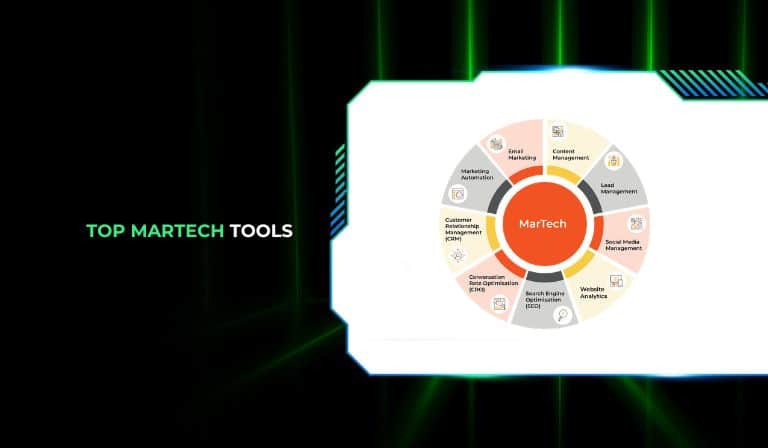
Martech tools is the broad category name for software that marketing teams use to plan, execute, measure, and improve their work. That covers everything from a simple email marketing platform to a full customer data platform (CDP) that unifies behavioral data across six channels. The category is enormous and it keeps growing, which is exactly why most marketing stacks end up being a mess.
Here is what actually happens in most companies. Someone on the team finds a tool that solves a specific pain. They sign up, it works, great. Then six months later someone else finds a different tool for a slightly overlapping problem. Both tools end up in the stack. Then a new head of marketing joins, brings in their preferred platforms, and now you have three tools doing one job, none of them integrated, and your data is split across all three. This is not hypothetical. This is the standard state of the average marketing team.
The fix is not to find the “perfect” all-in-one platform, because those rarely exist. The fix is to be honest about what problem you are actually trying to solve, pick the tool that solves it best, and make sure it connects to the rest of your stack before you commit.
Why Integration Beats Features Every Time
A tool with 50 features that does not connect to your CRM is worth less than a tool with 10 features that does. This sounds obvious but gets ignored constantly. Marketers get distracted by feature lists and case studies, and then spend three months post-purchase trying to get two platforms to share data through a series of Zapier hacks that break every time either platform updates its API.
The question to ask before buying any martech tool is: where does the data from this tool need to go, and how does it get there? If the answer involves more than one middleware layer, that is a red flag.
The Real Cost of Martech Sprawl
Paying for tools your team is not using is the obvious cost. But the hidden cost is worse. When data lives in separate platforms that are not synced, you get different numbers for the same metric depending on which tool you look at. That kills trust in data fast. Teams stop using dashboards because they do not trust them. Decisions go back to being made by whoever talks loudest in the meeting room. The martech investment has now made things worse, not better.
Top 10 Martech Tools for 2026 That Marketing Teams Are Actually Using
These are the tools that show up consistently in high-performing marketing workflows. Some are new. Some have been around for years and are still the best option for what they do. All of them are worth knowing about if you are building or refining your stack right now.
1. GA4 (Google Analytics 4)
GA4 is still the baseline. Every marketing team needs a way to see what traffic is doing on their website, and GA4 is free, deeply integrated with Google Ads, and now mature enough that most of the early complaints about its interface have been addressed through updates.
What makes GA4 different from Universal Analytics (the version it replaced) is the event-based data model. Instead of sessions and pageviews as the primary units of measurement, GA4 tracks individual user actions as events. A scroll, a video play, a form submission. This gives you a more accurate picture of what users actually do on your site rather than just how many people showed up.
The Exploration reports are where GA4 gets genuinely useful. Funnel Exploration lets you map out a specific conversion path and immediately see where users drop off. Segment Overlap lets you see how different audience segments intersect. These are not features you get from most paid analytics tools at the same depth, and GA4 is free.
One real limitation: GA4 does not retain raw event data forever. The default is 2 months. You need to extend this to 14 months in the admin settings, and even then, if you want longer data retention you need to connect GA4 to BigQuery, which is a separate setup. Do that early. You will regret it if you wait.
2. Ahrefs
Ahrefs is the SEO tool that other SEO tools are measured against. The backlink index is the largest in the industry, updated constantly, and the keyword data is specific enough to actually use for content planning rather than just directional guidance.
The feature that gets underused most is Content Gap. You input your domain, add three or four competitor domains, and Ahrefs shows you every keyword your competitors rank for that you do not. This is not theoretical. It is a direct list of content opportunities sorted by search volume and difficulty. You can filter by keyword difficulty, by search volume, by traffic potential. In 30 minutes you can build a content calendar for the next three months.
Site Audit is another one. It crawls your entire site and flags technical SEO issues ranked by impact. Broken internal links, slow pages, missing meta descriptions, orphaned pages. Not every issue on the list needs to be fixed immediately, but the severity scoring helps you prioritize what actually matters.
Ahrefs pricing starts at $129 per month for the Lite plan. It is not cheap. But if SEO is a real part of your marketing strategy and you are serious about it, the cost-per-insight is lower than most alternatives. Semrush is the main competitor and worth comparing, but most practitioners who have used both long-term end up with a preference, and that preference is usually shaped by which interface they started with.
3. HotJar
HotJar answers the question that GA4 cannot: why are users behaving the way they are? GA4 tells you that 70% of users leave a landing page without converting. HotJar shows you what they were doing before they left.
The core features are heatmaps and session recordings. Heatmaps aggregate click data across thousands of sessions and show you visually where users click, how far they scroll, and where their cursor moves. Session recordings let you watch real users navigate your site, anonymized, in real time playback.
The insight that comes out of this is usually different from what you expected. You might find that users are clicking on an image that is not a link, thinking it should be. Or that they scroll past a CTA because it does not look clickable. Or that on mobile, a form field is difficult to tap and 60% of users abandon it at exactly that field. These are fixes you can make in a day that have a direct impact on conversion rate, and you would never find them from traffic data alone.
HotJar’s free plan covers up to 35 sessions per day, which is enough to get started and validate whether you are getting useful data before committing to a paid plan. Paid plans start at $39 per month.
4. Buffer
Buffer is straightforward social media scheduling, and that is exactly what makes it good. You connect your social accounts, write your posts, schedule them in a queue, and Buffer publishes them at the times you set. The interface is clean, the mobile app works well, and it covers every major platform including Threads, which most competitors were slow to add.
The analytics are basic but sufficient for most small and mid-sized teams. Engagement rate per post, reach, profile growth over time. If you need deeper social analytics you will eventually outgrow Buffer and look at something like Sprout Social. But for teams that primarily want to maintain a consistent posting schedule without dedicating hours per week to manual publishing, Buffer does the job at a price that is hard to argue with. Free plan covers three channels. Paid plans start at $6 per channel per month.
5. Hootsuite
Hootsuite covers more ground than Buffer. It handles scheduling like Buffer does, but adds social listening, team workflows with approval processes, and deeper analytics that include competitive benchmarking. If you have a marketing team where multiple people contribute to social content and someone needs to review before posting, Hootsuite’s approval workflow is legitimately useful.
The social listening feature lets you track mentions of your brand, your competitors, and specific keywords across platforms. This is useful for spotting customer complaints before they escalate, tracking sentiment around a product launch, or finding UGC content to reshare. It is not as deep as a dedicated social listening platform like Brandwatch, but it covers the basics for most teams.
The honest caveat: Hootsuite’s pricing has increased significantly. The Professional plan is now $99 per month per user. For a small team that mostly wants scheduling, Buffer is the better call. Hootsuite makes sense when you genuinely need the team collaboration and reporting features, and those are being used consistently.
6. Optimizely
Optimizely is the go-to for A/B testing and experimentation at scale. If you want to test two versions of a landing page, a headline, a CTA button, or an entire checkout flow, Optimizely gives you the infrastructure to run those tests correctly, with statistical significance tracking so you know when you have enough data to call a winner.
The part that separates Optimizely from simpler testing tools is the feature flagging system. You can roll out a new feature to 10% of your traffic, measure the impact, and then gradually increase that percentage or roll it back entirely, all without a new deployment. This is particularly valuable for SaaS products and ecommerce platforms where changes to the core product experience need to be de-risked before full rollout.
Optimizely is enterprise-focused and priced accordingly. They do not publish pricing publicly, which is usually a signal that the starting point is significant. It is a tool for teams that are doing enough traffic and enough tests to justify the investment. If you are running fewer than five tests per month, a simpler tool like Google Optimize’s replacement (now integrated into GA4 experiments) or VWO at a lower tier will serve you better.
7. Marketo (Adobe Marketo Engage)
Marketo is a marketing automation platform built for B2B. Email campaigns, lead nurturing workflows, lead scoring, account-based marketing. If your sales cycle is longer than a week and your marketing team is responsible for generating and qualifying leads before they reach sales, Marketo is in the category of tools you need to know about.
Lead scoring is one of the more practically useful features. You assign point values to different behaviors: visiting the pricing page is worth more points than reading a blog post. Downloading a whitepaper is worth more than clicking an email. When a lead crosses a threshold, they get automatically routed to sales or moved into a different nurture track. This is not magic, but it does let your sales team spend time on leads that have shown real intent rather than everyone who filled out a top-of-funnel form.
Marketo integrates with Salesforce and Microsoft Dynamics natively, which matters a lot if your CRM is already built on one of those platforms. The implementation is not lightweight. Budget time for setup, data migration, and workflow configuration before you expect results.
8. Nutshell
Nutshell is a CRM platform designed specifically for B2B sales teams that want something between a spreadsheet and Salesforce. The interface is one of the cleaner ones in the mid-market CRM space, the pipeline views are flexible, and the reporting covers the basics without requiring a data analyst to configure it.
What makes Nutshell relevant in a martech context is how it handles the handoff between marketing and sales. Email sequences, contact history, deal tracking, and reporting all live in one place. For teams that have tried to run a marketing-to-sales handoff across separate email tools, a CRM, and a spreadsheet, having that consolidated is genuinely useful.
Pricing starts at $16 per user per month, which makes it accessible for smaller teams. There is a free trial and the setup is fast enough that most teams can get functional within a week.
9. Slack
Slack is not a martech tool in the traditional sense, but it is in every marketing team’s stack for a reason. Communication speed directly affects marketing execution speed. When a campaign needs a quick decision, or a developer needs a brief for a landing page, or someone on the paid team spots an anomaly in the data, the speed at which that information reaches the right person matters.
What makes Slack a martech tool in practice is the integrations. You can connect GA4 alerts to Slack so your team gets a notification when traffic drops below a threshold. You can connect Ahrefs ranking alerts. You can route form submission notifications from your CRM. When your data and your communication are in the same place, things move faster.
Slack’s free plan limits message history to 90 days. For most teams the Pro plan at $7.25 per user per month is sufficient.
10. Shopify
For ecommerce brands, Shopify has grown into something more than just a storefront. The marketing tools built into Shopify in 2026 cover email campaigns, abandoned cart recovery, discount management, basic SEO controls, and integration with Google Shopping and Meta Ads through the platform’s channel apps.
The reason Shopify earns a spot on this list as a martech tool is that it has reduced the number of separate platforms ecommerce teams need to run their marketing operations. Basic email automation through Shopify Email is now good enough that smaller brands can skip a separate ESP entirely. The analytics dashboard shows revenue by channel, product performance, and customer lifetime value in a way that is actually readable without a configuration project.
Where Shopify still falls short is in the depth of segmentation and automation for scaling brands. Once you are past $5M in annual revenue, you will likely outgrow Shopify Email and need a dedicated ESP like Klaviyo, which integrates deeply with Shopify anyway. But for brands in the early-to-mid growth stage, consolidating inside Shopify before adding more tools makes sense.
How to Pick the Right Martech Tools for Your Team
Picking from a list of 10 tools is easier than picking from a list of 500, but it still requires some clarity about your actual situation before you start signing up for free trials.
Start With the Problem, Not the Tool
This sounds obvious but almost nobody does it. Most martech buying decisions start with someone seeing a demo or a case study, getting excited, and then working backwards to justify the purchase. Start instead with a specific problem: conversions on the product page are low, email open rates have dropped, the sales team does not know which leads to prioritize. Work from that problem to the tool that solves it, not the other way around.
Check Integration Before You Buy
Every tool on this list integrates with some platforms and not others. Before you commit, check whether the tool integrates natively with your CRM, your analytics platform, and your primary data destination. If the integration requires Zapier and a custom webhook that your developer has to maintain, that integration will break eventually and your data will be unreliable for however long it takes someone to notice.
Audit What You Already Have
Before adding a new tool, check whether something already in your stack has the feature you are looking for buried under a menu you have never opened. Seriously. Run a quick audit of every tool you currently pay for, list out the features you actually use, and look at what each tool can do that you are not using. You might find you do not need a new tool. You might find you need to cancel two tools instead of adding one.
Martech Tool Pricing: What to Expect in 2026
Martech pricing has not gotten cheaper. The SaaS model remains subscription-based across almost all of these platforms, and most of the tools that were affordable in 2021 have gone through at least one pricing restructure since then.
Here is a rough breakdown of what to budget by tool category:
SEO tools like Ahrefs and Semrush run $100 to $450 per month depending on the plan tier and number of users. Annual billing typically saves around 20%.
Social media management ranges from free (Buffer’s basic plan) to $99 per user per month (Hootsuite Professional). Mid-market teams with one or two users handling social can usually stay under $50 per month.
Marketing automation platforms like Marketo are enterprise-priced, generally starting around $1,000 per month and scaling up based on database size and features. Smaller alternatives like Mailchimp’s automation features or ActiveCampaign offer similar core functionality starting at $30 to $100 per month.
Analytics and CRO tools like HotJar and Optimizely range from free entry tiers to significant enterprise contracts. HotJar’s useful tiers start at $39 per month. Optimizely pricing requires a sales conversation.
CRM platforms in the mid-market like Nutshell start around $16 per user per month. Salesforce and HubSpot at the enterprise level are much higher.
The honest take: most marketing teams are spending more on martech than they need to because they have not done a recent audit. Before you renew anything, pull the usage data. If a tool has been logged into fewer than 10 times in the last 90 days, that is a cancellation candidate.
Conclusion
Building a martech stack is not a one-time project. It is an ongoing decision about where your team’s attention and budget should go, and those decisions compound over time.
The 10 tools covered here are not the only options. But they are the ones that show up consistently in marketing teams that are actually growing, not just the ones with the biggest software budgets. GA4 and Ahrefs give you the data layer. HotJar fills in what the numbers cannot explain. Buffer or Hootsuite keeps your social presence consistent without eating your week. Marketo or Nutshell handles the sales handoff. Shopify consolidates the ecommerce side. Optimizely takes the guesswork out of what to change.
Pick based on your actual problem. Integrate before you add. Audit before you renew.
The best martech tools are not the ones with the longest feature list. They are the ones your team opens every day because they make the job easier and the decisions faster. Start there.
Frequently Asked Questions
What are martech tools?
Martech tools are software platforms that marketing teams use to plan, run, measure, and improve their marketing activities. The category includes everything from SEO tools like Ahrefs to email automation platforms like Marketo to analytics tools like GA4. The word “martech” is a contraction of “marketing technology.”
How many martech tools does the average company use?
According to Gartner’s 2024 research, the average enterprise marketing team uses between 50 and 90 tools. Most marketing leaders report using less than half of the features they are paying for. Smaller companies typically run between 5 and 20 tools depending on team size and marketing complexity.
What is the difference between a CRM and a martech tool?
A CRM (customer relationship management platform) is a type of martech tool focused specifically on managing contacts, deals, and communication between your team and potential or existing customers. Martech is the broader category that includes CRMs along with analytics tools, automation platforms, social media tools, SEO tools, and more.
Is GA4 free?
Yes, GA4 is free. Google provides GA4 at no cost for standard use. The main paid element is if you connect GA4 to BigQuery for longer data retention and raw data access, which incurs BigQuery storage and query costs, but those are typically small for most teams.
What is the best martech tool for a small business?
For a small business with a limited budget, the best starting stack is GA4 (free, for website analytics), Buffer (from $6 per month, for social scheduling), and either Mailchimp or a basic CRM like Nutshell (from $16 per user per month). These three cover the core marketing functions without significant overhead.
How do I know if a martech tool is worth the cost?
The clearest way is to tie the tool directly to a metric that matters. If you buy Ahrefs, are your organic rankings and traffic improving? If you install HotJar, have you made at least one conversion optimization change based on what you saw in session recordings? If you cannot name a specific decision the tool helped you make in the last 90 days, that tool is probably not earning its cost.
What is marketing automation and which tools do it?
Marketing automation is the use of software to run marketing tasks automatically based on rules or triggers, without manual action each time. Examples: sending a follow-up email 24 hours after someone downloads a resource, scoring leads based on behavior, or moving a contact into a different email sequence when they visit the pricing page. Tools that handle marketing automation include Marketo, HubSpot, ActiveCampaign, and Mailchimp (at basic levels).
What is the difference between Hootsuite and Buffer?
Both handle social media scheduling, but they are aimed at different team sizes. Buffer is simpler, cheaper, and designed for individuals or small teams that mainly want to schedule posts efficiently. Hootsuite covers team collaboration, social listening, approval workflows, and deeper analytics, which makes it better for larger marketing teams. If you need more than two people to have access and you need content approval before publishing, Hootsuite is the better fit.
Do martech tools replace marketing strategy?
No. Tools execute strategy; they do not create it. GA4 will show you that conversions are low, but it will not tell you what to change. HotJar will show you where users drop off, but fixing the problem still requires judgment about design and copy. The teams that get the most out of martech tools are the ones that already have a clear strategy and use the tools to move faster and measure more accurately.
What is A/B testing and which martech tools support it?
A/B testing is the practice of showing two different versions of a page, email, or element to different portions of your audience and measuring which version performs better. It removes guesswork from design and copy decisions. Tools that support A/B testing include Optimizely (for website and product experiments), VWO, and GA4’s built-in A/B testing feature (through Google Optimize integration). For email, most ESPs including Mailchimp and Marketo have native A/B testing for subject lines and content.
How often should I audit my martech stack?
Once per year at minimum, and ideally once per quarter. A quarterly audit does not have to be deep. It should answer three questions: which tools is the team actually using, which tool costs have increased at renewal, and is there any overlap between tools that could be eliminated. Annual audits should be more thorough and should include checking whether integrations are still working correctly and whether each tool is delivering measurable value.

