



Web crawlers are the invisible workforce powering how search engines discover, understand, and organize the web, turning billions of pages into searchable results. For site owners and marketers, grasping how crawlers operate is essential to ensure content gets found, indexed, and ranked. This guide explains what crawlers are, how they work, why they matter for SEO and business growth, and how to optimize a site for them.

What is a Web Crawler?
A web crawler (also called a web spider, search engine bot, or website crawler) is an automated program that systematically browses the public web, discovers links, fetches pages, and sends the content to a search engine’s indexing systems. In simple terms, crawlers navigate from link to link, understand a page’s text and meta data, and file that information so it can appear in search results. Think of them as methodical shoppers walking each aisle, scanning labels, and organizing items into the right shelves for quick retrieval later.

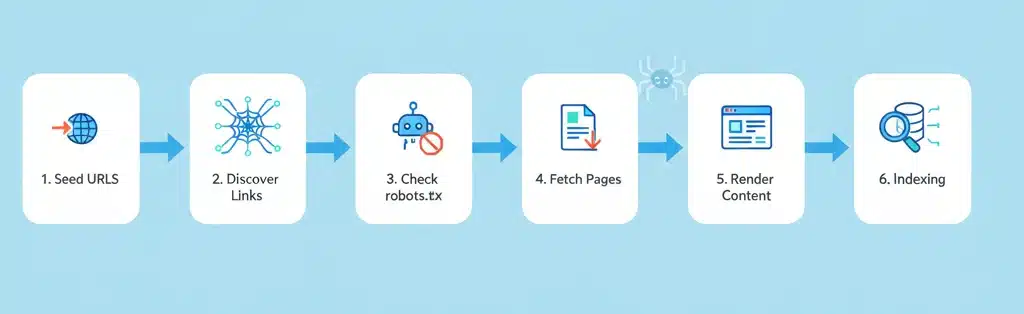
How Web Crawlers Work
1. Seed URLs and sitemaps
- Crawling starts from a set of known “seed” URLs, which may include popular sites, previous crawl lists, and user-submitted pages.
- XML sitemaps and URL submission tools help crawlers discover new or updated content faster.
2. Link discovery and crawl frontier
- Crawlers fetch a page, parse links, and add discovered URLs to a prioritized queue (the “crawl frontier”).
- Priority can depend on factors like page importance, freshness signals, and site reputation.
3. Access checks and politeness
- Before fetching, bots check robots.txt to see which paths are allowed or disallowed.
- Crawl-delay and concurrency rules help avoid overloading servers and respect site resources.
4. Fetching and rendering
- The bot requests the page, then may render it (including JavaScript) to access dynamic content.
- Core elements captured include visible text, title, meta tags, canonical tags, structured data, and links.
5. Indexing pipeline
- Extracted content is normalized, deduplicated, and categorized.
- Signals like relevance, quality, freshness, and internal/external links inform ranking systems.
6. Recrawl and freshness
- Important or frequently updated pages are revisited more often.
- Change frequency, sitemaps, and user interest influence recrawl schedules.
Types of Web Crawlers
- Focused crawlers: Target specific topics or domains to improve relevance and efficiency.
- Incremental crawlers: Emphasize updates, recrawling changed pages to keep indexes fresh.
- Distributed and parallel crawlers: Scale throughput by coordinating many fetching processes across machines.
- Vertical/product crawlers: Purpose-built for app search, enterprise search, or site search.
Popular Web Crawler Examples
- Google: Googlebot (mobile-first), plus specialized bots for Images, Video, News, Ads.
- Microsoft Bing: Bingbot, with additional bots for media and previews.
- Others: DuckDuckBot (DuckDuckGo), Yandex Bot, Baiduspider, Yahoo Slurp.
Why Web Crawlers Matter for Businesses
- Discoverability: If crawlers can’t access or understand content, it won’t be indexed or appear in search results.
- Organic growth: Proper crawling and indexing enable rankings, traffic, and conversions without paid ads.
- Change propagation: When products, blogs, or landing pages are updated, efficient crawling gets new information into the SERPs quickly.
- Data consistency: Accurate representation of titles, descriptions, structured data, and canonicals improves user trust and CTR.
Why Crawlers Are Critical for SEO
- Foundation of visibility: Crawling precedes indexing and ranking; technical access is non-negotiable.
- Crawl budget: Large sites must help bots spend limited time on high-value URLs, not get stuck on duplicates or traps.
- Technical quality: Fast, stable, and well-structured sites help crawlers do more work with fewer errors.
- Content clarity: Clean titles, meta descriptions, headings, and schema markup guide understanding and SERP presentation.
Controlling Web Crawler Access

- robots.txt: Allow/Disallow specific paths; set crawl-delay (where supported); avoid blocking essential assets (CSS/JS) that affect rendering.
- Meta robots and HTTP headers: noindex, nofollow, noarchive, and other directives on a per-page basis.
- Canonicalization: Use rel=“canonical” to consolidate duplicate URLs and focus signals.
- Authentication and gating: Keep private or sensitive areas behind logins; never rely on robots.txt for security.
Optimizing a Site for Web Crawlers
1. Technical optimization
- Performance: Improve Core Web Vitals, compress assets, enable caching, use a CDN, and minimize render-blocking resources.
- Mobile-first: Ensure responsive design and parity of content and links across mobile and desktop.
- JavaScript: Prefer server-side rendering or hydration patterns that expose primary content/links without heavy client-only dependencies.
2. Structure and content
- Information architecture: Organize content into clear categories; maintain shallow, logical click depth.
- Internal linking: Use descriptive anchor text; interlink related pages; surface orphan pages.
- Sitemaps and feeds: Maintain clean XML sitemaps and RSS/Atom feeds; include lastmod for freshness.
- On-page clarity: Unique titles, meta descriptions, headings, and structured data (e.g., Article, Product, FAQ) to aid understanding.
3. Monitoring and maintenance
- Search console tools: Check coverage, crawl stats, indexing issues, and page experience reports.
- Log file analysis: Verify which bots visit which URLs, status codes returned, and crawl frequency.
- Error hygiene: Fix 5xx/4xx spikes, address redirect chains/loops, and clean up broken links.
Common Crawler Challenges and Fixes
- Duplicate URLs: Control with canonicals, parameter handling, hreflang best practices, and consistent internal linking.
- Faceted navigation traps: Use noindex on thin combinations, disallow crawl on infinite filters, and provide curated landing pages.
- Thin or duplicate content: Consolidate, expand, or prune pages; aim for unique value and intent alignment.
- Render-blocked content: Ensure essential content and links are accessible without complex client-only rendering.
- Server strain: Rate-limit bots if necessary, scale infrastructure, and use caching to handle spikes.
Conclusion
Web crawlers determine whether content is found, how quickly updates appear, and how accurately pages are represented in search. By making a site accessible, fast, well-structured, and clear, businesses help crawlers do their job—and unlock sustainable growth in organic visibility. Prioritize technical health, smart internal linking, clean sitemaps, and continuous monitoring to stay consistently crawlable and competitive.
FAQs
1. How often do crawlers visit a site?
It varies by site authority, update frequency, and user interest; important pages are crawled more frequently.
2. Can specific crawlers be blocked?
Yes, via robots.txt user-agent rules or server configurations; use sparingly and never for sensitive data protection.
3. What’s the difference between crawling and indexing?
Crawling is discovery and fetching; indexing is storing, interpreting, and preparing content to rank.
4. How to check if a site is being crawled?
Review server logs, bot-specific reports, and search console crawl stats; test live URLs and inspect coverage.
5. What if a site isn’t crawlable?
Fix access issues (robots, auth, errors), improve performance, simplify architecture, and surface content via sitemaps and internal links.

Passionate about blogging and focused on elevating brand visibility through strategic SEO and digital marketing. Always tuned in to the latest trends, I’m dedicated to maximizing engagement and delivering measurable ROI in the dynamic world of digital marketing. Let’s connect and unlock new opportunities together!

