


If you run an ecommerce store, you already know the hard truth: getting traffic is expensive. Paid ads can bring sales, but the moment you stop spending, the visibility disappears. That’s why ecommerce brands that want long-term growth focus on SEO.

And when it comes to WordPress ecommerce, WooCommerce SEO gives store owners one of the most flexible and scalable ways to rank product pages, categories, and content in Google.
However, WooCommerce is not “SEO-ready” by default just because it runs on WordPress. It gives you a strong foundation, but the results come from how well you configure your store, structure your content, fix technical issues, and build a long-term strategy.
This is where a structured approach (or a professional WooCommerce SEO service) makes a big difference.
In this definitive guide, you’ll learn how SEO for WooCommerce works, what makes it unique, and the exact steps to improve your visibility and sales using technical SEO, on-page optimization, off-page strategies, and the right plugin stack.
Why WooCommerce SEO Matters for Ecommerce Growth
There are many ecommerce platforms available today. Some are fast to launch, some are beginner-friendly, and some come with locked-down structures that restrict customization.
Every platform has SEO strengths and SEO limitations. You’ll hit “SEO ceilings” sooner than expected if you can’t control:
- URL structure
- metadata (titles, descriptions)
- internal linking
- page speed optimization
- structured data
- indexation management
- content depth on product/category pages
WooCommerce gives you more control compared to many hosted platforms because it sits inside WordPress. That flexibility is exactly why brands invest in WooCommerce SEO and why agencies often build their ecommerce process around it.
But the advantage is only real when you set it up correctly and optimize consistently.
What Makes WooCommerce SEO Unique?
The reason woo commerce SEO feels different from other ecommerce SEO strategies is because WooCommerce is not a standalone platform—it’s a WordPress plugin.
That means most of what you do for seo WooCommerce follows strong WordPress SEO fundamentals, including:
- optimizing pages and content structure
- managing indexation and crawlability
- improving site speed and user experience
- controlling metadata, internal links, and canonical URLs
At the same time, ecommerce stores come with challenges that regular websites don’t have, such as:
- thousands of product pages
- similar product descriptions across variants
- duplicate URLs due to filters and category paths
- product pages that go out of stock or get discontinued
- thin category pages with little content
That’s why WooCommerce SEO is really a mix of:
- WordPress SEO
- ecommerce SEO
- conversion-focused optimization
SEO-Friendly Benefits of WooCommerce (Out of the Box)
WooCommerce is popular because it blends content and commerce in a way that few platforms can match.
Here are key WooCommerce advantages for SEO:
1. Analytics Integration
WooCommerce offers strong store analytics and integrates well with tools like GA4. You can track everything from product views to purchases and understand which SEO pages actually drive revenue.
2. Content + Ecommerce in One Platform
Many ecommerce platforms struggle to support content marketing at scale. WooCommerce makes it easy to run:
- product pages
- category pages
- blog posts
- buying guides
- landing pages
This is extremely valuable because informational content can attract visitors early in the buying journey and guide them toward products later.
3. Strong Organization System
WooCommerce allows you to organize store products using:
- categories
- tags
- attributes (size, material, color, etc.)
This helps structure your store logically for users and search engines, which supports better rankings and better navigation.
Best Practices: The Foundation of SEO for WooCommerce
The best results come when you treat WooCommerce SEO as a complete system that includes:
- technical SEO (indexing, speed, structure)
- on-page SEO (content, tags, internal links)
- off-page SEO (links, mentions, authority building)
A common mistake is focusing only on product page keywords and ignoring technical issues or thin category pages. That approach can work temporarily, but stores often hit a ceiling quickly.
A professional WooCommerce SEO service typically starts by fixing foundational problems first so all future efforts perform better.
Getting Started: Prepare Before You Optimize
Before making changes, you need a clear action plan.
Step 1: Define Goals
Your SEO goals might include:
- more product page traffic
- higher category rankings
- increased sales from organic
- improved conversion rate
- growth in non-brand traffic
- more visibility for competitive keywords
Step 2: Record Baseline Performance
Track where you are today so you can measure improvements later.
Key baseline metrics include:
- organic traffic (overall and to product pages)
- top landing pages
- top keywords
- impressions and CTR
- revenue from organic search
- conversion rate (organic sessions)
WooCommerce Analytics: Track What Matters
If you don’t track performance, SEO becomes guesswork.
Use GA4 as Your Primary Analytics Platform
GA4 is a strong analytics tool for ecommerce because it focuses on events and user journeys rather than only page views.
You can track:
- product view events
- add-to-cart actions
- checkout events
- purchases
- revenue and conversion paths
Enhanced Ecommerce Tracking (Recommended)
To get deeper ecommerce insights from WooCommerce into GA4, enhanced tracking helps connect products to revenue.
A commonly used approach is using a plugin like GTM4WP to push ecommerce events into GA4 properly.
This tracking matters because it helps you answer questions like:
- Which product pages drive sales from organic traffic?
- Which category pages attract traffic but do not convert?
- Where do users drop off before purchase?
Good SEO for WooCommerce is revenue-focused, not traffic-focused. Analytics turns your strategy into measurable growth.
Transactional Emails: Boost ROI from Organic Traffic
Transactional emails are not only an email marketing tactic—they support overall store performance and customer experience.
Examples include:
- order confirmations
- shipping confirmations
- delivery updates
But you should also build automation based on behavior, such as:
- cart abandonment emails
- win-back campaigns
- post-purchase review requests
Why does this matter for SEO?
Because you work hard to earn organic traffic. If users add items to their cart and leave, strong email flows can recover those sales and increase the ROI of your WooCommerce SEO service investment.
Keyword Research for WooCommerce SEO
Keyword research is the foundation of your entire strategy.
If you target the wrong keywords, you can rank and still not make sales.
What to Research for WooCommerce Stores
You need keyword targeting across multiple page types:
1. Product Keywords

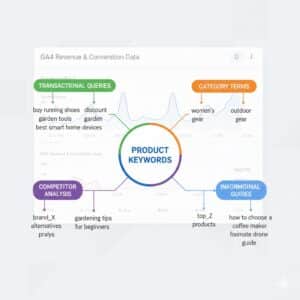
These are transactional queries like:
- “buy [product name]”
- “[product model] price”
- “[product type] online”
These keywords often belong on product pages.
2. Category Keywords
These are broader commercial terms like:
- “best [category]”
- “[category] for [use case]”
- “affordable [category]”
These usually belong on category pages.
3. Informational Keywords
These are top-of-funnel queries like:
- “how to choose [product type]”
- “[product] benefits”
- “[product] vs [product]”
These are ideal for blog content and buying guides that internally link to product categories.
Map Keywords to Pages (Keyword Mapping)
One of the best practices in woo commerce SEO is avoiding multiple pages targeting the same intent. Mapping prevents keyword cannibalization and improves ranking stability.
Technical SEO for WooCommerce (The Foundation)

Technical SEO ensures search engines can crawl, index, and rank your store pages properly.
Even the best product descriptions will fail if technical issues block crawling or create duplicate content problems.
Indexing: Make Sure Google Can Find Your Pages
Indexing is the first requirement of SEO. If your pages are not indexed, they cannot rank.
Key Technical Essentials
You need:
- an XML sitemap
- a correct robots.txt file
- proper indexation settings in WordPress
- search console validation
Many WooCommerce stores accidentally block important pages through settings or plugin misconfigurations.
A standard approach in WooCommerce SEO is to use an SEO plugin (like Yoast or alternatives) to manage sitemap generation and indexation controls without touching code.
XML Sitemap: Improve Discovery of Products and Categories
An XML sitemap helps search engines discover important pages such as:
- product pages
- product categories
- blog posts
- key landing pages
Best practices include:
- ensuring only indexable URLs are included
- keeping sitemaps clean and error-free
- submitting the sitemap via Google Search Console
This is especially important for large ecommerce stores where internal linking may not reach every product effectively.
Page Experience and Core Web Vitals
Page experience is critical in ecommerce because slow pages reduce both rankings and conversions.
For WooCommerce stores, speed issues are common due to:
- heavy product images
- too many scripts from plugins
- slow hosting
- poor caching setup
Core Web Vitals to Monitor
Key metrics include:
- LCP (loading performance)
- INP (interactivity responsiveness)
- CLS (visual stability)
Improving these helps users browse products smoothly, which increases engagement and purchase likelihood.
Common solutions include:
- caching plugins
- image optimization tools
- minimizing unnecessary scripts
Accessibility: Improve Usability for Everyone
Accessibility is about making your store usable for all visitors, including people with visual impairments.
In WooCommerce, accessibility improvements often include:
- adding descriptive alt text to product images
- ensuring buttons are readable and accessible
- improving contrast and navigation clarity
Accessibility also improves overall UX, which supports rankings and conversion rate.
Structured Data (Schema Markup)
Structured data gives search engines more context about your pages.
For ecommerce, it can help communicate:
- product name
- price
- availability
- ratings and reviews
- brand details
When implemented correctly, structured data can increase visibility in results and improve click-through rate.
For many stores, this becomes part of a high-quality WooCommerce SEO service because schema can be complex but powerful.
Canonical URLs and Permalinks (Avoid Duplicate Content)
Duplicate content is one of the biggest challenges in seo for WooCommerce.
Common causes include:
- products appearing in multiple categories
- URL parameters from filters
- different URLs leading to the same product
- tag archives creating thin pages
Why Canonicals Matter
A canonical tag tells search engines which version of a page is the preferred one to index. It consolidates ranking signals instead of splitting them across duplicates.
Redirects for Moved or Discontinued Products
When products are discontinued, you should use 301 redirects to:
- a newer version
- the closest category page
- a relevant replacement page
This protects SEO value and prevents users from landing on broken pages.
Breadcrumbs: Better Navigation and Internal Linking
Breadcrumbs help users understand where they are in your store.
Example:
Home > Category > Subcategory > Product
Breadcrumbs support:
- better navigation
- improved internal linking
- clearer site structure for search engines
They are simple to implement and often provide strong UX benefits.
On-Page SEO for WooCommerce
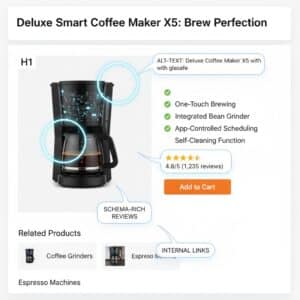
On-page SEO is where your rankings and click-through rate start improving quickly.
This includes URLs, metadata, product copy, category content, and images.
URL Optimization for WooCommerce Pages
Your product and category URLs should be:
- readable
- short
- descriptive
- keyword-relevant
Avoid long, messy URL strings that add confusion.
Example:
- Good: /mens-running-shoes/
- Weak: /product-category?id=349&ref=abc
Clean URLs increase relevance and user trust.
Title Tags, Meta Descriptions, and Headings
Title Tags
Each product and category page should have a unique title tag that includes:
- product name or category keyword
- key modifiers (size, brand, type) when relevant
- value proposition
Example:
“Running Shoes for Men – Lightweight, Comfortable, Durable”
Meta Descriptions
Your meta descriptions should:
- summarize the value clearly
- include keyword naturally
- encourage clicks
Example:
“Shop premium running shoes for men with fast delivery, multiple sizes, and secure checkout. Explore top designs for comfort and performance.”
Heading Tags
Your H1 should reflect the main topic of the page. Use H2 and H3 headings for structured content sections.
This improves readability and strengthens SEO relevance.
Product Copy: The Heart of WooCommerce Product SEO
WooCommerce product SEO depends heavily on unique and useful descriptions.
The biggest issue ecommerce stores face is duplicate or thin product content, especially when:
- using manufacturer descriptions
- selling products that are very similar
- listing variants with minimal differences
What Great Product Copy Includes
A strong product page should contain:
- clear product overview
- key features and benefits
- specifications
- size or compatibility information
- use cases
- FAQs (optional but powerful)
Good product copy builds trust and reduces returns and confusion.
Category Page Optimization
Category pages often rank better than product pages for broad keywords.
But many stores leave category pages empty or thin, which limits their ability to rank.
Improve Category Pages by Adding:
- a short intro paragraph explaining the category
- buying guide content
- links to best-selling subcategories
- filters that improve usability
- internal links to relevant blog posts
Category pages are one of the most underrated opportunities in seo WooCommerce.
Image SEO: Improve Speed, Relevance, and Accessibility
Images are essential in ecommerce, but they can slow your site and hurt rankings if unoptimized.
Best practices include:
- compressing images
- using descriptive filenames
- adding alt text for every product image
- avoiding huge file sizes
- ensuring images match product context
Alt text also supports accessibility and helps search engines understand product visuals.
Product Reviews: Boost Trust and Content Depth
Reviews create user-generated content that updates your product pages naturally over time.
Benefits include:
- improved conversion rate
- unique page content
- trust signals
- opportunities for review schema
A review system can be a powerful part of WooCommerce SEO, because it increases both relevance and social proof.
Off-Page SEO for WooCommerce Stores

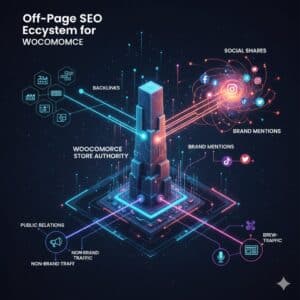
Technical and on-page work builds your foundation, but authority often comes from off-page factors.
Link Building for Ecommerce SEO
Earning backlinks helps improve rankings for product and category pages.
High-quality link sources include:
- manufacturers and suppliers
- affiliates and partners
- niche bloggers and reviewers
- PR coverage
- industry directories (high-quality only)
Avoid low-quality link schemes. Ecommerce sites are often targets for spammy SEO tactics, and those shortcuts can damage long-term growth.
Social Media Support
There’s debate about whether social media directly affects rankings, but it does impact:
- traffic
- brand awareness
- link opportunities
- product discovery
- engagement signals
Sharing product guides, category collections, and blog content can support your broader SEO for WooCommerce plan by increasing visibility and brand searches.
Brand Mentions and Engagement
Mentions matter. When people talk about your brand online, it builds authority signals.
This can come from:
- influencer content
- community engagement
- PR mentions
- customer discussions
The more visible your brand becomes, the more likely people search for it by name, which supports stronger overall performance.
Recommended SEO Plugin Stack for WooCommerce
WooCommerce can be enhanced with plugins that support optimization and analytics. A typical stack includes:
- Yoast (or similar): metadata, sitemap, robots, schema, canonicals, breadcrumbs
- Imagify: image compression and optimization
- WP Rocket: caching and speed improvements
- Redirection: clean 301 redirect management
- Stamped.io (or similar): product review management
- GTM4WP: enhanced ecommerce tracking for GA4
The key is to avoid plugin overload. Too many plugins can slow your site and create conflicts. Use only what supports your business goals.
Conclusion
WooCommerce offers one of the most SEO-friendly ecommerce environments when configured correctly. Its integration with WordPress gives you flexibility to optimize:
- products
- categories
- content marketing
- internal linking
- technical SEO and speed
The stores that win are not just the ones with the best products, but the ones with the best structure, content, and authority.
If you want consistent organic sales growth, investing in WooCommerce SEO is one of the smartest long-term moves you can make. And if you need faster results with fewer mistakes, partnering with a professional WooCommerce SEO service can help you implement best practices, avoid common issues, and scale rankings efficiently.
FAQs
What is WooCommerce SEO?
WooCommerce SEO is the process of optimizing WooCommerce stores to improve rankings for product pages, category pages, and ecommerce content. It includes technical SEO, on-page SEO, content strategy, and off-page authority building.
Is WooCommerce good for SEO?
Yes. WooCommerce is highly flexible because it runs on WordPress, allowing better control over metadata, content, URLs, and plugins compared to many ecommerce platforms.
How do I optimize WooCommerce product SEO?
Improve product SEO by writing unique descriptions, optimizing title tags and headings, adding alt text to images, implementing structured data, and earning reviews to add fresh content.
What is the best SEO plugin for WooCommerce?
Many stores use Yoast or similar plugins to manage metadata, sitemaps, schema, canonicals, and breadcrumbs. The best option depends on your store’s setup and needs.
How long does SEO for WooCommerce take to show results?
It depends on competition and your store’s current condition. Many stores see early improvements in 4–12 weeks, with stronger growth building over 3–6 months and beyond.
Should I hire a WooCommerce SEO service?
If your store is growing, competing in a tough niche, or has technical issues and many pages, hiring a WooCommerce SEO service can help scale results faster with a structured approach.

