



In today’s digital marketing landscape, understanding where your website traffic is coming from is essential to measure the success of your campaigns. UTM parameters are a powerful and free way to track how users reach your website and which marketing efforts drive traffic and conversions.

Originally developed by Urchin Software Corporation—acquired by Google in 2005—UTM parameters are now foundational to Google Analytics and many other analytics platforms. They enable marketers to append tags to URLs that provide granular insights into campaign performance.
In this comprehensive guide, you’ll learn what UTM parameters are, how to use them effectively, and best practices to keep your data clean and actionable. Whether you’re a beginner or looking to refine your tracking, this guide covers everything you need to know.
What Are UTM Parameters?
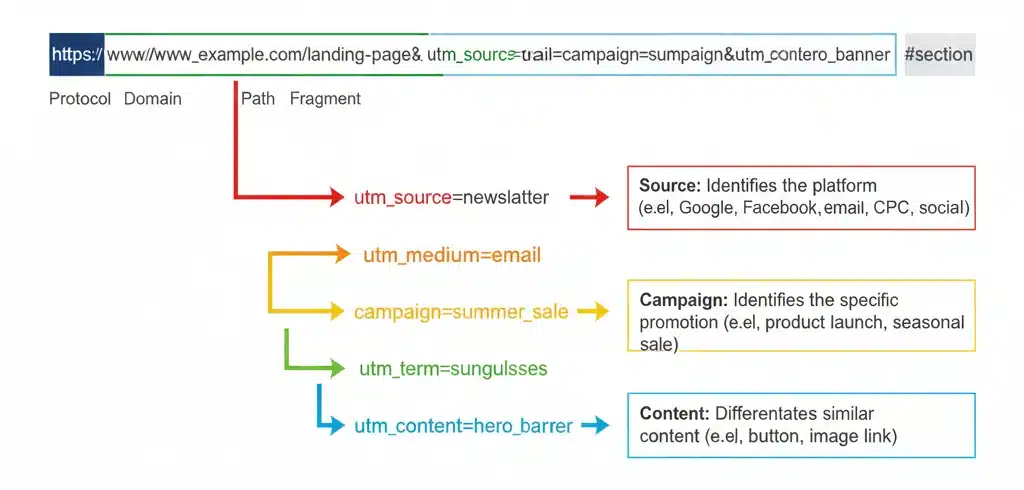
UTM parameters are custom tags added to the end of a URL to help track traffic sources in analytics tools like Google Analytics 4 (GA4). When a user clicks a link containing UTM parameters, the tags are sent back with the URL to the analytics platform, enabling you to identify exactly where visitors came from and which campaigns led them to your site.
These parameters answer critical questions such as:
- Which marketing channels are most effective?
- How are different campaigns performing?
- What content drives the most traffic or conversions?
Unlike generic traffic data, UTM parameters enable precise segmentation of traffic, giving deep insights into user behavior tied directly to campaigns.
Visual Example
Without UTM:
https://www.example.com/sale
With UTM:
https://www.example.com/sale?utm_source=newsletter&utm_medium=email&utm_campaign=winter_sale
The Five Types of UTM Parameters Explained
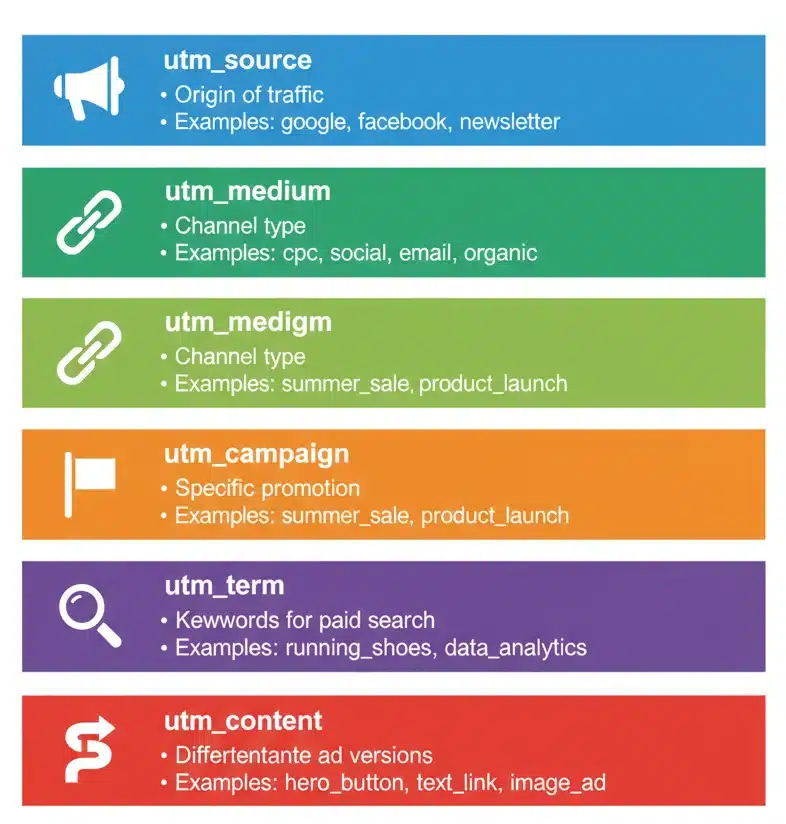
1. utm_source
This parameter identifies the source of your traffic, usually the website or platform that referred the visitor. Examples include:
- newsletter
Best practice: Use clear and consistent names to avoid fragmentation, e.g., always facebook instead of sometimes Facebook.
2. utm_medium
This clarifies the marketing medium or channel through which the link was accessed. Examples include:
- social
- cpc
It helps categorize traffic in Google Analytics channel groupings and should be consistently used.
3. utm_campaign
This parameter specifies the campaign the link belongs to. It could be a sale, product launch, or specific promotion like:
- summer_sale
- product_launch_2025
Naming campaigns clearly and consistently is essential to track performance across initiatives.
4. utm_term
Primarily used to track paid search keywords, it identifies which keyword triggered the ad click. Examples:
- hiking_boots
- running_shoes
When Google Ads is linked with GA, auto-tagging often replaces the need for this.
5. utm_content
Used to differentiate similar content or test variations, useful for A/B testing calls-to-action or content placements. Examples:
- header_cta
- footer_link
- button_version_a
Use clear and descriptive values to analyze which content performs best.
Why UTM Parameters Are Important for Your Business
UTM parameters empower marketers with essential capabilities:
- Traffic Attribution: Knowing the exact source of your visitors.
- Campaign Performance Comparison: Comparing effectiveness among channels.
- Cost Per Acquisition (CPA) Calculation: Measuring marketing ROI accurately.
- Customer Journey Tracking: Understanding how users interact with multiple channels.
- A/B Testing: Assessing different campaigns or content variations.
- Data Organization: Producing clean, usable analytics data for sound decisions.
- Channel Validation: Evidencing which marketing channels warrant budget allocation.
By providing this level of insight, UTMs help optimize strategy and boost marketing effectiveness.
How to Create UTM Parameters: Step-by-Step Guide
Method 1: Manual Creation
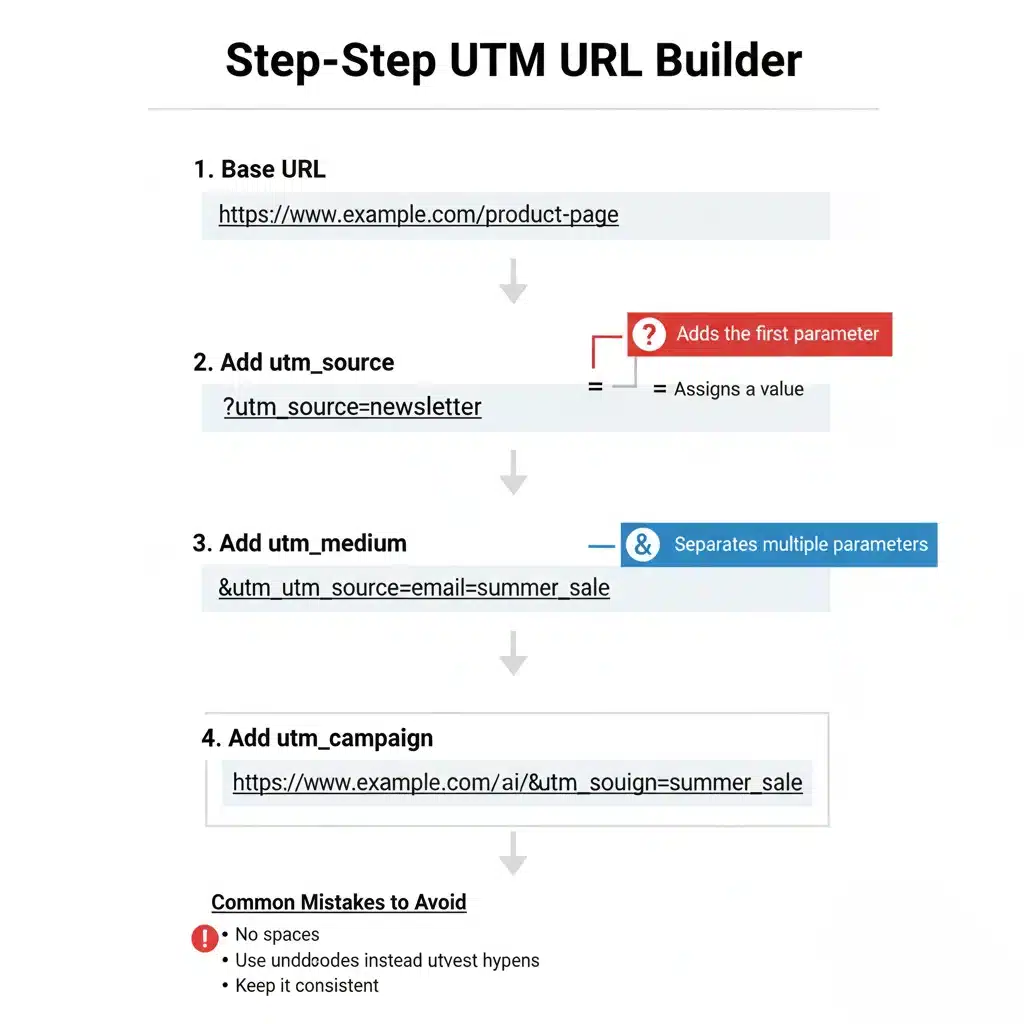
UTM parameters are added to URLs as query string parameters, appended after a ?, and separated by &.
Pattern:
https://www.example.com/page?utm_source=source&utm_medium=medium&utm_campaign=campaign
Steps:
- Start with your base URL.
- Add a ? to start parameters.
- Append required parameters (source, medium, campaign).
- Separate each parameter with &.
- Ensure no spaces; use hyphens or underscores if needed.
https://www.example.com/sale?utm_source=newsletter&utm_medium=email&utm_campaign=winter_sale
Method 2: Using Google Analytics Campaign URL Builder
Google provides an official UTM builder at Campaign URL Builder.
- Enter URL and parameter values in the form.
- Copy the generated URL.
- This reduces manual errors and ensures correct formatting.
Method 3: Using Alternative UTM Generator Tools
Several third-party tools automate UTM creation with extra features:
- UTM.io
- Terminus
- Effin Amazing UTM Builder
Paid tools often include tracking, history, and collaboration features to streamline campaign management.
Best Practices for UTM Parameter Implementation
Naming Conventions
- Use lowercase letters only.
- Avoid spaces; use hyphens or underscores.
- Develop standardized naming schemas.
- Keep names descriptive yet concise.
- Document conventions for team-wide use.
Required vs. Optional Parameters
- Always include: utm_source, utm_medium, utm_campaign.
- Optional but recommended: utm_term, utm_content.
Avoiding Common Mistakes
- Avoid inconsistent naming (facebook vs. Facebook).
- Do not tag internal links (pollutes data).
- Avoid typos and complicated parameter values.
Organizing and Managing UTMs
- Maintain a central spreadsheet or tool repository.
- Use shared documents for collaboration.
- Periodically audit for consistency.
Case Sensitivity Issues
- Google Analytics 4 treats parameters as case sensitive.
- Enforce lowercase to avoid fragmentation.
- Educate your team to maintain standards.
UTM Parameters for Different Marketing Channels
Email Marketing
- Tag each newsletter and campaign distinctly.
- Use utm_source=newsletter and utm_medium=email.
- Clearly label campaigns (e.g., black_friday_2025).
Social Media Campaigns

- Define source as platform (facebook, instagram).
- Medium as social or paid_social.
- Separate organic and paid efforts for clarity.
Paid Advertising (PPC)
- Use auto-tagging when possible (Google Ads).
- Apply UTMs when manual tagging is needed (Facebook Ads).
- Differentiate ad sets/campaigns with utm_campaign and utm_content.
Content Marketing & Guest Posts
- Track outbound guest posts and referral sources.
- Use specific campaign names for each guest platform.
Affiliate Marketing
- Assign unique UTMs per affiliate.
- Measure partner-driven traffic and conversions.
Offline to Online Campaigns
- Use vanity URLs redirecting to UTM links.
- Track print, TV, or QR code campaigns effectively.
How to View UTM Parameter Data in Google Analytics 4
Accessing Traffic Acquisition Reports
- Go to Reports > Acquisition > Traffic acquisition.
- Use dimensions like session source/medium/campaign.
- View and analyze utm_term and utm_content within reports.
Using Explorations for Advanced Analysis
- Create custom reports/filters using UTM parameters.
- Segment traffic by campaign or source.
- Build dashboards to monitor top-performing campaigns.
Comparing UTM Performance Metrics
- Analyze traffic volume, conversion rates, and revenue by UTM segment.
- Measure campaign ROI and allocation effectiveness.
Common GA4 UTM Terminology
- Understand session vs. first user source/medium.
- Recognize manual vs. auto-tagged keywords for PPC.
Advanced UTM Strategies & Tips
Multi-Value Parameter Tracking
- Pass multiple data points in utm_content using structured formats.
- Example: key1–value1_key2–value2.
- Enables granular content-level analytics.
A/B Testing with UTM Parameters
- Assign different utm_content values per variation.
- Analyze performance differences systematically.
- Use data to optimize campaigns.
Coordinating UTM Strategy Across Teams
- Educate and gain buy-in company-wide.
- Provide guidelines and training.
- Enforce standards for organization-wide consistency.
UTM Parameter Version Control
- Track changes over time.
- Maintain backward compatibility.
- Update documentation proactively.
Scaling UTM Management
- Utilize automation tools.
- Integrate UTMs with marketing automation and CRM.
- Manage complex campaigns efficiently.
Common Mistakes to Avoid
Inconsistent Naming Conventions
- Causes data fragmentation.
- Leads to inaccurate reporting.
- Prevent by standardized naming.
Tagging Internal Links
- Pollutes source data with self-referrals.
- Avoid tagging links within your own site.
Missing Required Parameters
- Leads to unassigned or generic data buckets.
- Always include source, medium, campaign.
Typos and Formatting Errors
- Cause split data in reports.
- Use tools to validate URLs.
Over-Tagging and Over-Complication
- Keep UTM values simple and meaningful.
- Avoid unnecessary parameters.
UTM Parameters vs. Other Tracking Methods
UTMs vs. GA Auto-Tagging
- Auto-tagging auto-generates tracking for Google Ads.
- UTMs allow manual tracking across channels.
- Combining both ensures comprehensive data.
UTMs vs. First-Party Cookies
- UTMs are URL-based; cookies track on-device.
- Cookies face privacy restrictions; UTMs more transparent.
UTMs vs. Custom Events
- UTMs track source/campaign data.
- Custom events track user behavior deeper in the funnel.
- Both complement each other.
Tools and Resources for UTM Parameter Management
Free Tools
- Google’s Campaign URL Builder
- Spreadsheet templates for UTM tracking
- Open-source URL parameter validators
Paid Solutions
- UTM management platforms like UTM.io, Terminus
- Features include link shortening, history, analytics integration
- Consider ROI before investing
Integration with Other Marketing Tools
- Automate UTM creation in marketing platforms
- Connect CRM and analytics for unified reporting
- Streamline campaign management
FAQ
1. How long do UTM parameters stay in Google Analytics?
They are tied to the session and user’s source data and typically last until the user’s session ends or is overwritten by a new campaign.
2. Can I use UTM parameters with shortened URLs?
Yes, using services like Bitly preserves the UTM tags for tracking without exposing long URLs.
3. Do UTM parameters affect SEO or page rankings?
No. UTM parameters are not counted as separate pages by search engines if properly managed (use canonical URLs).
4. Can I use UTM parameters for mobile app tracking?
Yes, through deep linking and tracking platforms optimized for mobile.
5. What’s the maximum length for UTM parameter values?
There is no specified limit, but keeping them concise improves readability and prevents potential issues.
6. How often should I review and update my UTM strategy?
Regularly, ideally before each campaign season or quarterly, to ensure consistency and relevance.
Conclusion
UTM parameters are an indispensable tool for marketers and analysts seeking clear, actionable insights into their campaign performance. By understanding what they are, using them correctly, and following best practices, you can confidently attribute traffic sources, optimize marketing spend, and measure impact more accurately than ever before.
Start by implementing UTMs in your next campaign using the tools and tips shared here. Organize your efforts with clear naming conventions, and regularly review your data for continual improvement.

Passionate about blogging and focused on elevating brand visibility through strategic SEO and digital marketing. Always tuned in to the latest trends, I’m dedicated to maximizing engagement and delivering measurable ROI in the dynamic world of digital marketing. Let’s connect and unlock new opportunities together!

