


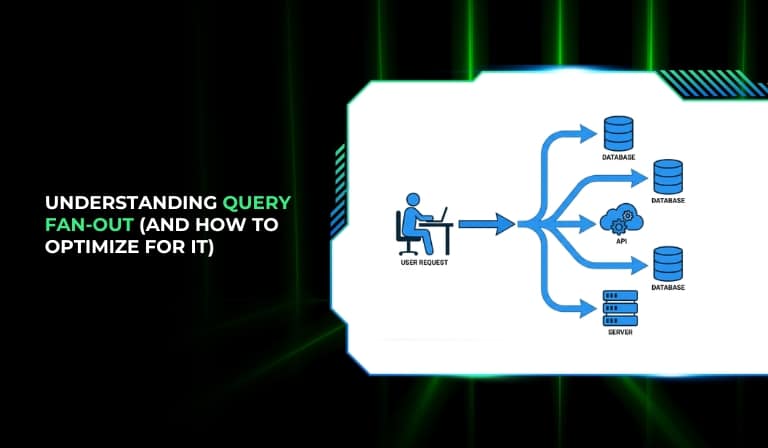
Your system feels slow. API rate limits get hit before noon. Dashboards take four seconds to load when they should take one. You’ve checked the database indexes, reviewed the network latency, and nothing obvious jumps out. The culprit is not where you’ve been looking. It’s query fan-out, and most practitioners run into it long before they have a name for it.

Query fan-out is what happens when a single user-facing request triggers multiple downstream queries or sub-requests across services, databases, or APIs. It hides in plain sight. It doesn’t throw an obvious error. It just quietly multiplies your infrastructure load until something breaks or slows to a crawl.
This article gives you a clear mental model for what query fan-out is, when it becomes a real problem, how to diagnose it, and seven specific strategies to bring it under control. Whether you’re running a distributed data system or a multi-account outreach stack, the same patterns apply.
What Is Query Fan-Out? (The Mental Model That Makes It Click)
Query fan-out happens when one top-level request, something the user triggers with a single click, a search, or an API call, causes the system to fire multiple downstream queries or sub-requests to fulfill that one request. The result is one visible action creating an invisible chain of backend work.
The key distinction practitioners rarely make is between fan-out by design and fan-out by accident.
Fan-out by design is intentional. You want to query three data sources in parallel because that’s faster than querying them sequentially. You’re aware of it, you’ve planned for it, and it serves a purpose.
Fan-out by accident is what happens when a system grows without architectural oversight. A feature gets added, an API call gets inserted, a query runs per-record instead of per-batch, and nobody notices until the system is processing ten times the volume it was designed for.
Most fan-out problems are the second kind.
Fan-Out in Distributed Systems vs. Search Pipelines vs. Outreach Automation
Fan-out is not a single-domain problem. It appears wherever one request spawns multiple downstream calls, and the context changes the shape of the problem.
- Distributed systems: A microservice receives a user request and fans out to three internal services to assemble the response. Each of those services may fan out further. This is the textbook case and the one most covered in engineering literature.
- AI search pipelines: A search query gets decomposed into multiple sub-queries across different indexes or data sources. Each sub-query runs in parallel, results get merged, and the user sees one result set. The fan-out is the decomposition step.
- Outreach automation platforms: A campaign status update query runs per-account across every connected LinkedIn seat. A lead import triggers enrichment calls per-contact. A dashboard load triggers analytics aggregation queries in real time. These are all fan-out events, and they’re far less discussed than the distributed systems case.
A Simple Analogy
Imagine asking your company’s CEO a single question: “What’s the status of Project X?” The CEO doesn’t know, so they ask five department heads. Three of those department heads don’t know either, so they each ask three team leads. One question. Fifteen conversations. Every one of them blocking the response back to you. That is query fan-out. The CEO is your application. The team leads are your downstream services and APIs.
The problem isn’t that the CEO asked for help. The problem is that nobody thought to cache the last status update, batch the department checks, or set a time limit on how long the CEO would wait before giving you a partial answer.
The important principle here: fan-out is not inherently bad. Uncontrolled fan-out is.
Why Query Fan-Out Becomes a Performance Problem (and When It Doesn’t)
Fan-out creates compounding costs, and the compounding is what catches teams off guard. A single downstream call adds a few milliseconds of latency. Three parallel downstream calls might not add much more than that. But forty downstream calls per user action, multiplied by a thousand concurrent users, is a different situation entirely.
The costs fan-out generates fall into four categories:
- Latency: The total response time is determined by the slowest downstream call in the chain, not the average. If one of your ten downstream calls takes 800ms, your user waits 800ms regardless of what the other nine did.
- Rate-limit exposure: Every downstream call consumes quota on an external API, a database connection pool, or a per-IP session limit. Fan-out amplifies your consumption rate without any increase in user-visible throughput.
- Compute overhead: Spawning, managing, and collecting results from parallel downstream calls uses memory and CPU on the orchestrating service. At low volume this is invisible. At scale, it becomes a real cost.
- Data consistency risks: When you fan out across multiple data sources and merge results, you introduce the possibility that different sources return data from different points in time. For outreach platforms, this can mean a lead’s status looks different depending on which account’s data was queried last.
The Three Scenarios Where Fan-Out Breaks Things
Scenario 1: Per-lead enrichment calls in high-volume outreach stacks. A sequence launches with 500 new contacts. Instead of a single batch enrichment call, the system fires 500 individual API requests to an enrichment provider. Apollo’s API, for example, has daily rate limits that an unoptimized stack can hit in minutes when running this pattern at scale.
Scenario 2: AI search tools spawning uncoordinated sub-queries. A single user search triggers parallel queries across multiple data indexes without a deduplication layer. The same underlying records get queried multiple times, results overlap, and the merge step becomes expensive because nobody filtered redundant data upstream.
Scenario 3: Multi-account LinkedIn automation platforms running per-account status checks. An operator with 30 connected LinkedIn accounts gets a dashboard refresh that fires 30 individual queries, one per account, to check conversation states. This both strains the underlying LinkedIn session limits and creates a slow dashboard that the operator has to wait on every time they open it.
When Fan-Out Is Working For You
Parallel reads in read-heavy architectures are a legitimate use of fan-out. A scatter-gather pattern, where you deliberately fan out to multiple sources and collect the best or most complete result, is standard practice in search and recommendation systems. Multi-source enrichment in outreach, where you query three different data providers and take the most recent result, is another valid application.
The difference between fan-out that helps and fan-out that hurts is usually two things: you planned it, and you put limits on it.
A useful rule of thumb: one user action generating three to five downstream calls is generally manageable. One user action generating more than fifteen to twenty downstream calls should be reviewed. One user action generating forty or more downstream calls is a structural problem.
How to Diagnose Query Fan-Out in Your System
This is where most articles fall short. They describe the problem well and then offer vague advice about monitoring. What follows is a practitioner-level diagnostic approach, not a generic suggestion to “add observability.”
Signals That Fan-Out Is the Problem
You don’t always need a tracing tool to recognize a fan-out problem. These signals appear in systems that have uncontrolled fan-out:
- Response times are slow on requests that should be fast. A dashboard that fetches twenty small pieces of data should be fast. If it’s slow, you likely have sequential or excessive parallel calls under the hood.
- API rate limit errors spike with user load, not with data volume. If rate limits correlate with the number of concurrent users rather than the volume of records being processed, you have fan-out proportional to user activity. That’s the tell.
- Database query logs show repeated near-identical queries within short time windows. If the same query runs fifty times in two seconds with slightly different parameters, something upstream is not batching or caching.
- Memory or compute spikes that don’t correspond to data volume. Fan-out increases the number of active connections, threads, or goroutines in flight. This drives memory and CPU usage independently of how much data is actually being processed.
Tools for Tracing Fan-Out
For engineering teams managing distributed systems:
- Jaeger is an open-source distributed tracing system that shows the full call tree for any request, including how many downstream calls it spawned and how long each took.
- Datadog APM provides distributed tracing with flame graphs, making it straightforward to see where fan-out is happening and what’s contributing most to latency.
- OpenTelemetry is the vendor-neutral instrumentation standard that feeds data into tools like Jaeger, Grafana Tempo, and others. If you’re building observability from scratch, this is the right starting point.
For teams managing outreach and enrichment stacks:
- API call auditing at the HTTP layer. If your outreach stack runs on top of Apollo, Clay, or LinkedIn APIs, enable request logging and count the calls-per-action ratio manually.
- CRM enrichment logs. Most CRMs and outreach tools log enrichment events. Pull the logs for a 24-hour window and count how many enrichment calls were triggered per lead imported or sequence launched.
The Fan-Out Ratio Test
This is a simple method that works without any specialized tooling. Log the number of downstream calls your system makes for each top-level user action over a sample of one hundred requests. Calculate the ratio: downstream calls divided by user actions.
- A ratio of 1:3 to 1:5 is typical and usually acceptable.
- A ratio above 1:15 warrants investigation.
- A ratio above 1:40 is a structural fan-out problem regardless of current performance.
If the ratio is climbing week over week as your system grows, fan-out is scaling with your user base, which means the problem will get worse not better.
Query Fan-Out Optimization: 7 Strategies That Actually Work
This is the part that matters. Each strategy below is specific enough to implement. None of them are “add more servers.”
1. Batching Over Per-Item Queries
The single highest-impact change in most outreach and enrichment stacks is replacing per-record API calls with batch calls.
- The problem: A sequence launches for 500 contacts. The system calls an enrichment API once per contact to pull job title, company size, and LinkedIn URL. That’s 500 API calls, each with its own network round-trip, its own rate-limit consumption, and its own error surface.
- The fix: Use the batch endpoint. Apollo’s bulk people enrichment endpoint, for example, accepts up to 10 records per call. That same 500-contact sequence goes from 500 API calls to 50. Clay’s table enrichment feature batches lookups across its data provider network by default.
- The impact: Running 500 individual enrichment calls versus one batch run is not a minor optimization. At typical API rate limits, individual calls can exhaust daily quotas in under an hour when running multiple campaigns simultaneously. Batch calls distribute that cost across far fewer requests.
The principle generalizes beyond enrichment. Database queries, internal service calls, and webhook triggers should all be evaluated for batch opportunities before being designed as per-record operations.
2. Query Result Caching (With TTLs That Make Sense)
Caching the results of downstream calls prevents the same data from being fetched multiple times within a window where it’s unlikely to have changed.
- Short-TTL caches (seconds to minutes): Appropriate for data that changes frequently but where stale results are acceptable within a narrow window. LinkedIn conversation states, for example, can tolerate a 60-second cache in most outreach workflows without causing operational problems.
- Long-TTL caches (hours to days): Appropriate for stable reference data. A company’s headquarters location, industry classification, or employee count doesn’t change hour-to-hour. These are safe to cache for 24 hours or longer, dramatically reducing enrichment API calls for contacts associated with the same company.
- The common mistake: Caching at the wrong layer. If you cache at the API gateway level but the data downstream changes per-user-session, your cache delivers wrong data. If you cache at the database level for data that’s already cheap to query, you add complexity without benefit. Cache as close to the expensive downstream call as possible, and only for data where the TTL makes sense given how often the data actually changes.
In active outreach sequences, caching lead enrichment data incorrectly can cause sequences to fire with outdated job titles or company names. The cache TTL needs to match the operational cadence of the sequence, not just the technical feasibility of caching.
3. Query Planning and Request Deduplication
Before spawning a downstream call, check whether an identical or overlapping call is already in flight or was recently completed.
- In distributed systems, this is called request coalescing or deduplication middleware. A request arrives while a downstream call for the same data is already in progress. Instead of starting a second call, the system waits for the first call to complete and returns the same result to both callers. This is standard practice in API gateways and CDN layers.
- In outreach stacks, deduplication maps to lead import logic. Before triggering enrichment for a contact, check whether that contact was enriched in the last thirty days. If they were, skip the enrichment call and use the cached result. This alone can cut enrichment API consumption by 40 to 60 percent in stacks with recurring imports from overlapping data sources.
- In AI search pipelines, query deduplication means normalizing sub-queries before execution. If two decomposed sub-queries are semantically equivalent, run one and reuse the result.
Deduplication doesn’t require sophisticated infrastructure. A simple key-value store (Redis works well) with a 30-day TTL on enrichment events handles the outreach case without additional complexity.
4. Fan-Out Budgets (Set Hard Limits Per Request)
A fan-out budget is a hard ceiling on the number of downstream calls any single top-level request is allowed to trigger.
- Define the budget based on acceptable latency and rate-limit headroom. If your SLA is a 500ms response time and each downstream call takes 50ms, you can afford roughly ten parallel calls before latency risk appears.
- If the budget is exceeded, queue the overflow for async processing rather than spawning additional synchronous calls. The user gets a partial result immediately and the remaining data loads asynchronously.
- For dashboard loads in outreach platforms, this means showing the first batch of account data immediately while remaining account data loads in the background, rather than waiting for all thirty accounts to respond before showing anything.
Fan-out budgets are mostly a discipline problem, not a technology problem. They need to be defined during feature design, not added after the fact when the system is already slow.
5. Async Fan-Out for Non-Blocking Workflows
Not every downstream call needs to complete before the user-facing response is sent.
- The principle: Identify which downstream calls are needed to construct the immediate response and which can be deferred. Move deferred calls to an async queue.
- Tools: Redis Queue, BullMQ, and AWS SQS are common choices for async job queues. The choice depends on your infrastructure, but all three support delayed execution and retry logic.
- The outreach application: When a new batch of leads is imported, the import confirmation doesn’t need to wait for enrichment to complete. The import is confirmed immediately. Enrichment jobs are queued and processed asynchronously. Leads appear in the CRM as enrichment completes, without the import flow blocking on API calls.
- The AI search application: Secondary data lookups that improve result quality but aren’t needed for the primary result set can be queued for async processing. The user sees primary results in 200ms and supplementary data populates over the next second or two.
The tradeoff is UX complexity. You need to communicate to the user that data is loading in stages rather than appearing all at once. For most B2B tools, this is a better experience than a four-second wait for a fully-populated screen.
6. Data Locality and Query Routing Optimization
Data locality means keeping frequently co-queried data physically close together in the same data store, so retrieving it doesn’t require cross-service fan-out.
- The problem: A dashboard query needs user data, account data, and campaign data. Each lives in a separate microservice with its own database. The dashboard fans out to three services and waits for all three to respond.
- The fix: For data that is almost always queried together, consider pre-joining it at write time and storing the joined result in a read-optimized store. This trades storage for query simplicity. The dashboard query becomes one read instead of three.
- In AI search pipelines, data locality means pre-aggregating and pre-indexing data at index build time rather than at query time. If your search index already contains the joined result, the query doesn’t need to fan out to multiple indexes to assemble it.
- The practical limit: This strategy works well for read-heavy data with relatively stable relationships. It doesn’t work well for data that updates frequently or where the join relationships change often. For those cases, async fan-out with caching is usually a better fit.
7. Scatter-Gather with Timeout Contracts
When fan-out is intentional, the scatter-gather pattern handles it without letting slow downstream calls block the entire response.
- How it works: The orchestrating service fans out to N downstream calls simultaneously. It sets a strict timeout for how long it will wait for each call. When a call returns within the timeout, its result is included. When a call exceeds the timeout, it is skipped, and the response is assembled from whatever results arrived in time.
- Timeout contracts: Each downstream call should have an explicit timeout defined at design time. A common approach is to set individual call timeouts at roughly 70 to 80 percent of the total acceptable response time, leaving a margin for result assembly and response serialization.
- The outreach application: Multi-source enrichment queries three data providers in parallel. Provider A responds in 120ms, Provider B in 340ms, and Provider C times out at 500ms. The system assembles the result from Providers A and B and returns it to the user. Provider C’s data is not included. The user gets an 80 percent complete enrichment result in 500ms rather than waiting for a complete result that may never arrive.
- The operational decision: Partial results require a defined merge strategy. What happens when two providers return conflicting data for the same field? Which source wins? These decisions need to be made at design time, not resolved ad hoc at runtime.
Query Fan-Out in LinkedIn Outreach Automation (The Part Nobody Writes About)
Most fan-out content focuses on distributed systems architecture. The LinkedIn outreach context gets almost no coverage, which is a significant gap given how many teams are running automation across multiple accounts and hitting performance walls they can’t explain.
Multi-account outreach platforms generate fan-out at the account layer. Each connected LinkedIn account has its own session context, its own rate limits, and its own API interaction history. When an operator connects 30 LinkedIn accounts to a single platform, any operation that needs to reflect state across all accounts becomes a fan-out event. Checking conversation states, pulling connection acceptance rates, refreshing lead reply status: all of these spawn per-account queries.
Where Fan-Out Silently Kills Outreach Performance
- Per-lead enrichment at sequence start. When a campaign launches and the platform enriches each contact individually before sending connection requests, 500 contacts become 500 API calls in rapid succession. Most enrichment APIs have rate limits between 200 and 1,000 calls per day per API key. A single poorly timed campaign launch can exhaust the daily enrichment budget before other campaigns have a chance to run.
- Real-time status polling across all accounts. Some platforms poll each connected LinkedIn account on a fixed interval to check for new replies, accepted connections, or updated profile data. With 30 accounts polled every 60 seconds, that’s 30 API calls per minute just for status checks, consuming session capacity that could be used for sending sequences or accepting connections.
- Analytics aggregation on dashboard load. If the analytics dashboard runs live aggregation queries across all accounts every time an operator opens it, a team of three operators opening dashboards simultaneously generates three full aggregation query sets, each touching all 30 accounts. That’s 90 account-level queries within seconds of each other, for dashboard data that is rarely actionable at the second-by-second level.
What Optimized Multi-Account Outreach Architecture Looks Like
- Batch enrichment before sequences launch, not per-contact at launch time. The optimal workflow is: import leads, trigger batch enrichment for the full list, wait for enrichment to complete, then launch the sequence. This keeps enrichment API consumption predictable and prevents campaign launches from triggering rate-limit spikes.
- Event-driven conversation state updates instead of polling. Rather than polling each account on a timer, well-architected outreach platforms use event-driven updates: LinkedIn activity triggers a webhook or a change-data-capture event, which updates the platform’s internal state for that specific conversation. The platform only makes a call when something actually changes, not on a fixed schedule regardless of activity.
- Pre-aggregated analytics with scheduled refresh. Dashboard analytics should be pre-computed on a schedule (hourly or daily depending on the use case) and served from a pre-built result set. The operator sees analytics data that is one hour old rather than one second old, but the dashboard loads in 200ms instead of four seconds, and the platform isn’t running thirty-account aggregation queries every time someone opens a tab.
Platforms built for scale handle this at the infrastructure layer. When Arlo AI manages conversations across dozens of accounts simultaneously, the architecture needs to separate per-account activity from cross-account reporting. Otherwise, the act of checking results creates the same load as the outreach itself. The outcome for operators is one clean dashboard and predictable sequence performance, rather than a system that slows down as more accounts are added.
Conclusion
Query fan-out is an architectural pattern, not a bug. Every reasonably complex system uses it in some form. The difference between fan-out that works and fan-out that creates problems is whether it’s deliberate, bounded, and observable.
The systems and stacks that handle scale well are not the ones that avoid fan-out. They’re the ones that know exactly how much fan-out each operation generates, have defined limits on that number, and have strategies in place for when those limits would otherwise be exceeded.
The practical starting point is simple: pick your highest-volume workflow, the one that runs most frequently or serves the most users, and count the downstream calls it generates per top-level user action. If that number surprises you, you have a fan-out problem worth addressing. If it’s within a reasonable range and you know what it is, you’re ahead of most teams.
That number, more than any benchmark or architecture diagram, tells you where to focus next.
FAQs
1. What is query fan-out in simple terms?
Query fan-out is when one user request causes multiple downstream requests to be made automatically by the system. For example, when a user opens a dashboard and the system responds by querying five different data sources simultaneously to build that dashboard view, that’s fan-out. The user made one request; the system made five.
2. Is query fan-out always a problem?
No. Fan-out is a normal part of distributed system design. Querying multiple data sources in parallel is often intentional and faster than querying them sequentially. Fan-out becomes a problem when it’s uncontrolled, meaning the system generates more downstream calls than were planned for, the calls grow proportionally with user load in unexpected ways, or the calls exhaust rate limits or create latency that exceeds acceptable thresholds.
3. How do I know if query fan-out is causing my API rate limit errors?
The key indicator is whether rate limit errors correlate with the number of concurrent users rather than the volume of data being processed. If rate limits get hit faster when more users are active, even when data volume stays constant, fan-out proportional to user activity is the likely cause. Add HTTP-level logging to count API calls per user action and look for a ratio higher than expected.
4. What is the difference between fan-out and scatter-gather?
Fan-out describes the general pattern of one request spawning multiple downstream calls. Scatter-gather is a specific, intentional implementation of fan-out where requests are deliberately distributed to multiple sources (scatter) and results are collected and merged (gather). Scatter-gather is fan-out with a plan. Uncontrolled fan-out is fan-out without one.
5. How does batching reduce query fan-out?
Batching replaces multiple individual calls with a single call that covers multiple records. Instead of making one API request per lead in a 500-contact list, a batch call covers all 500 in one or a few requests. This reduces the total number of downstream calls without reducing the amount of data being processed, which directly cuts rate-limit consumption and connection overhead.
6. What is a healthy fan-out ratio?
There is no single universal number, but a practical working range is one to five downstream calls per top-level user action for synchronous, user-facing requests. Ratios above fifteen calls per action warrant review. Ratios above forty calls per action consistently indicate a structural problem that will get worse as usage scales. Async workflows can tolerate higher ratios since the calls don’t directly affect user-facing response time.
7. How does query fan-out affect LinkedIn automation tools?
LinkedIn automation platforms generate fan-out at the account layer. Each connected LinkedIn account has its own session and rate limits. Operations that span multiple accounts, like checking conversation states, loading campaign analytics, or running enrichment at sequence launch, fan out to per-account queries. Poorly architected platforms hit LinkedIn session limits, deliver slow dashboards, and exhaust enrichment API quotas because they treat multi-account operations as repeated single-account operations rather than designing for the aggregate.
8. Can caching fully solve a query fan-out problem?
Caching reduces fan-out by serving previously fetched data instead of making a new downstream call. It can eliminate a large portion of redundant calls, especially for stable reference data. But it doesn’t solve fan-out for data that must be fresh on every request, and it introduces its own risks around stale data if TTLs aren’t set correctly. Caching is one tool in the optimization stack, not a complete solution on its own.
9. What is request deduplication and how does it reduce fan-out?
Request deduplication means checking whether an identical downstream call is already in progress or was recently completed before starting a new one. If a matching call exists, the system waits for the existing call and returns its result to both callers, rather than spawning a second identical call. In outreach stacks, this translates to skipping enrichment for contacts that were already enriched within a defined time window, which can reduce enrichment API consumption significantly when the same contacts appear in multiple imports.
10. How do multi-account outreach platforms manage fan-out across LinkedIn accounts?
Well-built multi-account platforms use three approaches. First, they separate per-account activity (sending connections, handling replies) from cross-account aggregation (analytics, reporting) so these two types of operations don’t compete for the same resources. Second, they use event-driven architecture for conversation state updates rather than polling every account on a fixed schedule. Third, they pre-compute analytics on a schedule and serve cached results from dashboards rather than running live aggregation queries every time a dashboard is opened.
11. What tools help trace and diagnose query fan-out?
For engineering teams, Jaeger, Datadog APM, and OpenTelemetry-compatible tracing tools provide distributed request tracing that makes fan-out visible. For outreach and enrichment stacks, HTTP-level request logging grouped by triggering user action gives you the same diagnostic information without requiring a full APM deployment. The goal in both cases is to count downstream calls per top-level user action and identify where ratios are unexpectedly high.
12. Is query fan-out a problem specific to distributed systems or does it apply to single-server setups too?
Fan-out applies to any system where one operation triggers multiple downstream calls, regardless of whether those calls cross service boundaries. A single-server application that calls an external API once per database record, makes five database queries to assemble a single page view, or runs synchronous background tasks per user action is experiencing fan-out. The distributed systems framing is common because fan-out is most visible and most costly at that scale, but the underlying pattern and the optimization strategies apply equally to monolithic architectures.

