


There’s a mistake that happens quietly in SEO strategies all the time, and most people doing it have no idea it’s happening. A marketing team sits down to plan their content. Someone opens a keyword research tool, pulls a list of terms with decent search volume, drops them into a spreadsheet, and the team starts writing content around those terms. The content goes live. It ranks okay. Maybe page two or three. Conversions are thin. Traffic is mediocre. And the conclusion the team reaches is that SEO is just slow and unpredictable and you have to be patient.

But the actual problem is something more specific. The team built their strategy around keywords without understanding the search queries those keywords represent. And those two things are not the same. They look the same on the surface. They live in the same spreadsheets. They get discussed in the same meetings. But they operate very differently and confusing them produces content that’s technically optimized but practically useless.
Here’s the gap in plain language. A keyword is what you as a marketer decide to target. A search query is what an actual human being typed into Google. The keyword lives in your strategy document. The query lives in someone’s head at a specific moment when they have a specific need. Sometimes the keyword accurately captures the query. A lot of the time it doesn’t. And when it doesn’t, you’re creating content for a term rather than for a person, and Google is getting better every single year at telling the difference.
This isn’t a minor technical distinction. It changes how you do keyword research, how you write content, how you interpret your rankings data, and how you understand why certain pages convert and others don’t. So let’s actually dig into it properly, because the difference matters more than most SEO guides bother explaining.
Keywords vs Search Queries: What Each One Actually Means
Start with the basics because they’re worth getting exactly right.
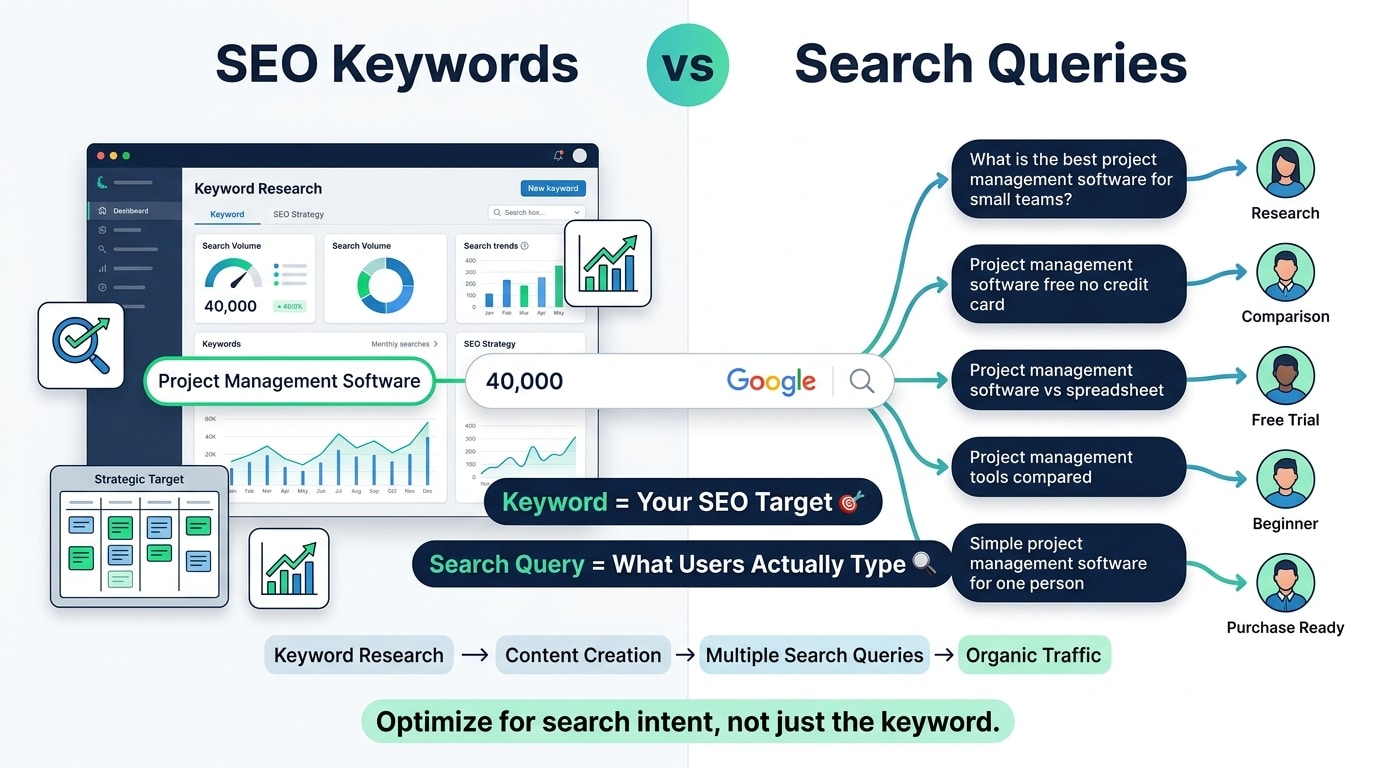
A keyword in SEO is a term or phrase that you identify as a target for your content. It’s the result of research. You used Ahrefs, Semrush, Google Keyword Planner, or some other tool, you saw that “project management software” gets 40,000 searches a month, and you decided that’s a keyword you want to rank for. It’s a strategic choice made in advance based on data.
A search query is the actual text string a person typed into a search engine at a specific moment. It’s spontaneous. It’s human. It reflects exactly what that person was thinking about when they went to Google. Search queries are collected in Google Search Console under the “Queries” report. They’re also what Google uses to determine which pages to show in which results.
So here’s the gap. The keyword “project management software” is clean and simple. But the search queries that trigger results for that keyword include things like: “what is the best project management software for small teams,” “project management software free no credit card,” “project management software vs spreadsheet,” “project management tools compared 2024,” “simple project management software for one person.” Those are five genuinely different intentions. Different stages of the buying journey. Different content needs. Different conversion potential.
If you write one piece of content targeting “project management software” without understanding which of those underlying queries you’re actually addressing, you’re writing for a label. Not for a person.
Why Google Doesn’t Just Match Keywords Anymore
This is important context. For a long time, early-era Google, keyword matching was relatively literal. You had a keyword on your page, Google matched queries to that keyword, you ranked. That era is gone and it’s been gone for a while.
Google’s understanding of language has gotten dramatically more sophisticated. The BERT update in 2019 was a big shift. It allowed Google to understand the context and nuance of queries much better, particularly longer, more conversational queries. The MUM (Multitask Unified Model) update went further. And the integration of AI into Google’s ranking systems means that today, Google isn’t just matching words. It’s trying to understand intent.
What that means practically: Google often ranks pages for queries that don’t contain the exact keyword on the page, because Google understands that the page’s content answers the question even without a literal keyword match. And Google sometimes fails to rank pages that are stuffed with a keyword, because the content doesn’t actually satisfy the intent behind the queries that keyword represents.
So the old approach of “put the keyword in the title, H1, first paragraph, and a few times in the body” works less and less. It’s not irrelevant, but it’s downstream of the bigger question: does this page give the person who typed that query exactly what they were looking for?
That question requires understanding search queries, not just keywords.
How Keyword Research Gets Done Wrong (And Why It Matters)
Most keyword research starts and ends with a volume number. Someone types a seed term into a keyword tool, looks at the list of suggestions, filters by search volume and keyword difficulty, picks the ones that look achievable, and moves on. The intent behind those keywords gets a cursory glance at best.
That’s a problem. Volume tells you how many people are searching. It tells you nothing about what they want when they search, how far along they are in a decision process, or whether the people searching are even your target customer.
Take the keyword “CRM.” Ahrefs shows this keyword has somewhere around 110,000 monthly searches globally. Sounds like a goldmine. But think about who’s actually searching that single word. Students writing a paper about CRM software. Entry-level employees who just heard the term in a meeting and don’t know what it means. Developers researching the category. Journalists writing an article. Actual buyers looking for a CRM tool, sure, but they’re probably a small fraction of that volume, and the ones who are buyers are probably at the very earliest stage of awareness.
Now look at “best CRM for real estate agents.” Lower volume, maybe 2,400 searches a month. But every single one of those searchers is a real estate agent or working with one, they know what a CRM is, they’re in the market for one, and they want to compare options. The conversion rate from ranking for that term will be dramatically higher than ranking for “CRM” even though the volume is a fraction.
The keyword research went wrong the moment volume became the primary filter. The right filter is a combination of intent alignment, audience fit, and commercial relevance. Volume matters but it’s third or fourth on the priority list, not first.
Understanding Search Intent and Why It’s the Whole Game
Search intent is the reason someone typed a query. And Google has gotten extremely good at identifying intent and matching it to content. There are four basic types that get talked about a lot: informational, navigational, commercial, and transactional.
Informational queries are questions. “How does CRM software work.” “What is a sales funnel.” “Why is my website traffic dropping.” The person wants to learn something. They’re not ready to buy. The content that satisfies this intent is educational, detailed, and thorough.
Navigational queries are people looking for a specific place. “Salesforce login.” “HubSpot pricing page.” “Notion templates.” These people already know where they want to go. Ranking for competitor navigational queries is hard and usually not worth the effort unless you’re specifically targeting competitor audiences.
Commercial investigation queries are where things get interesting. “Best CRM for small business.” “HubSpot vs Salesforce.” “Alternatives to Asana.” These people are in research mode. They know they need something, they’re comparing options, and they’re getting close to a decision. This is where comparison content, listicles, and review-style posts do well.
Transactional queries show purchase intent. “Buy Salesforce subscription.” “Ahrefs discount code.” “Sign up for HubSpot free trial.” These people are ready to do something. The content that works here is product pages, landing pages, and direct conversion-focused copy.
So then, the keyword “CRM software” sits in informational territory. The keyword “best CRM for sales teams” sits in commercial investigation. The keyword “HubSpot free trial” is transactional. Three different keywords, three completely different types of content needed, three completely different conversion expectations. Treating them the same way in your content strategy produces content that satisfies nobody.
What Google Search Console Actually Shows You (And How to Use It)
Here’s one of the most underused tools in SEO. Google Search Console has a report called “Search results” that shows you the actual queries people typed into Google before clicking on your site. Not keywords. Actual queries. This data is gold and most people either don’t look at it or don’t know what to do with it.
Open Search Console, go to Performance, and look at the queries report. You’ll see every search term that triggered an impression or click for your site. Sort by clicks to see what’s actually driving traffic. Then sort by impressions to see what you’re appearing for but not getting clicks on.
A few things this tells you that keyword tools can’t.
First, you’re probably ranking for queries you never targeted. Your content sometimes matches intent for queries that weren’t in your keyword plan. When you find these, you can optimize the page specifically for those queries, add more content around them, build internal links to that page, and often improve rankings without creating anything new.
Second, you’ll find queries where your click-through rate is terrible. You’re getting 2,000 impressions but only 15 clicks. That’s a 0.75% CTR, which is very low. Usually this means your title tag and meta description aren’t matching what the searcher actually wants. If the query is “how to reduce customer churn” and your page title says “Customer Retention Strategies,” there’s a mismatch. Fix the title to match the query language and CTR improves.
Third, you’ll find queries that you’re ranking for on page two or three that represent real conversion opportunities. Position 11 to 20 gets very few clicks but if the underlying intent is commercial and the volume is decent, optimizing that page to move from position 15 to position 5 can meaningfully change traffic and revenue.
Search Console is the place where keywords meet actual search queries. It’s where you find out what’s really happening versus what you planned.
Long-Tail Queries and Why They Do More Work Than Short Keywords
Long-tail is a term that gets thrown around a lot and sometimes gets misunderstood. It doesn’t just mean long keywords. It means queries that are specific, lower volume, and often much higher intent.
“SEO” is a head keyword. Massive volume, very broad intent, almost impossible to rank for without a massive domain authority, and the conversion rate from ranking for it would be low anyway because most searchers want generic information.
“SEO for B2B SaaS companies with small teams” is a long-tail query. Much lower volume but extremely specific. The person searching that knows what SEO is, knows their business context, and is looking for specific advice or a specific service. If a B2B SaaS marketing agency ranks for that query, the traffic converts way better than anything they’d get from ranking for “SEO.”
The interesting thing about long-tail queries is that they collectively add up to the majority of all search volume. The head keywords get the big numbers in keyword tools, but the enormous variety of specific, longer queries that people type every day is where most of the actual searching happens. Google has said that a significant portion of the queries it processes every day are queries it has never seen before. That’s because people type naturally, and natural language is endlessly varied.
This is why content that truly covers a topic deeply tends to rank for hundreds or thousands of long-tail queries it never explicitly targeted. A comprehensive guide to email marketing might target “email marketing strategy” as its main keyword but end up ranking for “how often to send marketing emails to subscribers,” “email marketing for ecommerce beginners,” “why my email open rates are dropping,” and dozens of other specific queries. That’s topical authority at work and it comes from writing for the depth of a topic rather than just stuffing a single keyword.
The Keyword Research Process That Actually Accounts for Queries
So if the standard approach of pull-keywords-filter-by-volume is incomplete, what does a better process look like?
Start with your customer, not with a keyword tool. What questions do your customers actually ask before they buy? What problems do they describe when they first reach out? What does the sales team hear on calls? What do support tickets look like? This is where real search queries live. People type into Google the same things they’d ask a knowledgeable friend. If your customers are asking “how do we get our sales team to actually use the CRM,” that’s probably a real search query worth checking.
Then go to Google itself. Type in a seed term and look at the autocomplete suggestions. Those are real queries people are typing. Look at the “People also ask” section on the results page. Those are real questions people search. Look at “Related searches” at the bottom. All of this is query data that keyword tools often miss or aggregate away.
Then use keyword tools to validate volume and assess competition. Ahrefs and Semrush are the best options. But use them to check the queries you found through customer research and Google exploration, not as the starting point. The tool should confirm and expand your list, not generate it from scratch.
Then group your keywords by intent. Not by topic, by intent. All the informational queries about a topic go into one group that produces one type of content. All the commercial investigation queries go into another group. Transactional queries go into another. This grouping tells you what kind of content to create and what conversion expectation to have from each piece.
Finally, check what’s already ranking for each target query before you write anything. Look at the top three results. Are they blog posts or product pages? Are they long comprehensive guides or short quick answers? Are they listicles or tutorials? Google is showing you, through what it already ranks, what type of content it thinks satisfies the intent for that query. Match the format. Don’t fight it.
How Query Data Changes the Way You Write Content
Understanding the actual queries behind a keyword changes the content you produce in very specific ways.
Take a page targeting “email marketing.” Generic keyword. But if you look at the queries that actually trigger results in this space, you’ll find a huge mix: “email marketing for beginners,” “email marketing best practices,” “how to build an email list from scratch,” “email marketing platforms compared,” “email marketing vs social media.” Those are completely different needs.
If you’re writing a pillar page on email marketing, knowing these queries tells you exactly which subtopics to include, which questions to answer, and how to structure the content so it satisfies the most common underlying needs. Without that query data, you’d write something generic that covers email marketing at a surface level and satisfies nobody properly.
It also changes how you write headings. A heading that says “Email Marketing Strategies” is keyword-optimized. A heading that says “How to Build Your First Email List When You Have Zero Subscribers” is query-optimized. The second one matches the specific language real people use when they’re searching for that information. Google reads headings and uses them to understand what topics a page covers and which queries it should rank for.
The same logic applies to FAQ sections. Frequently asked questions should be literally the questions people type into Google, not questions you invented because they sounded relevant. Pull the actual questions from “People also ask” in Google, from Search Console query data, from tools like AnswerThePublic. Use the exact phrasing people use. That’s what gets your FAQ sections ranking in featured snippets and “People also ask” results.
Tracking Rankings vs Tracking Actual Query Performance
Most SEO reporting tracks keyword rankings. Position tracking in Ahrefs or Semrush shows you where you rank for your target keywords over time. This is useful but incomplete.
The problem with tracking only keyword rankings is that it tells you your position for a term but not how you’re actually performing across all the queries that bring people to your page. A page might rank position 5 for your target keyword but position 1 for 47 related long-tail queries you never tracked. Or it might rank well for the keyword but the queries it’s actually getting impressions for have bad intent alignment, and that’s why the conversion rate is low.
Real SEO performance measurement needs to combine keyword position tracking with Search Console query data. Look at the total impressions and clicks your pages are getting across all queries, not just tracked keywords. Look at the average position across all queries for a page, not just the target keyword. Look at which queries are driving clicks and whether those queries match the conversion intent you were hoping for.
If a page targeting a commercial keyword is getting most of its traffic from informational queries, that’s an intent mismatch. The page is attracting early-stage browsers when you wanted late-stage buyers. That mismatch shows up in conversion rate data. Low conversions often aren’t a page problem, they’re a query alignment problem.
Paid Search: Where the Keyword vs Query Gap Gets Expensive Fast
In paid search, the difference between keywords and queries has a direct, immediate cost. This is where understanding the distinction really saves money.
In Google Ads, you bid on keywords. But your ads show for search queries. And depending on your match types, those queries can be quite different from your keywords.
Broad match is the worst offender. If you bid on “project management software” with broad match, Google will show your ad for queries like “project coordination tools,” “task management apps,” “how to manage team projects,” “project scheduling software free,” and a lot of other variations. Some of those are great. Some are completely irrelevant to what you sell. And you’re paying for every click regardless.
So then, the keyword becomes expensive because it’s matching to queries you never intended to capture. The way you find this out is by looking at your Search Terms report in Google Ads, which shows the actual queries that triggered your ads and generated clicks. This is the Google Ads equivalent of Search Console’s queries report.
Negative keywords are how you fix this. When you find queries in the Search Terms report that are irrelevant to your product, you add them as negative keywords to stop your ads from showing for those queries. This is ongoing maintenance, not a one-time setup. And it’s entirely dependent on understanding the difference between the keywords you’re bidding on and the queries your ads are actually matching to.
A Google Ads account that’s never had negative keywords added is almost certainly wasting 20% to 40% of its budget on irrelevant queries. That’s a real number that real audits find regularly.
How AI and Conversational Search Are Changing the Query Landscape
There’s a shift happening right now that makes the keyword vs query distinction even more important than it was two years ago.
AI Overviews in Google, formerly called SGE, are changing what appears at the top of search results for certain queries. Instead of ten blue links, some queries now produce an AI-generated summary at the top of the page. The queries that trigger these overviews tend to be informational and conversational. Questions. Comparisons. Explanations.
What this means for SEO is that ranking on page one for an informational keyword used to guarantee visibility. Now, even a position one result might appear below an AI overview that answers the query directly. Clicks for some informational queries are declining as a result because the answer appears on the results page itself.
So then, the queries that remain most valuable for driving traffic are the ones where the AI overview doesn’t satisfy intent completely. Complex comparisons. Specific product or service recommendations. Local queries. Queries where people want a real source or a real opinion, not a synthesized AI answer. And this shifts the value of search further toward commercial and transactional queries where people want to actually go somewhere and do something.
The practical implication: if your content strategy is heavily weighted toward informational keywords, it’s worth auditing how many of those keywords are now triggering AI overviews and getting most of the attention before anyone scrolls to your result. Diversifying toward commercial intent queries and making sure your content is distinctive enough to be worth clicking even when an AI summary exists is the right response.
Conclusion
The companies that get SEO right aren’t just building keyword lists and checking them off. They’re thinking about the actual person who typed something into Google, what that person wanted in that moment, and whether their content genuinely delivers it.
Keywords are the map. Search queries are the territory. The map is useful but it’s always a simplification. When you navigate only by the map without looking at the actual terrain, you end up somewhere close to where you wanted to be but not exactly there. In SEO terms, that’s page two. Or page one with a terrible conversion rate. Or great rankings for terms that don’t bring buyers.
Pull your Search Console data today. Look at the actual queries driving traffic to your most important pages. Compare them to the keywords you targeted when you wrote those pages. Notice the gaps. That gap between what you planned and what’s actually happening is where better SEO strategy lives.
Frequently Asked Questions
What’s the simplest way to explain the difference between a keyword and a search query?
A keyword is what you target in your strategy. A search query is what a real person actually typed. They overlap most of the time but not always. The keyword “email marketing” is in your spreadsheet. The query “how to write a marketing email that people actually open” is in someone’s Google search bar. Understanding the second one is how you write content that actually works.
Where do you find actual search query data for your site?
Google Search Console is the primary source. Under Performance, the Queries report shows every search term that triggered an impression or click for your site in the last 16 months. You can filter by page to see which queries are bringing people to specific pages. This data is free and it’s more accurate for your specific site than any third-party tool.
Do keywords still matter if Google understands intent now?
Yeah, they still matter. Keywords are how you signal to Google what a page is about. Using your target keyword in the title, H1, and naturally throughout the content is still a ranking factor. The difference is that keyword density and exact match placement matter less than they used to. What matters more is covering the topic thoroughly enough to satisfy all the underlying queries the keyword represents.
Why is my page ranking for queries I never targeted?
Because Google understands your content well enough to match it to related queries. When you write thoroughly about a topic, your content naturally covers subtopics and angles that match long-tail queries you never explicitly targeted. This is a good thing. It means your content has topical depth. Check which unexpected queries you’re ranking for in Search Console and see if there are ways to strengthen those rankings by adding more content around those specific queries.
Should you target one keyword per page or multiple?
One primary keyword per page is still the right starting point because it keeps your content focused on satisfying one core intent. But in reality, a well-written page will rank for many related queries around that primary keyword. The question to ask is whether two keywords have the same intent. If yes, one page can target both. If the intents are different, you need different pages.
How does this apply to local SEO?
Hugely. Local search queries are extremely specific and intent-rich. “Emergency plumber Austin TX” is a very different query from “plumbing” even though they’re in the same topic area. Local businesses need to optimize for the specific query language their customers use, including the city, neighborhood, service type, and urgency signals. Check Google Search Console and Google Business Profile Insights to see the actual queries local customers are using.
What tools besides Google Search Console help with query research?
AnswerThePublic visualizes the questions and prepositions people use around any topic, which gives you query-level insight. AlsoAsked does something similar and pulls from “People also ask” data. Ahrefs and Semrush both have keyword explorer tools that show related terms and questions. Google’s autocomplete and related searches are free and underused. None of these replace Search Console for data about your own site’s performance, but they’re great for finding queries to target with new content.

An avid blogger, dedicated to boosting brand presence, optimizing SEO, and delivering results in digital marketing. With a keen eye for trends, he’s committed to driving engagement and ROI in the ever-evolving digital landscape. Let’s connect and explore digital possibilities together.

