
Before you start
In the ever-evolving world of Search Engine Optimization (SEO), having the right tools at your disposal can make all the difference.

Among these tools, Screaming Frog SEO Spider stands out as a powerful ally for both novice and experienced SEO professionals. But what exactly is Screaming Frog, and how can it revolutionize your SEO strategy?
Screaming Frog SEO Spider is a website crawler that helps you improve onsite SEO by extracting data and auditing for common SEO issues.
Whether you’re managing a small business website or overseeing large-scale enterprise SEO projects, this versatile tool can significantly streamline your workflow and uncover valuable insights.
In this comprehensive beginner’s guide, we’ll walk you through the basics of using Screaming Frog for SEO. We’ll cover everything from installation and setup to running your first crawl and interpreting the results.
By the end of this article, you’ll have a solid foundation for leveraging Screaming Frog to enhance your website’s search engine performance.
Stop 01 of 12
2 minWhat is Screaming Frog?
Screaming Frog is a powerful SEO tool designed to help website owners and digital marketers improve their site’s search engine performance.
Developed by Screaming Frog, a UK-based search marketing agency, the Screaming Frog SEO Spider is a website crawler that enables users to extract and analyze data from their websites.
Its comprehensive capabilities make it an indispensable tool for conducting technical SEO audits, identifying on-page SEO issues, and optimizing overall site performance.
Free vs. Paid: What You Actually Get
Screaming Frog works on a freemium model with no monthly subscription. The free version crawls up to 500 URLs per session and covers the core auditing basics: broken links, response codes, duplicate pages, and XML sitemap generation. What it doesn’t include is JavaScript rendering, saving or reopening crawls, scheduling, custom extraction, and AI integration.
The paid license runs £199 per year (roughly $279 USD), per user, with volume discounts starting at five licenses. For a freelancer auditing a handful of small sites, the free version is often enough. For agencies running crawls regularly across multiple client sites, especially JavaScript-heavy ones, the paid license pays for itself after the first large audit or migration.
Key Features and Benefits
- Website Crawling: Screaming Frog efficiently crawls websites, identifying and reporting various SEO issues.
- Link Analysis: It helps in examining both internal and external links, detecting broken links, and understanding link structures.
- Content Analysis: The tool provides insights into duplicate content, missing metadata, and other content-related issues.
- Technical SEO Audits: Screaming Frog can find technical issues like slow-loading pages, pages blocked by robots.txt, and more.
- Sitemap Generation: Users can create XML sitemaps and submit them to search engines for better indexing.
- AI-Powered Content Analysis: Since version 21, Screaming Frog connects directly to OpenAI, Gemini, Anthropic, or a locally run Ollama instance, letting you run custom prompts against every crawled page, generate missing alt text, summarize content, or flag pages by intent, without leaving the crawl.
- Semantic Similarity Detection: Using vector embeddings, the tool can now flag pages that are semantically too close to each other even when the text isn’t an exact match, which is useful for catching keyword cannibalization that a simple duplicate-content check would miss.
Stop 02 of 12
1 minGetting Started with Screaming Frog
Downloading and Installing Screaming Frog
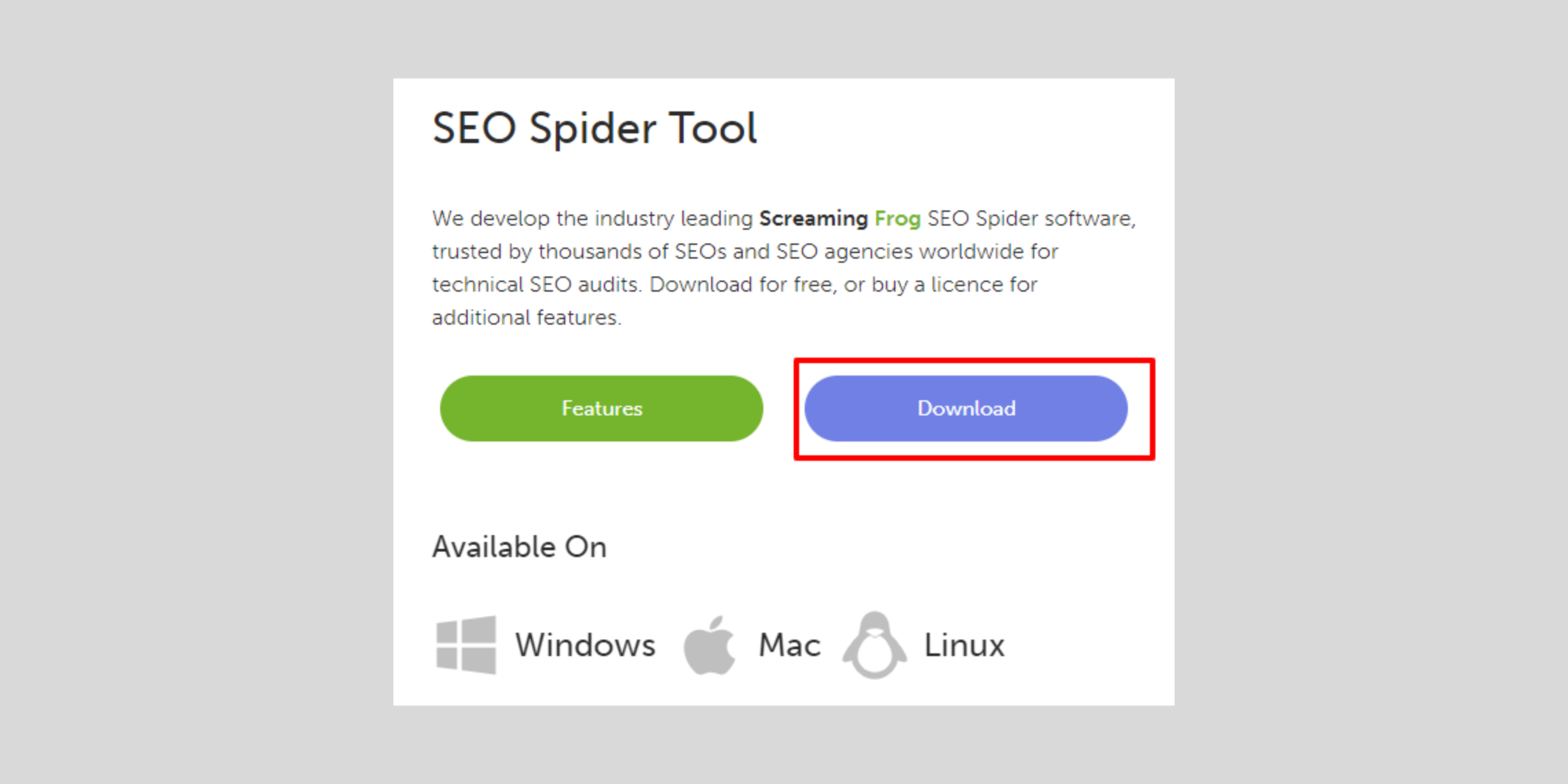
To get started with Screaming Frog, you need to download and install the software from the official Screaming Frog website.
The tool is available for Windows, macOS, and Ubuntu.
-
System Requirements:
-
- Windows: Windows 10 and above
- macOS: macOS 10.15 and above
- Ubuntu: Ubuntu 20.04 and above
For crawling large sites (10,000+ URLs), Screaming Frog recommends at least 8GB of RAM, with 16GB or more for enterprise-scale crawls, since the default configuration stores crawl data in memory rather than on disk.
-
Installation Steps:
-
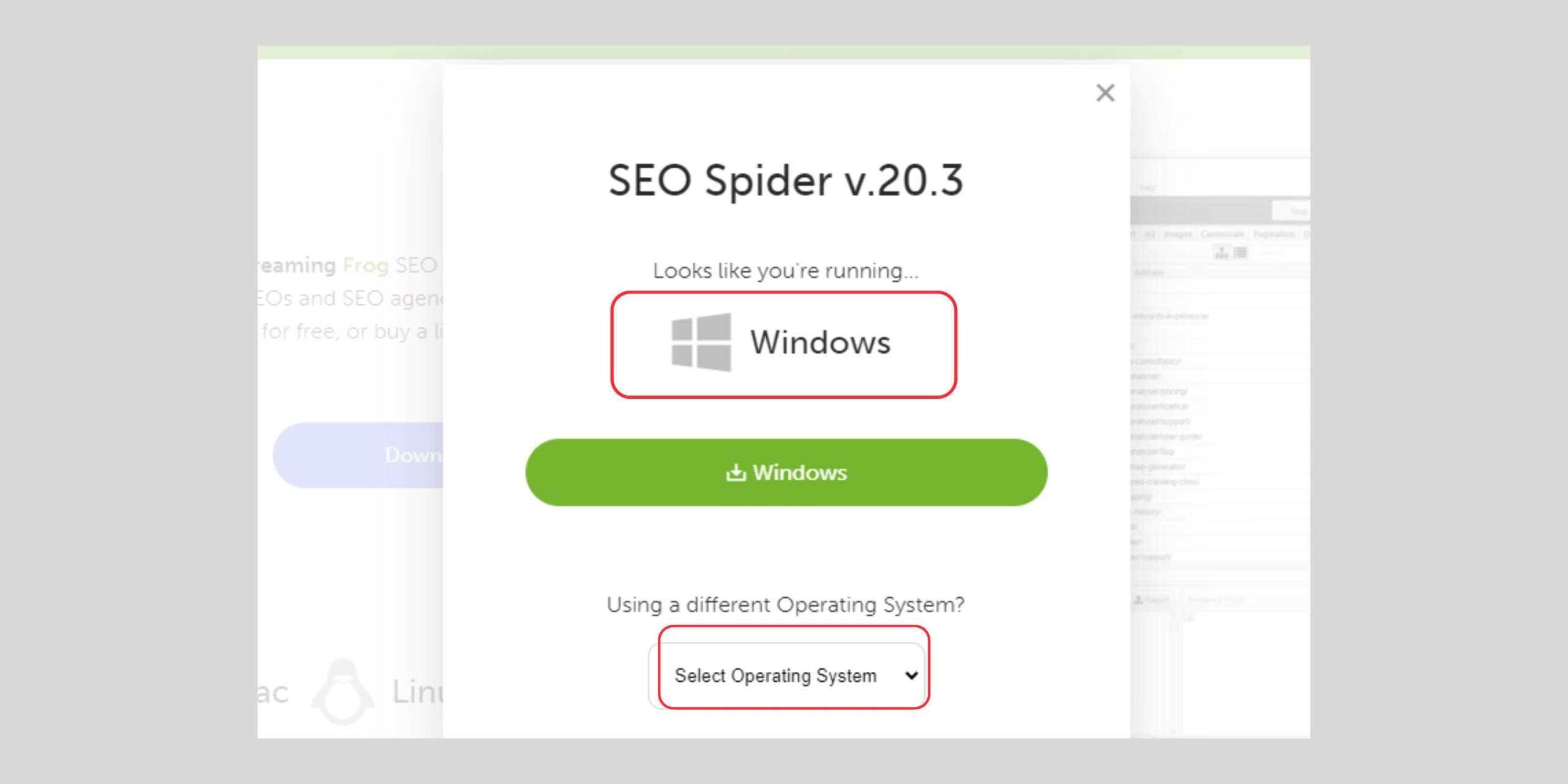
- Visit the Screaming Frog download page.
- Choose the appropriate version for your operating system.
- Download the installer file and follow the on-screen instructions to install the software.
Setting Up Screaming Frog for the First Time
Once installed, launch Screaming Frog and set up the basic configurations to suit your needs.
-
Interface Walkthrough:
-
- Menu Bar: Access various functionalities and settings.
- Toolbar: Quick access to common actions like starting/stopping a crawl.
- Main Window: Displays crawl data in a tabular format.
- Configuration Panel: Adjust settings related to crawling, user-agent, robots.txt, etc.
Stop 03 of 12
1 minRunning Your First Crawl
How to Run a Full Website Crawl
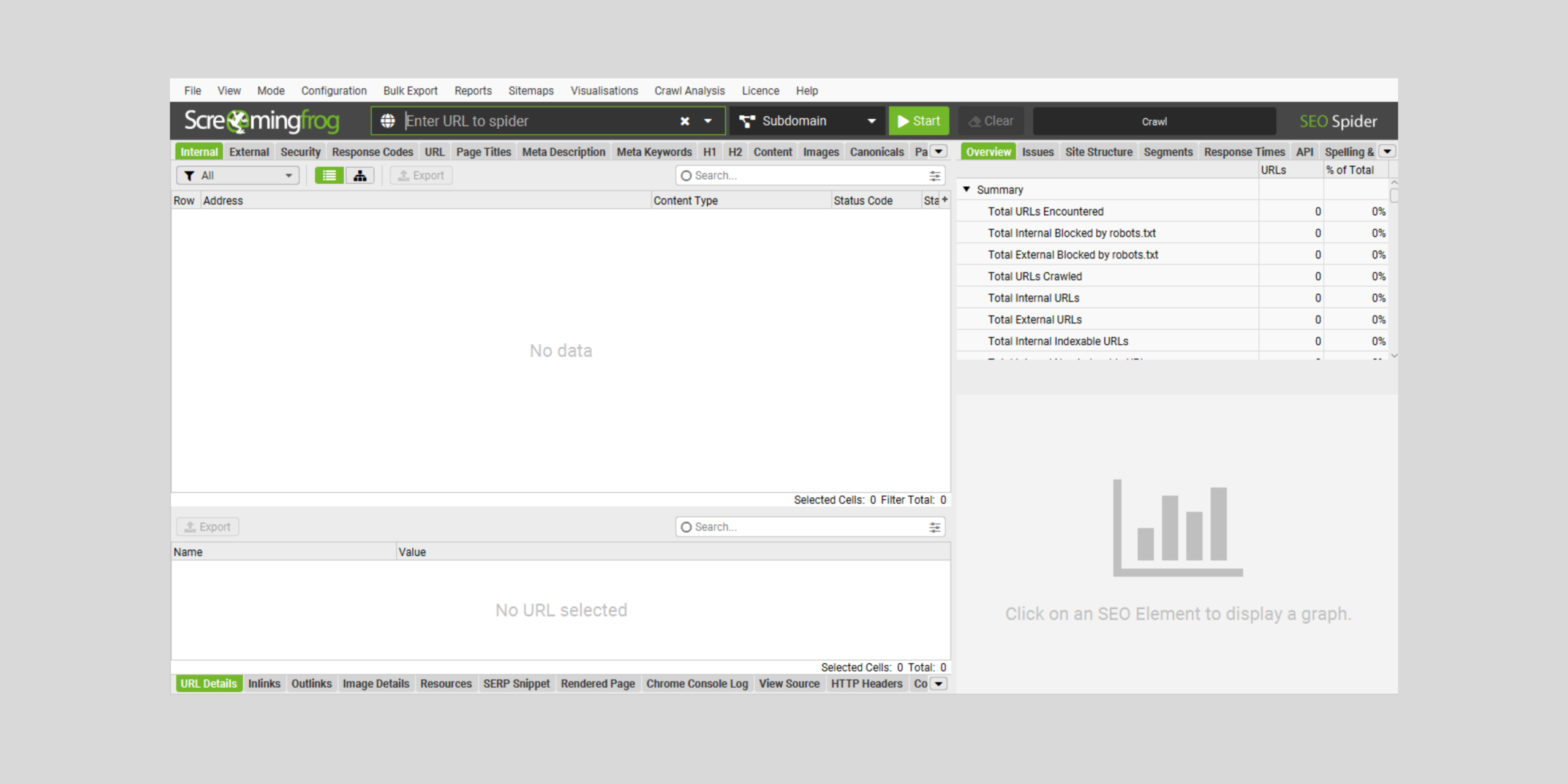
Running a full website crawl is the first step in using Screaming Frog effectively.
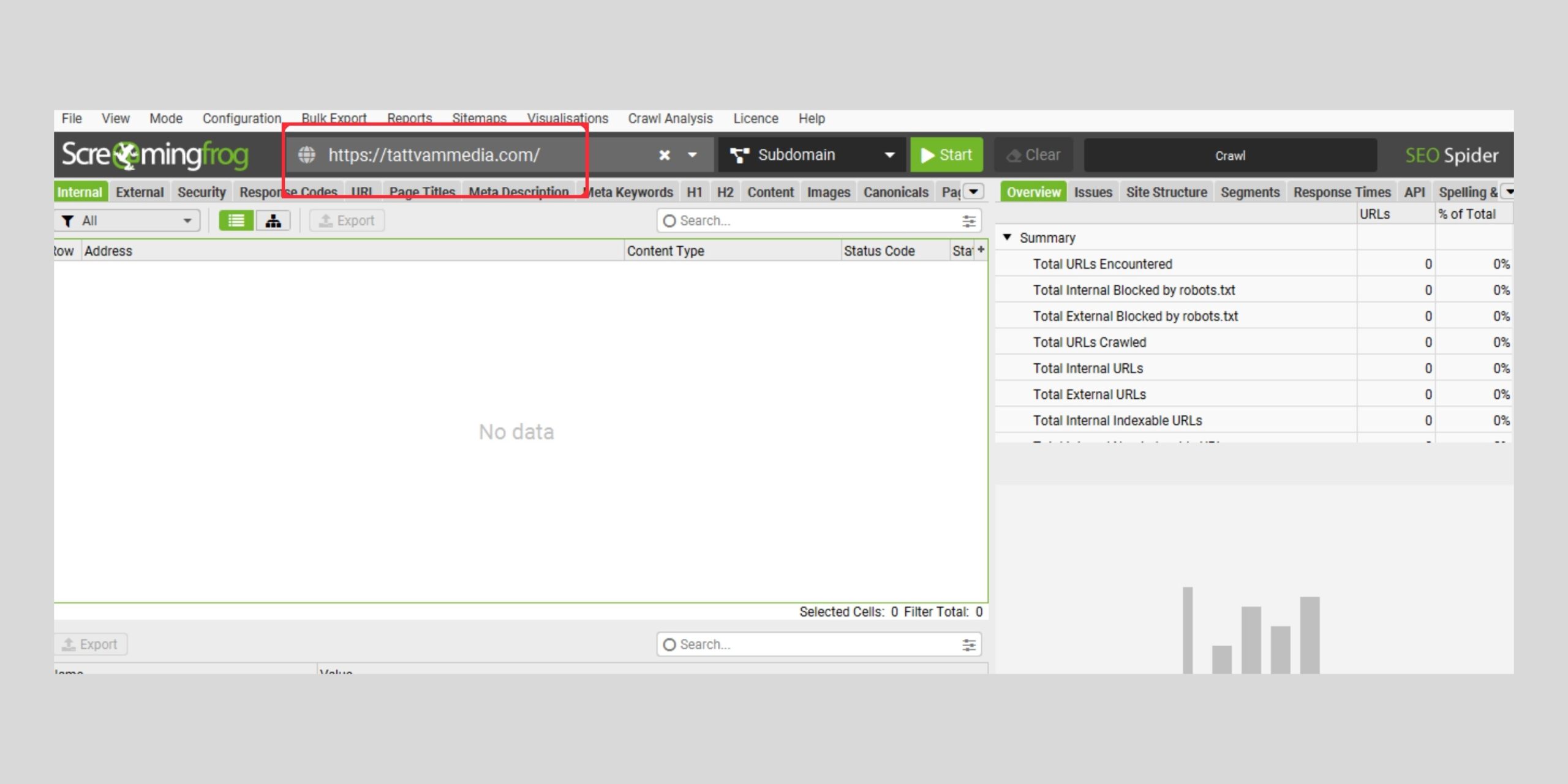
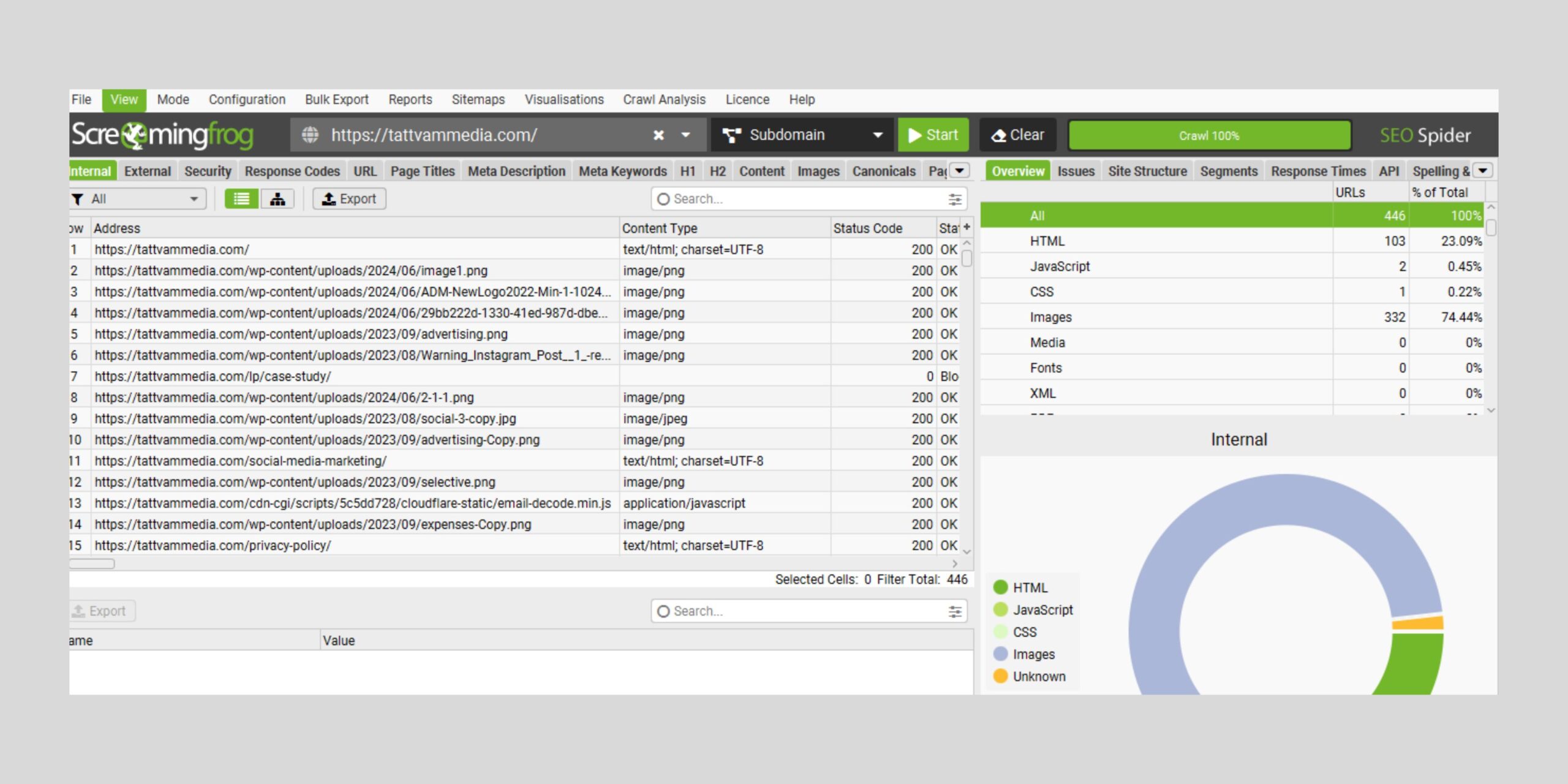
- Enter the URL: Type the website URL into the “Enter URL to spider” box.

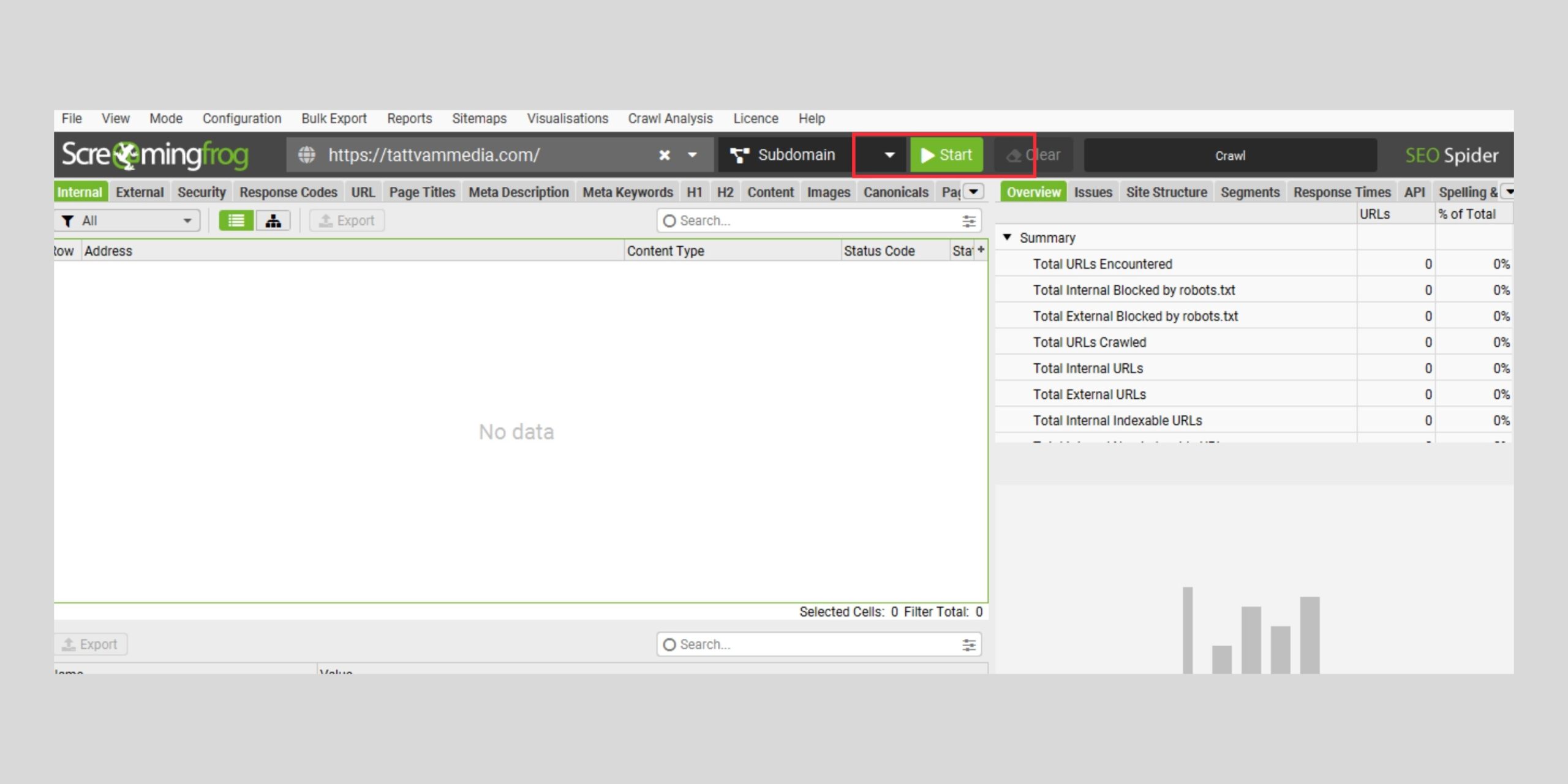
- Start the Crawl: Click the “Start” button.
- Monitor the Crawl: Watch the progress in the main window, which will display the URLs being crawled and the data being collected.
- Review the Results: Once the crawl is complete, review the data in various tabs such as Internal, External, Protocol, Response Codes, etc.
 Monitor the Crawl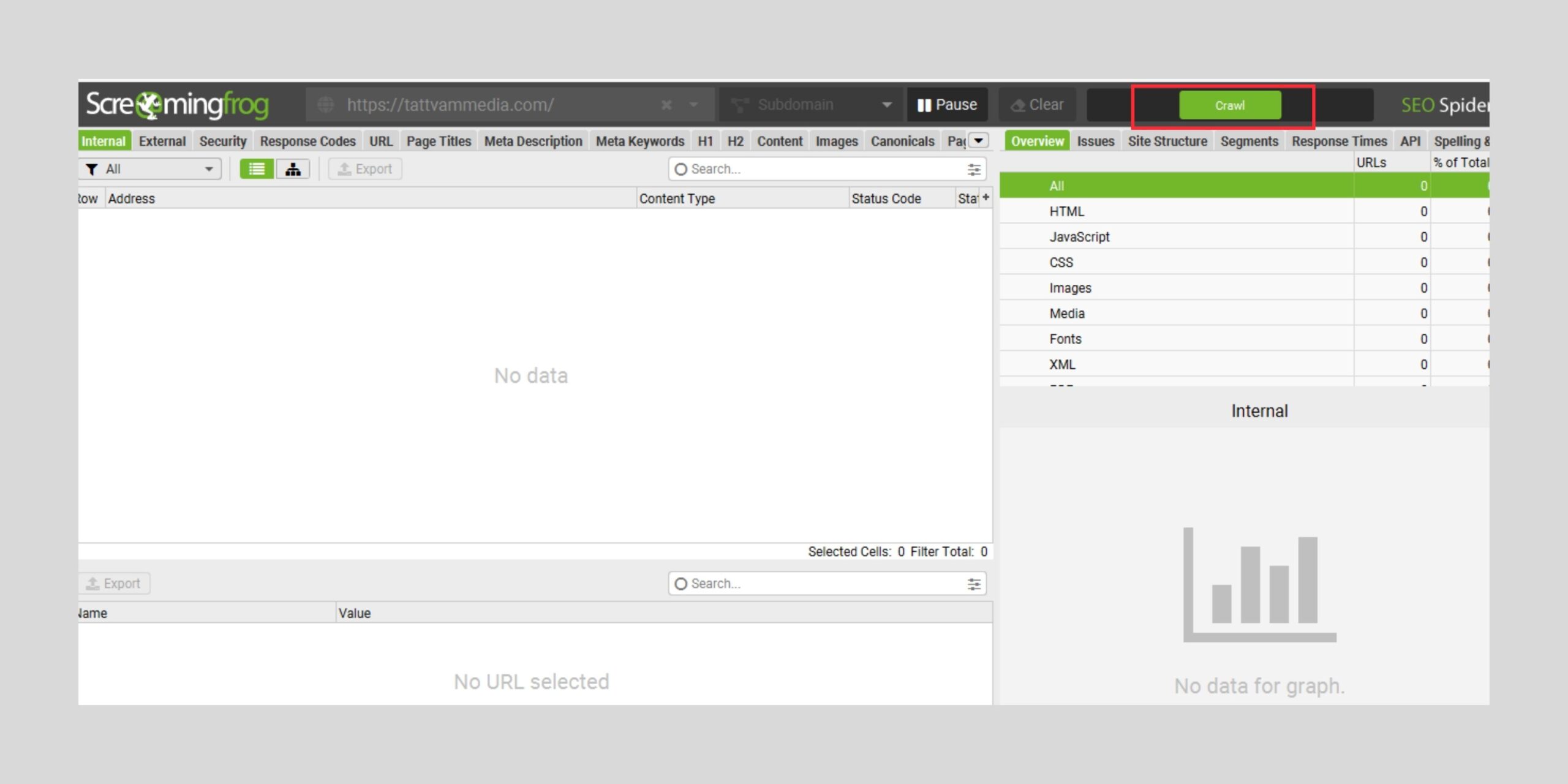
Exploring Different Crawl Modes
Screaming Frog offers several crawl modes to suit different needs.
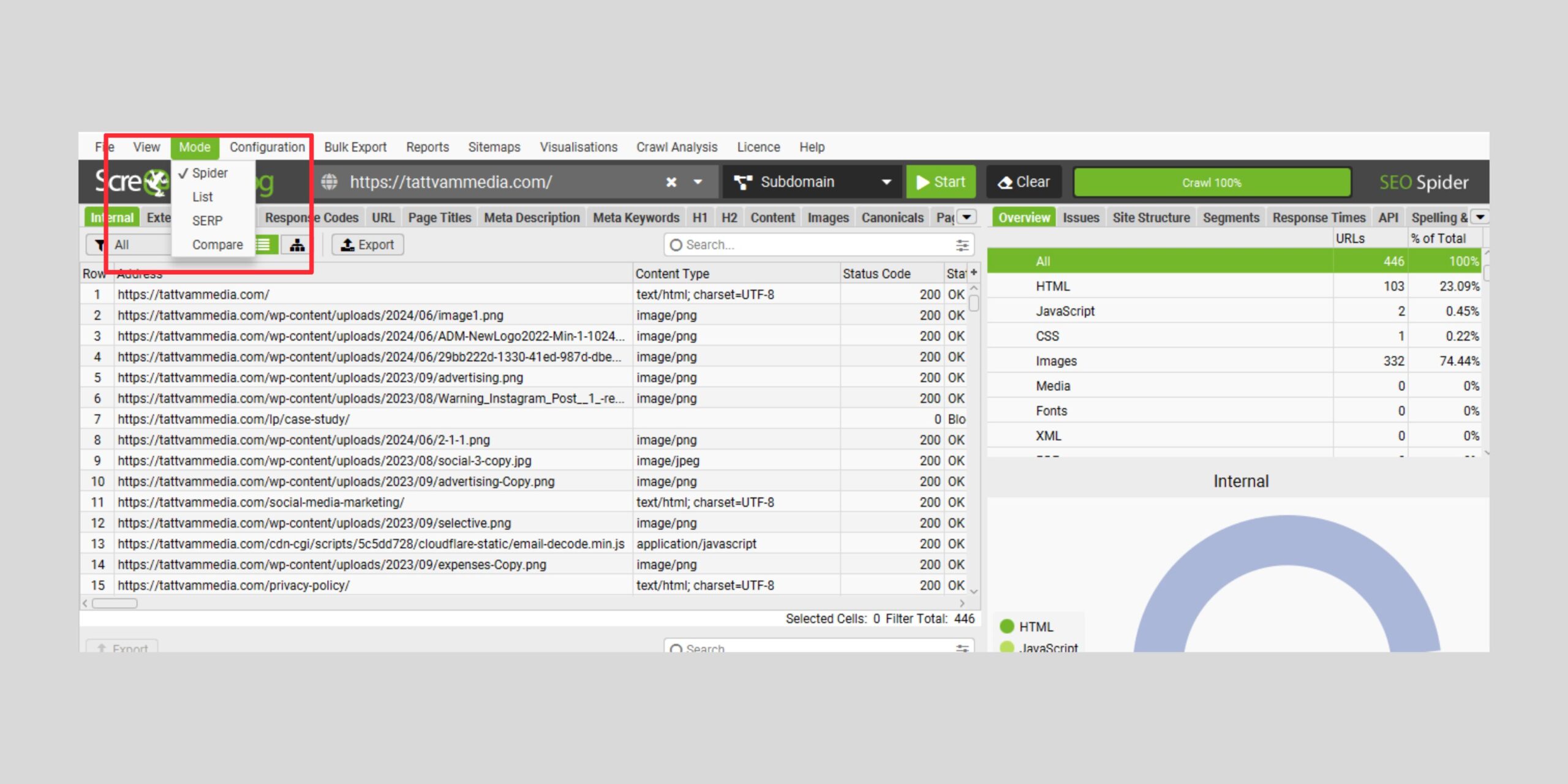
- Spider Mode: The default mode, which crawls websites like search engines.
- List Mode: Allows you to upload a list of URLs to crawl.
- SERP Mode: Crawls search engine results pages.
- Compare Mode: Compares two crawls to identify changes and issues.
Stop 04 of 12
1 minAnalyzing Your Website
Performing a Link Audit
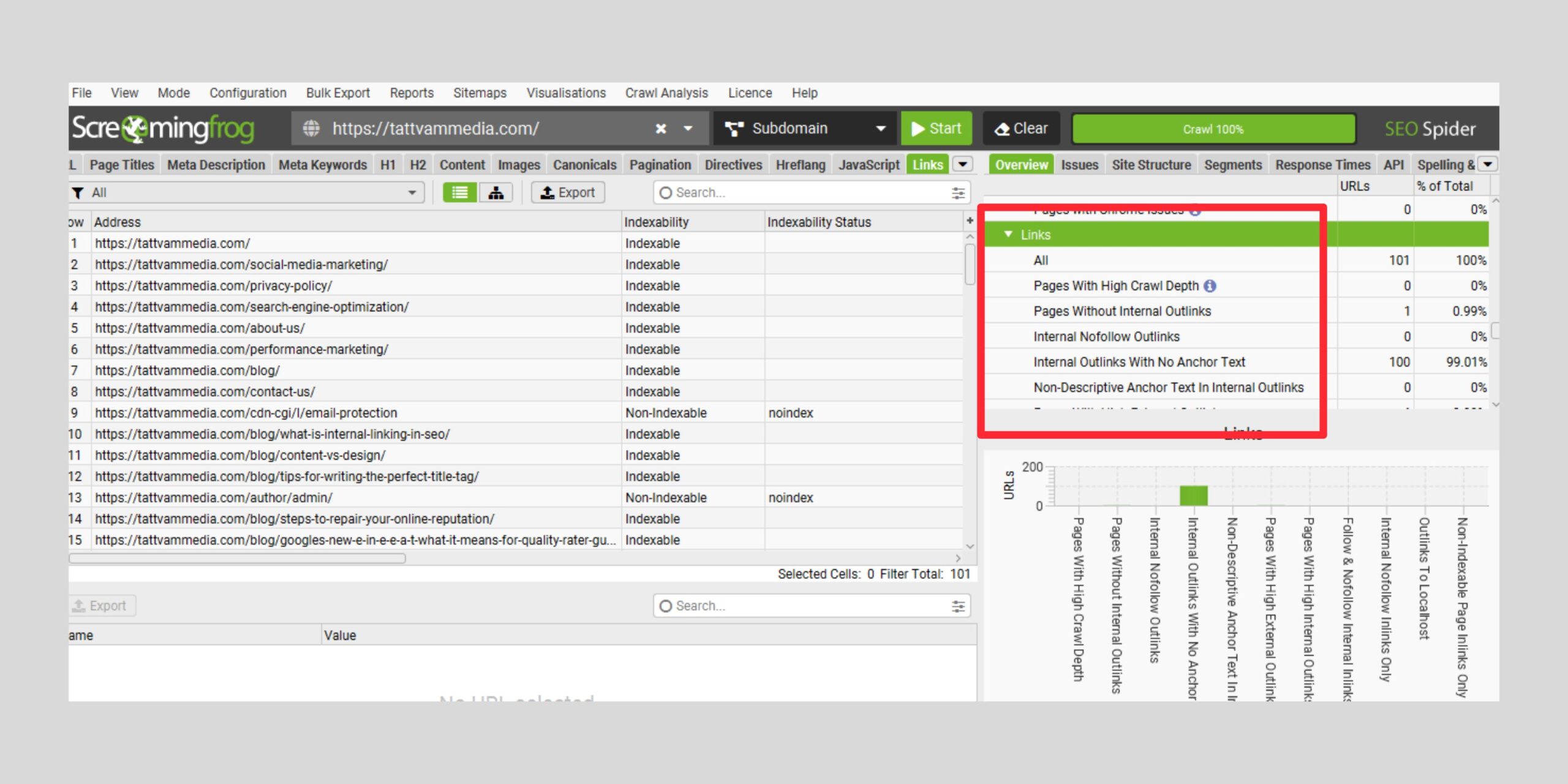
Link audits help ensure that all links on your website are functioning correctly and are beneficial for SEO.
- Checking Internal and External Links: Use the “Internal” and “External” tabs to review all links.
- Finding Broken Links and Redirects: Identify 404 errors and 301 redirects under the “Response Codes” tab.
- Analyzing Link Structure and Internal Linking: Use the “Site Structure” tab to visualize and optimize your internal linking.
Performing a Content Audit
A content audit helps identify issues related to the quality and structure of your website content.
- Identifying Low-Content Pages: Check the “Content” tab for pages with thin content.
- Detecting Duplicate Content: Use the “Duplicate” filter to find pages with identical content.
- Checking for Missing or Duplicate Metadata: Review the “Meta Description” and “Title” tabs for issues.
Spelling and Grammar Checks
Maintaining high-quality content is crucial for SEO.
- Configuring Checks: Enable the spelling and grammar check options in the “Configuration” menu.
- Running Checks and Interpreting Results: Review the results under the “Content” tab and make necessary corrections.
Also check out our guide on Screaming Frog alternatives for more options.
Stop 05 of 12
1 minUsing Screaming Frog’s AI Integration
Screaming Frog now connects directly to OpenAI, Gemini, Anthropic, and Ollama, letting you run AI prompts against every page in a crawl without exporting data anywhere else. This turns the tool from a pure technical auditor into something that can also handle content-quality analysis at scale.
To set it up, go to Crawl Config > API Access, choose a provider, and enter your API key. Before running prompts, make sure “Store HTML” is enabled under Crawl Config > Spider > Extraction, since the AI features need the full page content available to analyze.
Once connected, you can use AI prompts to generate missing alt text across an entire site, summarize long-form content for quick review, or classify pages by search intent. A second capability, semantic similarity analysis, uses vector embeddings rather than prompts: enable it under Config > Content > Embeddings, and after the crawl finishes, the Content tab will populate a “Semantically Similar” filter showing pages that cover overlapping topics even when the wording doesn’t match exactly. This is useful for catching keyword cannibalization that a standard duplicate-content check would miss entirely.
Two things worth knowing before turning this on: it’s a paid-license feature, and each provider requires its own API key with its own cost structure. Gemini currently offers a free tier through Google AI Studio (in select regions), which makes it the cheapest way to test the feature before committing to a paid API plan elsewhere.
Stop 06 of 12
1 minAdvanced Configuration and Customization
Customizing Your Crawl Settings
Customizing crawl settings allows you to focus on specific areas of your website.
- Filtering URLs: Use the “Exclude” and “Include” options to filter specific URLs.
- Setting Up Custom Extraction: Define custom extraction rules for specific data points.
- Configuring User-Agent and Robots.txt Settings: Adjust these settings to simulate different crawl environments.
Using Screaming Frog with Large Sites
Crawling large websites requires specific strategies to manage data and resources effectively.
- Strategies for Crawling Large Websites: Break down the crawl into smaller sections, increase the crawl speed, or use the “Limit Crawl Depth” option.
- Handling Subdomains and Subdirectories: Configure the tool to include or exclude specific subdomains and subdirectories.
- Analyzing Sites That Require Cookies or Authentication: Use the “Configuration” menu to set up cookies and authentication for restricted areas.
Stop 07 of 12
1 minGenerating and Validating Sitemaps
Creating XML Sitemaps
XML sitemaps help search engines understand the structure of your website and index it more effectively.
- Building Sitemaps from Crawled Data: Use the “Sitemaps” tab to generate sitemaps.
- Validating Sitemaps: Check for errors and ensure all URLs are valid.
- Submitting Sitemaps to Search Engines: Submit the generated sitemaps to Google Search Console and Bing Webmaster Tools.
Stop 08 of 12
1 minSolving Technical SEO Issues
Common SEO Issues Screaming Frog Can Help Solve
Identifying and fixing technical SEO issues is crucial for improving your website’s performance.
- Finding Slow-Loading Pages: Use the “Page Speed” tab to identify and optimize slow pages.
- Identifying Pages Blocked by Robots.txt: Check the “Blocked by Robots.txt” tab for issues.
- Detecting Pages with Missing Meta Directives: Look for pages missing “noindex,” “nofollow,” and other directives.
Site Migration Checks
Screaming Frog can help ensure a smooth site migration process.
- Ensuring Successful Site Migrations: Compare pre- and post-migration crawls to identify issues.
- Checking for Indexing and Ranking Issues: Use the “Search Console Integration” to monitor changes.
Stop 09 of 12
1 minCompetitive Analysis and Link Building
Analyzing Competitor’s SEO Strategies
Screaming Frog doesn’t have a dedicated “competitor analysis” tab, but you can still run competitor research by crawling their site directly, the same way you’d crawl your own.
- Finding Competitor’s Most Important Pages: Crawl the competitor’s domain in Spider mode, then sort by internal link count in the “Internal” tab to see which pages they’ve prioritized in their own linking structure.
- Analyzing Competitor’s Internal and External Links: Review their “Internal” and “External” tabs the same way you would your own site, and cross-reference with the “Site Structure” visualization to understand how they’ve organized content around topics.
- Spotting Content Overlap with AI: If you have AI integration set up, run a semantic similarity comparison between your crawled content and a competitor’s to spot topic gaps and near-duplicate coverage across both sites.
Link Building Opportunities
Screaming Frog can help identify new link-building opportunities.
- Finding Broken Links for Outreach: Use the “Broken Links” tab to find and target outreach opportunities.
- Identifying Promising Link Locations: Analyze competitors’ links to discover potential link-building targets.
Stop 10 of 12
1 minAdditional Tips and Best Practices
Regular Maintenance with Screaming Frog
Regularly using Screaming Frog helps maintain your website’s SEO health.
- Scheduling Regular Crawls: Automate crawls using the scheduling feature.
- Keeping Up with SEO Best Practices: Stay updated with the latest SEO trends and incorporate them into your strategy.
Integrating Screaming Frog with Other Tools
Screaming Frog can be integrated with other SEO tools for enhanced functionality.
- Using Screaming Frog with Google Analytics: Import Google Analytics data to enrich your analysis.
- Combining Screaming Frog Data with Other SEO Tools: Use data from tools like Ahrefs, Moz, and SEMrush for a comprehensive SEO strategy.
Stop 11 of 12
1 minConclusion
Using Screaming Frog for SEO can significantly improve your website’s performance by identifying and resolving technical issues, optimizing content, and enhancing your overall SEO strategy.
By following this beginner’s guide, you’ll be well on your way to mastering Screaming Frog and leveraging its full potential for your SEO efforts.
Stop 12 of 12
3 minFrequently Asked Questions (FAQ’s)
What is Screaming Frog?
Screaming Frog is a website crawler that helps you audit and analyze your website for SEO improvements. It identifies issues such as broken links, duplicate content, and helps with on-page optimization.
How does Screaming Frog help with SEO?
Screaming Frog assists by crawling your site, identifying SEO issues like missing meta tags, slow page load speeds, and other factors that could affect search engine rankings. It helps optimize on-page SEO elements, technical issues, and overall site structure.
How do I use Screaming Frog to find broken links?
After crawling your site, Screaming Frog lists all URLs with their status codes. Broken links show up with 404 or other error codes, allowing you to easily identify and fix them.
How does Screaming Frog work?
The tool crawls the URLs of a specified website, gathering data on HTML elements and following internal links. It presents this information in a user-friendly interface, allowing users to identify and fix technical SEO issues.
How much does Screaming Frog cost?
Screaming Frog SEO Spider is free to use for crawls up to 500 URLs, with core features like broken link detection, response codes, and basic sitemap generation included. The paid license costs £199 (roughly $279 USD) per year, per user, and removes the URL cap while unlocking JavaScript rendering, scheduled crawls, saved crawl files, custom extraction, and AI integration.
Is the free version of Screaming Frog enough for small websites?
Yes, for sites under 500 pages, the free version covers most of what a beginner needs: crawling, broken link detection, duplicate content checks, and basic metadata review. The main limitations are no JavaScript rendering, no saving or reopening crawls, and no scheduling, which matter more for larger or JavaScript-heavy sites than for a small brochure site.
Does Screaming Frog crawl JavaScript websites?
Yes, but only on the paid license. Screaming Frog can render JavaScript the way modern browsers do, which lets it crawl single-page applications and sites built with frameworks like React or Vue. The free version does not render JavaScript, so JS-heavy sites will show incomplete crawl data until you upgrade.
What is Screaming Frog’s AI integration used for?
Screaming Frog connects directly to AI providers including OpenAI, Gemini, Anthropic, and Ollama, letting you run custom prompts against crawled pages. Common uses include generating missing alt text at scale, summarizing long-form content, and detecting semantically similar or near-duplicate pages using vector embeddings, catching content overlap that a standard duplicate-content check would miss.
How is Screaming Frog different from Ahrefs or SEMrush?
Screaming Frog is a crawler focused on technical SEO audits: it looks at the actual structure and code of your own website. Ahrefs and SEMrush are database-driven platforms built for keyword research, backlink analysis, and competitor tracking across the wider web. Most SEO workflows use Screaming Frog for technical audits and pair it with a tool like Ahrefs or SEMrush for keyword and competitive research, since they answer different questions rather than compete directly.
Can Screaming Frog crawl large websites with thousands of pages?
Yes, though performance depends on your machine’s RAM since Screaming Frog stores crawl data in memory by default. For sites with 10,000+ URLs, at least 8GB of RAM is recommended, with 16GB or more for enterprise-scale crawls. You can also switch to database storage mode under Configuration, which trades some speed for the ability to handle much larger crawls without running out of memory.
Can I schedule Screaming Frog to crawl automatically?
Yes, but scheduling is a paid-license feature. Under File > Schedule, you can set up recurring crawls at whatever interval you need, daily, weekly, or monthly, and have the results saved automatically. This is useful for ongoing site health monitoring, catching new broken links or indexing issues, and site migrations where you want to track changes over time without manually starting each crawl.
From insight to action
Want results like these for your brand?
Talk to a consultant about your position, your message and your next step.
Talk to our team