


Most SEO teams are still optimizing for what a human would type. A clean keyword, a matching page, a title tag with the phrase in the right place. That worked. It still works, partially. But it describes a search system that AI-assisted platforms have quietly retired.

When a user types a query into Google AI Mode, Perplexity, or ChatGPT with browsing enabled, the AI does not go looking for one page that matches one keyword. It generates 10 to 20 related sub-queries, fans out across multiple sources simultaneously, and synthesizes a single answer from what it finds. Your page does not compete on one query. It competes across a cluster of related questions it may never have been written to address.
This is what query fan-out means in practice, and it is why query fan-out tools for AI search SEO have moved from an edge-case interest to a core workflow requirement in 2026.
This guide maps the actual tool landscape by job function, not just by name. It separates fan-out generators from simulators, coverage auditors from visibility trackers, and gives you a decision framework for choosing the right tool at the right stage of your workflow.
What Query Fan-Out Actually Means for AI Search Visibility (and Why Your Current Tools Are Missing It)
Before choosing a tool, you need a precise understanding of the mechanism. Most articles rush past the definition and go straight to the list. That is a mistake, because a practitioner who does not understand how fan-out works at the system level cannot evaluate a tool’s output or know when it is wrong.
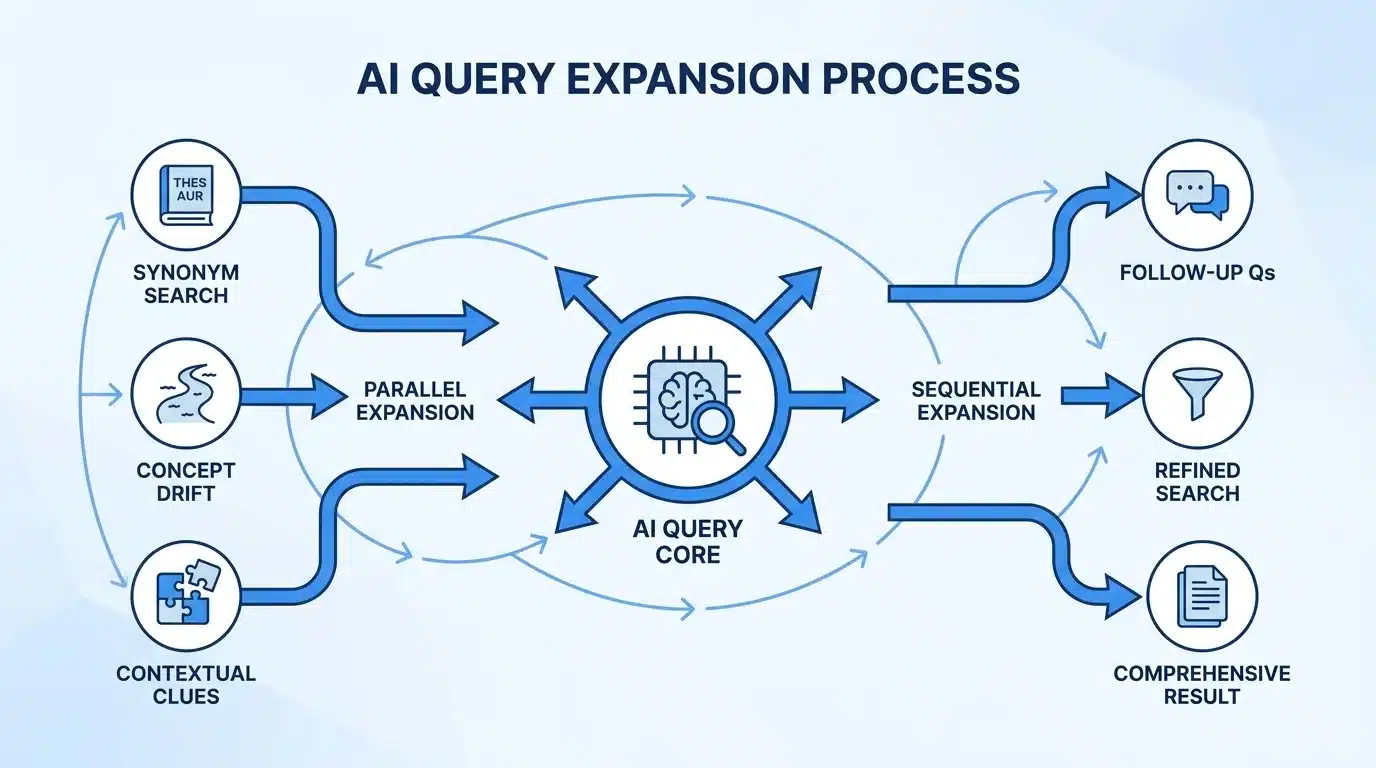
Query fan-out is the process by which AI-assisted search systems expand a single user prompt into multiple related sub-queries before retrieving and synthesizing a response. The user sees one answer. Behind it is a tree of parallel or sequential searches that the AI ran on its own, without the user asking for them.
How AI Systems Expand a Single Query Into Sub-Queries
The expansion behavior differs meaningfully across platforms, and that difference matters for how you use fan-out tools.
- Google AI Mode fans out simultaneously across multiple sub-query branches. According to Google’s own technical documentation on its AI Mode search experience, the system uses a “query fan-out technique” that runs parallel queries across different facets of a topic at the same time. A search for “best CRM for remote sales teams” does not just retrieve CRM pages. It simultaneously generates and runs sub-queries covering pricing, feature comparisons, remote team-specific requirements, integration options with tools like Slack and Zoom, and user reviews, then synthesizes results from all of those branches into a single AI-generated answer.
- Perplexity tends toward sequential sub-query behavior. It follows up on one angle before opening the next, which means its fan-out tree is often narrower but deeper on specific branches.
- ChatGPT with browsing blends both approaches depending on prompt structure. Open-ended questions produce broader parallel searches. Specific questions produce sequential follow-ups.
The practical implication is that a single tool calibrated to simulate one model’s fan-out behavior will not perfectly predict another model’s behavior. Every fan-out tool on the market today is an approximation of this process, not a direct readout of it.
What This Means for Content Coverage
This is where the shift from traditional SEO becomes concrete.
- A page no longer competes on one query. It competes across the full fan-out cluster that any given AI system generates from the seed query. If your page answers the seed query but misses three of the eight sub-query branches the AI generates, your citation probability on those branches is near zero.
- Coverage is not the same as comprehensiveness. A 5,000-word article can miss an entire fan-out branch if it was written to rank for a specific keyword phrase rather than to address the intent space the AI system maps around that phrase.
- Missed branches translate directly to missed citations. When an AI system generates an answer and you are not cited, it is not random. It is because another page covered the branches your page skipped.
The Common Mistake: Optimizing for the Prompt, Not the Fan-Out
Most content teams still build pages around the seed query and treat related questions as secondary keywords to sprinkle in. In traditional search, this was adequate. In AI search, the related questions are the primary evaluation surface.
The AI does not read your page the way a human does, sequentially from introduction to conclusion. It extracts answers from specific sections that correspond to specific sub-queries. If those sections do not exist, or if they bury the answer in the middle of a paragraph rather than leading with it, the AI moves to the next source.
This is the gap that fan-out tools are designed to close. Not by replacing keyword research, but by mapping the full intent space that AI systems actually evaluate.
The Four Categories of Query Fan-Out Tools (And Which Job Each One Does)
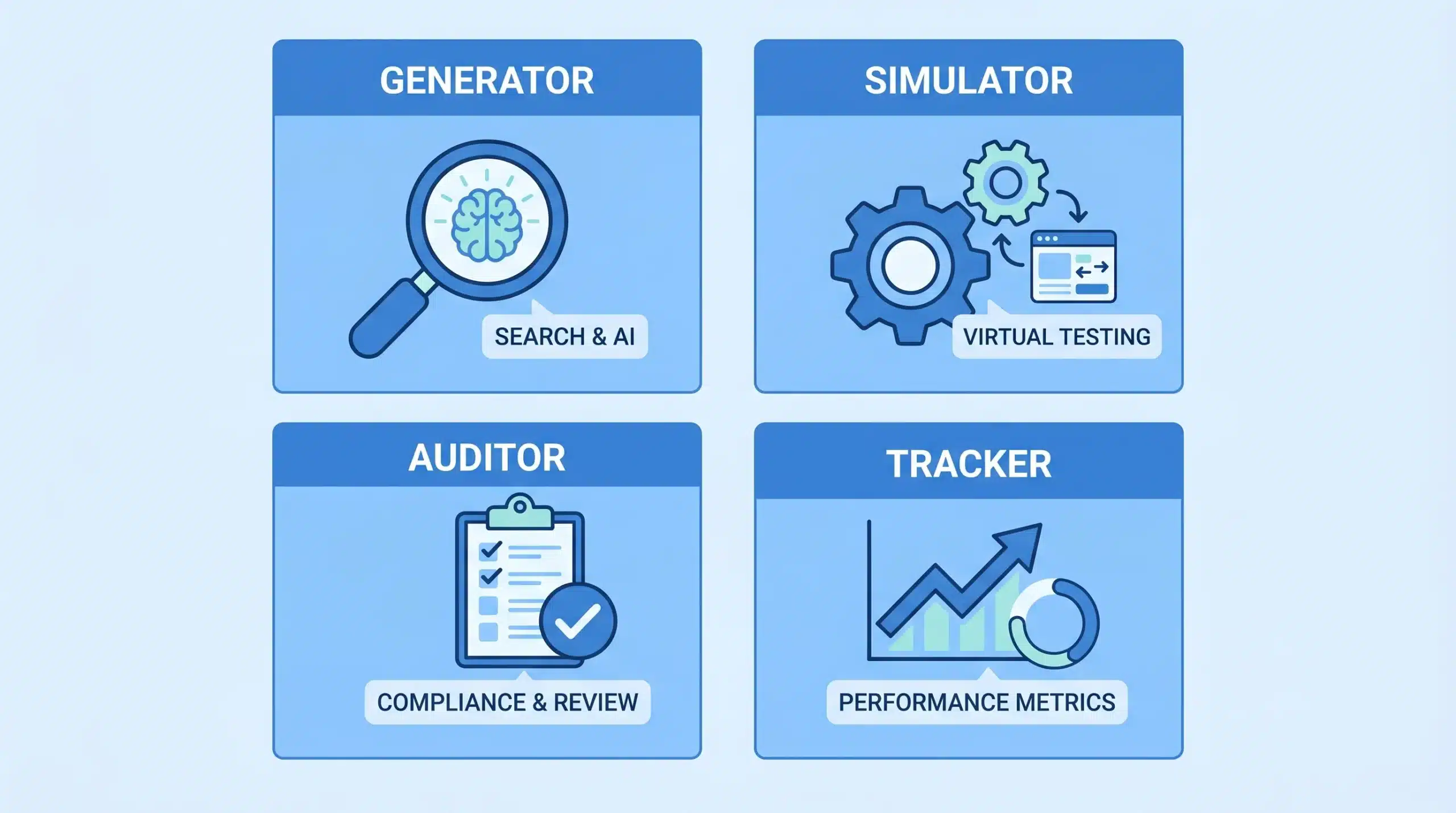
Every other guide on this topic throws tools into one undifferentiated list. That is the wrong way to evaluate them. The right tool depends entirely on what stage of the workflow you are in and what question you are trying to answer. There are four distinct categories, each doing a different job.
Category 1: Fan-Out Generators
Fan-out generators take a seed topic or keyword and produce a structured set of query variants, sub-questions, and intent branches. They are used at the content planning stage, before writing begins. Their job is to show you the shape of the intent space before you commit to a content structure.
Tools in this category:
- AlsoAsked maps the “People Also Ask” question graph across multiple levels of depth for a given query. It shows not just the first-level related questions but the questions that branch from those questions, which is a reasonable proxy for fan-out structure. The free tier is limited in daily use; the paid tier gives access to full question trees by country and language.
- Keywords Everywhere (Chrome extension) added a specific feature that displays the fan-out queries that ChatGPT generates when processing a topic. This is one of the few tools that surfaces AI-model-specific fan-out behavior directly in a browser-based research workflow.
- Semrush Topic Research generates a cluster of subtopics, questions, and related searches for a seed keyword. It does not simulate AI model behavior specifically, but it maps the broader intent space that a topic occupies across traditional search, which overlaps significantly with AI fan-out clusters.
- Manual prompting via ChatGPT or Gemini using structured expansion prompts is still one of the most effective generators for practitioners who know what to ask. A prompt like “Expand this topic into 15 related search queries a user might type at different stages of intent” produces a fast, usable fan-out map. The limitation is that it reflects the model’s own training data, not its live fan-out behavior in search mode.
What generators do well: They produce breadth quickly and help teams identify the scope of a topic cluster before any content is written.
What generators miss: They show what questions exist around a topic, but they do not validate which specific branches AI systems actually pull from when generating a live answer. A generator might produce 20 related questions, but only 8 of those might appear in a real AI-mode fan-out for that query. Without a simulator, you cannot tell which 8 those are.
Category 2: Fan-Out Simulators
Fan-out simulators approximate how a specific AI search system would expand a query in real time. They are more dynamic than generators because they mimic a model’s actual behavior rather than producing a static list of related questions based on search data.
Simulators are used primarily by content auditors checking whether existing content maps to AI behavior, and by content strategists who want to build new content to match confirmed AI expansion patterns rather than inferred ones.
Tools in this category:
- QueryTool.ai is one of the most detailed simulators currently available. It runs a query through Gemini (in AI Mode style or AI Overview style) and GPT (in Chat style), then produces sub-query clusters, a list of sources the AI pulled from for each cluster, and entities that appeared across the simulation. A single simulation run typically produces 11 to 15 sub-query clusters and 32 to 53 sources, depending on the query and model. The free tier is limited to 2 runs per model type. The paid tier allows batch job processing.
- Position Digital Query Fan-Out Extractor is a free tool that reveals the internal search queries an AI model generates to research a topic before producing an answer. It was initially developed by Position Digital as an internal client tool and is now publicly available. It is particularly useful for understanding the pre-answer research behavior of AI systems, which is slightly different from the final answer’s source list.
- Locomotive Agency Query Fan-Out Tool uses embeddings to score content coverage against a simulated fan-out cluster. An embedding is a numerical representation of the meaning of a sentence or phrase that allows a model to compare semantic similarity. The tool uses this approach to measure how closely a piece of content aligns with the full semantic space of a topic’s fan-out, not just keyword matching.
The critical limitation of every simulator: Each simulator runs against one model. Google AI Mode and Perplexity fan out differently, as described in the previous section. A simulation calibrated to Gemini will not perfectly predict ChatGPT behavior, and neither will perfectly predict Perplexity. Most practitioners who use a single simulator treat its output as a universal description of how AI search works. It is not. It is a useful approximation of one platform’s behavior on one day.
Model versions update without public announcements. A fan-out simulation run in January may produce different cluster structures than one run in April on the same query. Running simulations periodically on your highest-priority topics is not optional if you want the data to stay accurate.
Category 3: Content Coverage Auditors
Coverage auditors evaluate an existing page against a fan-out cluster and identify which sub-query branches the page answers, partially answers, or misses entirely. They are used after content creation, either to audit new pages before publishing or to evaluate existing pages before an optimization push.
Tools in this category:
- Locomotive Agency Query Fan-Out Tool (it serves double duty here) produces a coverage score that measures how well a page’s content aligns with the full fan-out cluster for its target query. A low score on specific branches tells you exactly where gaps exist, not just that gaps exist.
- Semrush Content Gap compares your page’s topic coverage against competing pages that rank for the same keyword cluster. It identifies subtopics and questions that competitors address but your page does not. This is not the same as a fan-out audit, because it compares you to competing pages rather than to AI system behavior directly, but it produces actionable gap data.
- Ahrefs Content Gap operates similarly to Semrush’s version. It surfaces keywords and subtopics that competing domains rank for that your domain does not, which can proxy for fan-out coverage gaps when analyzed at the page level rather than the domain level.
- Structured ChatGPT audit using the target page’s content pasted directly into the context window. A prompt like “Based on this content, which of the following sub-queries does this page answer completely, partially, or not at all?” followed by a list from a simulator run produces a fast, usable gap analysis. This manual approach is not as scalable as dedicated tools, but it is more accurate than any tool that compares your page only to competing pages.
The key limitation of most coverage auditors: Tools like Semrush and Ahrefs compare your page to competing pages, not to the AI system’s actual fan-out behavior. This means a high coverage score tells you that you cover more ground than your competitors, not that you cover the ground the AI system actually evaluates. If all competing pages miss the same fan-out branch, you will score well relative to competitors and still miss the AI citation opportunity entirely.
Category 4: AI Visibility and Citation Trackers
Citation trackers measure whether your content is being cited in AI-generated answers across platforms. This is the measurement layer of the fan-out workflow. It is the category most teams skip because the tools are the least mature, and because the data is the hardest to act on without a clear optimization hypothesis.
Tools in this category:
- QueryTool.ai source tracking surfaces, per sub-query cluster, which domains and pages were cited in the AI’s simulated answer. If your domain does not appear in the source list for a cluster that corresponds to your target content, that is a direct signal that you are not being cited on that branch, and the coverage auditor output tells you why.
- Semrush AI Toolkit is an evolving feature set within Semrush that tracks brand and domain visibility across AI-generated answers on platforms including Google AI Overviews and ChatGPT. It gives a directional sense of AI visibility trends over time, though the data is sampled rather than exhaustive.
- Manual spot-checking across Google AI Mode, Perplexity, and ChatGPT with browsing enabled, logged systematically in a spreadsheet, is still the most reliable tracking method for practitioners at smaller scale. It is labor-intensive but produces data you understand completely, unlike black-box tool scores.
The honest state of this category: There is no equivalent of Google Search Console for AI citations. No tool currently gives you a reliable, comprehensive log of every time your domain was cited in an AI-generated answer across all platforms. The tools in this category give useful directional signals, but anyone claiming precision here is overstating what 2026 tooling can actually deliver. Setting realistic expectations with clients or stakeholders on this point is not a weakness; it is what separates practitioners from people who are selling dashboards.
The Query Fan-Out Tool Stack by Workflow Stage
Having a tool category map is useful. Knowing which tools to use in which order, and what specific question each one answers, is what makes the map worth something in a real workflow.
There are four stages. Each one feeds into the next, and the data produced at each stage changes what you do at the next.
Stage 1: Topic and Cluster Planning (Pre-Writing)
This stage happens before any content is drafted. The goal is to determine the full intent space around a topic and decide whether it belongs on one page or needs a cluster of pages.
Tools to use at this stage: AlsoAsked, Semrush Topic Research, Keywords Everywhere ChatGPT fan-out view, manual expansion prompts in ChatGPT or Gemini.
What you are trying to answer: What is the full set of intent branches around this topic? Are they all closely enough related to serve from one page, or does the fan-out produce distinct enough angles that each one warrants its own page?
The decision rule: If a fan-out generator produces more than 8 meaningfully distinct intent branches that cannot be answered by a single coherent article structure, you are looking at a cluster, not a single page. Trying to serve all 12 branches from one page usually produces a page that serves none of them well enough for the AI to extract clean answers from any of them.
What to output from this stage: A structured list of intent branches, organized by whether they belong on the target page, on a related page in a cluster, or in a dedicated standalone piece. This output becomes the brief for the content team.
Stage 2: Pre-Draft Simulation (Before Writing)
Once the target page’s scope is defined, run a simulation before the writer touches a blank document. The goal is to understand which specific sub-queries the AI model is actually generating for this topic, which sources it is pulling from, and which entities and concepts appear consistently across fan-out branches.
Tools to use at this stage: QueryTool.ai, Position Digital Fan-Out Extractor.
What you are trying to answer: Which sub-queries does the AI generate from this prompt? Which domains is it currently citing for each sub-query? What entities, named tools, platforms, statistics, and methodologies appear consistently across branches?
What to output from this stage: A structured entity and sub-topic list that the content must reference to be citation-eligible. Not keywords to include for density, but specific things the AI is looking for across the fan-out and not finding in sufficient depth on any current page. This is the gap your content should fill.
The difference between a page built from keyword research and a page built from pre-draft simulation output is measurable. One page is written to rank for a phrase. The other is written to answer the questions an AI system generates from that phrase. These are related but not the same.
Stage 3: Content Audit (After Writing or for Existing Pages)
After a page is written, or when auditing existing high-priority pages, a coverage audit identifies where the page’s current content covers the fan-out cluster, where it partially covers it, and where it misses entirely.
Tools to use at this stage: Locomotive Agency Query Fan-Out Tool, Semrush Content Gap, structured ChatGPT audit with page content pasted in.
What you are trying to answer: Which fan-out branches does this page currently address with a complete, extractable answer? Which branches does it mention but not answer clearly enough for the AI to extract? Which branches are absent entirely?
What to output from this stage: A prioritized list of sections or FAQ entries to add to the page, organized by which branches have the highest AI citation probability. The branches where your page partially covers the answer are the highest-priority targets because the gap is smallest. Full additions require more editorial work.
The gap between “partially covers” and “fully covers” is usually structural rather than informational. The information exists in the page but is buried inside a paragraph rather than led with a direct answer at the section level.
Stage 4: Tracking and Iteration (Ongoing)
After optimization edits are published, the tracking stage measures whether the changes are producing AI citations. This closes the feedback loop and tells you whether your workflow is producing real visibility or just better-looking content audits.
Tools to use at this stage: QueryTool.ai source tracking, Semrush AI Toolkit, manual citation spot-checks logged systematically.
What you are trying to answer: Is this page appearing as a cited source in AI answers for its target queries? Is that citation rate improving or declining after edits? Which branches are now citing the page that were not before?
What to output from this stage: A tracking log per page, per target query, per platform, updated on a biweekly or monthly cadence. When a page begins being cited in a new branch, note what the most recent edit added. That pattern tells you which content changes the AI system responded to, and it becomes your optimization model for future pages.
One honest note on this stage: frequency, consistency, and specificity of content updates correlate with AI citation probability, but no tool can guarantee it or precisely attribute a citation to a specific edit. The measurement here is directional, not deterministic.
How to Choose the Right Query Fan-Out Software for Your Situation
The tool categories and workflow stages exist independently of your team size and budget. How you apply them depends entirely on your situation. Here is a decision framework organized by the three most common practitioner profiles.
If You Are a Solo SEO or Small Team
Start with the free tier of tools before committing to any paid subscriptions.
- Position Digital Fan-Out Extractor is free and gives you direct simulation output without requiring an API key or account. Start here for pre-draft simulation.
- AlsoAsked free tier covers basic question mapping for topic planning.
- Keywords Everywhere is low cost per credit and gives you the ChatGPT fan-out view directly in browser without needing a separate tool.
- QueryTool.ai free tier allows 2 runs per model type per session. For a solo practitioner working on a handful of priority pages per month, this is enough to do pre-draft simulation without a paid subscription.
Add paid tools when you have a disciplined workflow at smaller scale and can clearly articulate what question each tool is answering. Tool sprawl without workflow discipline produces data that no one acts on.
If You Are an In-House Team at a Mid-Size or Enterprise Brand
Semrush AI Toolkit plus manual simulation via QueryTool.ai covers most workflow stages for an in-house team with a moderate publishing cadence.
- Semrush Topic Research and Content Gap handles Stage 1 and provides ongoing competitor coverage benchmarks.
- QueryTool.ai handles Stage 2 pre-draft simulation with enough depth for most topic types.
- Semrush AI Toolkit provides directional AI visibility tracking for Stage 4.
The biggest leverage point for in-house teams is usually not the tracking stack. It is getting fan-out insights into the editorial brief template. If every brief that goes to a writer includes the Stage 2 simulation output, the entity list, and the coverage gap from Stage 3, the writing quality for AI search alignment improves at scale without adding tools.
Before adding a third or fourth tool to the stack, ask whether the second tool’s data is being actioned consistently. If it is not, a third tool will not fix that.
If You Are an Agency Managing Multiple Clients
Fan-out simulation per client at scale is time-consuming with single-query tools. The two constraints that matter most for agencies are batch processing and tracking standardization.
- QueryTool.ai has a batch job queue that allows multiple queries to run simultaneously rather than one at a time. For an agency running fan-out simulations across 10 to 20 clients per month, this is the difference between a usable workflow and one that takes a full-time person to operate.
- Tracking at scale is the harder problem. Semrush AI Toolkit provides directional data, but a lightweight custom tracking setup in Google Sheets, logging manual spot-checks per client, per target query, per platform, on a biweekly cadence, is often more reliable and more actionable than waiting for enterprise tracking tools to mature.
- Fan-out analysis in the onboarding audit is where agencies create the most durable client value. A structured fan-out gap report, showing which intent branches the client’s current content covers and which it misses, communicates the scope of AI search optimization work more clearly than a keyword gap report. Clients who understand why content needs to be restructured to cover specific branches approve better work and set more realistic timelines.
The Honest Limits of Every Tool in This Category
These apply regardless of team size.
- No tool simulates fan-out identically to how Google AI Mode, Perplexity, and ChatGPT each process a live query. They approximate real behavior based on available model access and methodology choices. The approximation is useful. It is not a ground truth.
- Simulator outputs change as model versions update. Google, OpenAI, and Perplexity update their models without publishing fan-out behavior change logs. A simulation from three months ago may not reflect current behavior. Running simulations on priority topics every quarter, not once and then filing the output, is a workflow requirement, not optional.
- Coverage scores are relative to competing pages, not to absolute AI system requirements. A high score means you cover more sub-query branches than competitors. It does not mean you will be cited. If all competitors have low coverage on a topic, your score can look high while your absolute coverage is still insufficient to earn consistent citations.
What Query Fan-Out Optimization Actually Looks Like in a Piece of Content
Tools surface the data. Editorial decisions apply it. Most articles on this topic stop at the tool list and leave practitioners without a clear picture of what a fan-out-optimized page actually looks like at the content level.
Here is what it looks like in practice.
Answer-First Structure at the Sub-Query Level, Not Just the Page Level
Traditional content writing puts the answer somewhere in the body of the section. AI extraction works differently. According to Search Engine Land’s coverage of AI search optimization, AI systems extract answers at the section level, and the most reliable extraction point is the first clean, self-contained sentence of a section.
This means each H2 and H3 in your article should open with a direct, complete answer to the sub-query that section addresses. Not a definition. Not a transition from the previous section. The answer, stated plainly.
- Before (traditional structure): “Internal linking is one of the most overlooked aspects of SEO. Many site owners focus on external backlinks while neglecting the connections between their own pages. In this section, we will explain why internal links matter and how to use them.”
- After (fan-out-optimized structure): “Internal links help AI search systems understand the topical relationships between your pages, which increases the probability that multiple pages in a cluster will be cited across related fan-out branches.”
The second version is the AI’s extractable answer. The first version makes the AI read three sentences before finding anything worth extracting. Most pages are written like the first version. Pages that earn consistent AI citations are written like the second.
Entity Density and Specificity
Fan-out simulators surface entities: specific tool names, platform names, methodologies, named frameworks, and real statistics that appear consistently across fan-out branches. These entities are what AI systems use to confirm that a source is authoritative on a topic, not just adjacent to it.
Including those entities explicitly and specifically is what separates a page that earns citations from a page that covers the same territory vaguely.
- Vague coverage: “There are several tools available for tracking AI search visibility.”
- Entity-dense coverage: “QueryTool.ai tracks which domains are cited per sub-query cluster in Gemini and GPT simulations. Semrush AI Toolkit provides directional visibility data across Google AI Overviews. Neither gives you a complete log of all citations across all platforms.”
The second version names specific tools, describes their specific functions, and acknowledges their specific limitations. AI systems cite the second version. The first version is indistinguishable from thousands of other pages on the same topic and offers the AI no reason to prefer it as a source.
FAQ Structure as Fan-Out Branch Coverage
Not every fan-out branch warrants a full H2 section. Some branches are narrow enough that a 3-sentence FAQ answer covers them completely. The FAQ block at the end of a long-form article is the most efficient way to cover these without disrupting the main article structure.
Each FAQ answer should be 2 to 4 sentences, complete without surrounding context, and mapped to a specific identified fan-out branch from the Stage 2 simulation output. This is not a generic SEO tactic. It is a direct translation of fan-out gap data into content coverage.
The specific format matters too. Questions written to match the exact phrasing patterns that appear in the fan-out simulation (not just keywords, but actual question structures) align more closely with the sub-queries the AI generates and increase the probability that the FAQ answer is extracted as a direct response to that sub-query.
Internal Linking as Topical Cluster Signaling
Individual pages do not exist in isolation in AI search evaluation. Pages in a topic cluster signal to AI systems that a site has depth across the fan-out space, not just coverage of one seed query.
Using fan-out generator output to plan cluster architecture, then using contextual anchor text in internal links to connect related pages along topically logical paths, communicates topical authority at the domain level rather than just the page level.
The anchor text in internal links should describe the destination page’s primary sub-query coverage, not just its title. An anchor text that says “see our guide on AI Overview optimization” tells the AI that the linked page covers AI Overview optimization specifically. That connection is indexed as topical depth, not just as a navigation element.
AI Search Visibility Tracking Without a Dedicated Tool (What to Do Right Now)
Not every team is ready to invest in a paid tracking stack. That does not mean skipping Stage 4 entirely. A lightweight manual tracking system built on a regular cadence produces more actionable data than an expensive tool that no one checks consistently.
Here is a practical setup that works at the individual page or small-site level and can be scaled to agencies with some systematization.
Pick 10 to 15 target queries per site or per client. These should be the queries most directly tied to business-value content, not the full long tail. Run each query through three platforms: Google AI Mode, Perplexity, and ChatGPT with browsing enabled. Do this once every two weeks or once per month, depending on your publishing cadence.
For each query, log the following in a spreadsheet:
- Was your domain cited anywhere in the AI-generated answer?
- If yes, which sub-query branch did the citation appear in (compare against your Stage 2 simulation output)?
- What anchor text or framing did the AI use when citing your page?
- Which competing domains were cited and in which branches?
Cross-reference citation data with Google Search Console at a monthly cadence. When a page earns an AI citation on a branch but you see no corresponding click attribution in Search Console, that is still real visibility. The user saw your brand name in the AI answer even if they did not click through. Build a model that accounts for this. Citation frequency matters, not just click credit.
When a page begins being cited in a new branch after a content edit, note what changed in that edit. Over 3 to 6 months, patterns emerge. Certain content changes consistently produce new citations. Specific entity additions, answer-first reformatting, or FAQ additions that target previously uncovered branches are the most common triggers. That pattern is your optimization model for future pages, built from your own data rather than from general advice.
When a page gets cited consistently on a branch, run a new fan-out simulation on that topic. Simulations surface adjacent branches the AI is also generating that the page does not yet cover. A page that is already being cited is a better candidate for expansion than a page starting from zero, because the AI system has already established some trust in it as a source on that topic.
The ceiling on this manual approach is time. It scales to 10 to 15 priority queries per practitioner before the tracking cadence becomes unmanageable. At that point, moving to a tool-assisted tracking setup is worth the investment. But the discipline and workflow built through manual tracking makes any tool you add to it significantly more useful, because you will know exactly what question you are asking the tool to answer.
Conclusion
Query fan-out tools are only as useful as the workflow they feed into. A great simulator with no pre-draft process produces data that sits in a tab and gets ignored. A coverage auditor without a structured brief template produces a gap report that a writer cannot act on. The tools work when they are connected to specific workflow stages, and each stage produces a specific output that the next stage consumes.
The four categories are not interchangeable. Generators answer one question. Simulators answer a different one. Coverage auditors and citation trackers answer two more. Buying the most expensive tool in one category does not replace the other three.
The decision framework comes down to two questions: what stage of the workflow am I in, and what specific question am I trying to answer? Answer those two questions honestly for each tool in your current stack, and it becomes immediately clear which tools are earning their place and which ones are producing data that no one is using.
The next step is specific: run one fan-out simulation on your highest-traffic page this week. Use QueryTool.ai or Position Digital’s free extractor. Take the sub-query cluster output, compare it against your page’s current H2 structure, and count how many branches have a clear, answer-first section addressing them directly. That gap count is your content priority list, and it is more actionable than any keyword report you have run in the last six months.
FAQs
1. What is a query fan-out tool and how does it work?
A query fan-out tool helps SEOs and content teams understand how AI search systems expand a single user query into multiple related sub-queries before generating an answer. Tools in this category either generate a list of likely sub-query branches (generators), simulate how a specific AI model would expand a query in real time (simulators), evaluate how well existing content covers the fan-out cluster (coverage auditors), or track whether a page is being cited in AI-generated answers (visibility trackers). Most tools focus on one of these four functions, and a complete workflow requires at least one tool from each category.
2. How is query fan-out different from traditional keyword research?
Traditional keyword research identifies the phrases users type into a search engine and maps pages to those phrases. Query fan-out research maps the full set of related sub-queries that an AI system generates from a single seed query before constructing its answer. The practical difference is that a page optimized for keyword research is designed to rank on one phrase. A page optimized for query fan-out is designed to serve as a cited source across multiple AI-generated sub-query branches that no user ever typed explicitly. The evaluation surface is broader and the optimization unit shifts from the individual keyword to the intent cluster.
3. Which query fan-out tool is the best free option for beginners?
Position Digital’s Query Fan-Out Extractor is the strongest free option for beginners who want simulation output without signing up for a paid plan or supplying an API key. It reveals the internal search queries an AI model generates before producing an answer, which is exactly the data you need for pre-draft simulation. AlsoAsked’s free tier is a useful complement for question-tree mapping at the content planning stage. Using both together covers Stage 1 and Stage 2 of the fan-out workflow at zero cost.
4. How often should I run query fan-out simulations on my content?
For high-priority pages tied directly to business-value queries, run a new simulation every quarter. AI model versions update without published fan-out behavior change logs, which means simulation output from six months ago may not reflect how the current model version expands the same query. For lower-priority pages, running a simulation once before drafting and once after a major content revision is sufficient. Treating simulation output as a permanent record rather than a point-in-time snapshot is the most common workflow mistake in this category.
5. Do different AI search platforms fan out queries in different ways?
Yes, and this difference is practically significant. Google AI Mode uses a parallel fan-out technique that generates multiple sub-query branches simultaneously, according to Google’s own documentation on its AI Mode search experience. Perplexity tends to fan out sequentially, following one branch at a time before opening adjacent ones. ChatGPT with browsing blends both approaches depending on how a prompt is structured. Every simulator on the market today approximates one platform’s behavior, not all platforms simultaneously. Using a single simulator’s output as a universal description of AI search fan-out behavior will produce blind spots in your coverage.
6. Can query fan-out tools tell me if my content will rank in Google AI Overviews?
No tool can reliably predict AI Overview inclusion in advance. What fan-out tools can do is surface the sub-query branches that Google’s AI Mode evaluates for a given topic, and identify whether your current content covers those branches with extractable, answer-first responses. Pages that cover confirmed fan-out branches with clear, entity-specific answers appear in AI Overviews more consistently than pages that do not, but there is no deterministic relationship between fan-out coverage and AI Overview citation. The tools reduce your gap, not eliminate your uncertainty.
7. What is the difference between a fan-out generator and a fan-out simulator?
A generator takes a seed topic and produces a structured list of related questions and intent branches, typically drawn from search data, People Also Ask results, or AI training data. A simulator approximates how a specific AI search system would actually expand a query in real time, including which sources the AI would pull from and which entities would appear across branches. Generators are broader and faster to run. Simulators are more specific to actual AI behavior but require more time and, in most cases, a paid plan. For content planning, generators are sufficient. For pre-draft optimization and coverage auditing, simulators produce more actionable data.
8. How do I use fan-out analysis output to actually edit existing content?
Start by comparing the sub-query cluster from your Stage 2 simulation against your page’s current heading structure. Every sub-query branch that does not have a corresponding H2 or H3 that opens with a direct, complete answer is a content gap. Prioritize the gaps where your page partially covers the branch (mentions the topic but does not answer the sub-query clearly) over the gaps where the branch is entirely absent, because partial coverage requires structural editing rather than full content addition. For branches that are narrow enough to cover in 2 to 4 sentences, add them to the FAQ section rather than creating new main-body sections that would disrupt the article’s flow.
9. Is there a way to track whether my content is being cited in AI-generated answers?
There is no tool equivalent to Google Search Console for AI citations. Semrush AI Toolkit and QueryTool.ai source tracking provide directional data on AI visibility, but neither gives a complete log of all citations across all platforms. The most reliable current approach is a manual spot-check system: running 10 to 15 priority queries through Google AI Mode, Perplexity, and ChatGPT with browsing on a biweekly or monthly cadence, and logging citation appearances in a structured spreadsheet. This is labor-intensive but produces data you understand completely, which makes it more actionable than black-box tool scores.

